Embedding the Simulation Kernel
Architecture
OMNeT++ has a modular architecture. The following diagram illustrates the high-level architecture of OMNeT++ simulations:
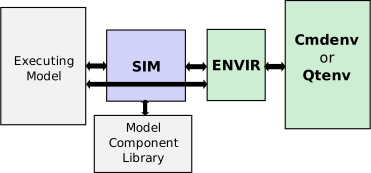
The architecture of OMNeT++ simulations
The blocks represent the following components:
Sim is the simulation kernel and class library. Sim is a library linked to simulation programs.
Envir is another library that contains all code that is common to all the user interfaces. main() also resides in the Envir library. Envir presents itself towards Sim and the executing model as an instance of the cEnvir facade class. Some aspects of the Envir library like result recording can be customized using plugin interfaces. Embedding OMNeT++ into applications usually involves writing a custom cEnvir subclass (see sections Implementing a New User Interface and Embedding the OMNeT++ Simulation Kernel.)
Cmdenv, Qtenv are Envir-based libraries that contain specific user interface implementations. A simulation program is linked with one or more of them; in the latter case, one of the UI libraries is chosen and instantiated either explicitly or automatically when the program starts.
The Model Component Library includes simple module definitions and their C++ implementations, compound module types, channels, networks, message types, and everything belonging to models that have been linked to the simulation program. A simulation program can run any model that contains all of the required linked components.
The Executing Model is the model that is set up for simulation. This model contains objects (modules, channels, and so on) that are all instances of the components in the model component library.
The arrows in the figure describe how components interact with each other:
Executing Model :math:`Leftrightarrow` Sim. The simulation kernel manages the future events and activates modules in the executing model as events occur. The modules of the executing model are stored in an instance of the class cSimulation. In turn, the executing model calls functions in the simulation kernel and uses classes in the Sim library.
Sim :math:`Leftrightarrow` Model Component Library. The simulation kernel instantiates simple modules and other components when the simulation model is set up at the beginning of the simulation run. In addition, it refers to the component library when dynamic module creation is used. The mechanisms for registering and looking up components in the model component library are implemented as part of Sim.
Executing Model :math:`Leftrightarrow` Envir. The Envir presents itself as a facade object towards the executing model. Model code directly accesses Envir e.g. for logging (
EV<<).Sim :math:`Leftrightarrow` Envir. Envir is in full command of what happens in the simulation program. Envir contains the
main()function where execution begins. Envir determines which models should be set up for simulation, and instructs Sim to do so. Envir contains the main simulation loop (determine-next-event, execute-event sequence) and invokes the simulation kernel for the necessary functionality (event scheduling and event execution are implemented in Sim). Envir catches and handles errors and exceptions that occur in the simulation kernel or in the library classes during execution. Envir presents a single facade object toward Sim – no Envir internals are visible to Sim or the executing model. During simulation model setup, Envir supplies module parameter values for Sim when Sim asks for them. Sim writes output vectors via Envir, so one can redefine the output vector storing mechanism by changing Envir. Sim and its classes use Envir to print debug information.Envir :math:`Leftrightarrow` Cmdenv/Qtenv. Cmdenv, and Qtenv are concrete user interface implementations. When a simulation program is started, the
main()function (which is part of Envir) determines the appropriate user interface class, creates an instance and runs it. Sim’s or the model’s calls on Envir are delegated to the user interface.
Embedding the OMNeT++ Simulation Kernel
This section discusses the issues of embedding the simulation kernel or a simulation model into a larger application. We assume that you do not just want to change one or two aspects of the simulator (such as event scheduling or result recording) or create a new user interface similar to Cmdenv or Qtenv – if so, see chapter Customizing and Extending OMNeT++.
For the following section, we assume that you will write the embedding program from scratch, that is, starting from a main() function.
The main() Function
The minimalistic program described below initializes the simulation library and runs two simulations. In later sections, we will review the details of the code and discuss how to improve it.
#include <omnetpp.h>
using namespace omnetpp;

int main(int argc, char *argv[])
{
    // the following line MUST be at the top of main()
    cStaticFlag dummy;

    // initializations
    CodeFragments::executeAll(CodeFragments::STARTUP);
    SimTime::setScaleExp(-12);

    // load NED files
    cSimulation::loadNedSourceFolder("./foodir");
    cSimulation::loadNedSourceFolder("./bardir");
    cSimulation::doneLoadingNedFiles();

    // run two simulations
    simulate("FooNetwork", 1000);
    simulate("BarNetwork", 2000);

    // deallocate registration lists, loaded NED files, etc.
    CodeFragment::executeAll(CodeFragment::SHUTDOWN);
    return 0;
}
The first few lines of the code initialize the simulation library. The
purpose of cStaticFlag is to set a global variable to true
for the duration of the main() function to help the simulation
library handle exceptions correctly in extreme cases.
CodeFragment::executeAll(CodeFragment::STARTUP) performs various startup
tasks, such as building registration tables out of the Define_Module(),
Register_Class(), and similar entries throughout the code.
SimTime::setScaleExp(-12) sets the simulation time resolution to
picoseconds; other values can be used as well, but it is mandatory to
choose one.
Note
The simulation time exponent cannot be changed at a later stage since it is
a global variable, and the values of the existing simtime_t instances
would change.
The code then loads the NED files from the foodir and
bardir subdirectories of the working directory (as if the NED path
was ./foodir;./bardir), and runs two simulations.
The simulate() Function
A minimalistic version of the simulate() function is shown below.
To shorten the code, the exception handling code has been omitted (try/catch blocks)
apart from the event loop. However, every line is marked with “E!” where various
problems with the simulation model can occur and can be thrown as exceptions.
void simulate(const char *networkName, simtime_t limit)
{
    // look up network type
    cModuleType *networkType = cModuleType::find(networkName);
    if (networkType == nullptr) {
        printf("No such network: %s\n", networkName);
        return;
    }

    // create a simulation manager and an environment for the simulation
    cEnvir *env = new CustomSimulationEnv(argc, argv, new EmptyConfig());
    cSimulation *sim = new cSimulation("simulation", env);
    cSimulation::setActiveSimulation(sim);

    // set up network and prepare for running it
    sim->setupNetwork(networkType); //E!
    sim->setSimulationTimeLimit(limit);

    // prepare for running it
    sim->callInitialize();

    // run the simulation
    bool ok = true;
    try {
        while (true) {
            cEvent *event = sim->takeNextEvent();
            if (!event)
                break;
            sim->executeEvent(event);
        }
    }
    catch (cTerminationException& e) {
        printf("Finished: %s\n", e.what());
    }
    catch (std::exception& e) {
        ok = false;
        printf("ERROR: %s\n", e.what());
    }

    if (ok)
        sim->callFinish(); //E!

    sim->deleteNetwork(); //E!

    cSimulation::setActiveSimulation(nullptr);
    delete sim; // deletes env as well
}
The function accepts a network type name (which must be fully qualified with a package name) and a simulation time limit.
In the first few lines, the code looks up the network among the available module types and prints an error message if it is not found.
Then it proceeds to create and activate a simulation manager object (cSimulation). The simulation manager requires another object, called the environment object. The environment object is used by the simulation manager to read the configuration. In addition, the simulation results are also written via the environment object.
The environment object (CustomSimulationEnv in the above code) must
be provided by the programmer; this is described in detail in a later section.
Note
In versions 4.x and earlier, the simulation manager and the
environment object could be accessed as simulation and ev
(which were global variables in 3.x and macros in 4.x). In 5.x they can be
accessed with the getSimulation() and getEnvir() functions,
which are basically aliases to cSimulation::getActiveSimulation() and
cSimulation::getActiveSimulation()->getEnvir().
The network is then set up in the simulation manager. The
sim->setupNetwork() method creates the system module and
recursively all modules and their interconnections; module parameters are
also read from the configuration (where required) and assigned. If there is
an error (for example, module type not found), an exception will be thrown. The
exception object is some kind of std::exception, usually a
cRuntimeError.
If the network setup is successful, sim->callInitialize() is
invoked next to run the initialization code of modules and channels in the
network. An exception is thrown if something goes wrong in any of the
initialize() methods.
The next lines run the simulation by calling
sim->takeNextEvent() and sim->executeEvent()
in a loop. The loop is exited when an exception occurs. The exception
may indicate a runtime error or a normal termination condition such as
when there are no more events or the simulation time limit has been
reached. (The latter are represented by cTerminationException.)
If the simulation has completed successfully (ok == true), the code
goes on to call the finish() methods of modules and channels. Then,
regardless of whether there was an error, cleanup takes place by calling
sim->deleteNetwork().
Finally, the simulation manager object is deallocated, but the active simulation manager is not allowed to be deleted; therefore, it is deactivated using setActiveSimulation(nullptr).
Providing an Environment Object
The environment object needs to be subclassed from the cEnvir class,
but since it has many pure virtual methods, it is easier
to begin by subclassing cNullEnvir. cNullEnvir defines all
pure virtual methods with either an empty body or with a body that throws
an "unsupported method called" exception. You can redefine methods
to be more sophisticated later on as you progress with the development.
You must redefine the readParameter() method. This enables module parameters to obtain their values. For debugging purposes, you can also redefine sputn() where module log messages are written to. cNullEnvir only provides one random number generator, so if your simulation model uses more than one, you also need to redefine the getNumRNGs() and getRNG(k) methods. To print or store simulation records, redefine recordScalar(), recordStatistic(), and/or the output vector related methods. Other cEnvir methods are invoked from the simulation kernel to inform the environment about messages being sent, events scheduled and cancelled, modules created, and so on.
The following example shows a minimalistic environment class that is enough to get started:
class CustomSimulationEnv : public cNullEnvir
{
  public:
    // constructor
    CustomSimulationEnv(int ac, char **av, cConfiguration *c) :
        cNullEnvir(ac, av, c) {}

    // model parameters: accept defaults
    virtual void readParameter(cPar *par) {
        if (par->containsValue())
            par->acceptDefault();
        else
            throw cRuntimeError("no value for %s", par->getFullPath().c_str());
    }

    // send module log messages to stdout
    virtual void sputn(const char *s, int n) {
        (void) ::fwrite(s,1,n,stdout);
    }
};
Providing a Configuration Object
The configuration object needs to subclass from cConfiguration. cConfiguration also has several methods, but the typed ones (getAsBool(), getAsInt(), etc.) have default implementations that delegate to the much fewer string-based methods (getConfigValue(), etc.).
It is fairly straightforward to implement a configuration class that emulates an empty ini file:
class EmptyConfig : public cConfiguration
{
  protected:
    class NullKeyValue : public KeyValue {
      public:
        virtual const char *getKey() const {return nullptr;}
        virtual const char *getValue() const {return nullptr;}
        virtual const char *getBaseDirectory() const {return nullptr;}
    };
    NullKeyValue nullKeyValue;

  protected:
    virtual const char *substituteVariables(const char *value) {return value;}

  public:
    virtual const char *getConfigValue(const char *key) const
        {return nullptr;}
    virtual const KeyValue& getConfigEntry(const char *key) const
        {return nullKeyValue;}
    virtual const char *getPerObjectConfigValue(const char *objectFullPath,
        const char *keySuffix) const {return nullptr;}
    virtual const KeyValue& getPerObjectConfigEntry(const char *objectFullPath,
        const char *keySuffix) const {return nullKeyValue;}
};
Loading NED Files
NED files can be loaded with any of the following static methods of cSimulation: loadNedSourceFolder(), loadNedFile(), and loadNedText(). The first method loads an entire subdirectory tree, the second method loads a single NED file, and the third method takes a literal string containing NED code and parses it.
Note
One use of loadNedText() is to parse NED sources previously converted to C++ string constants and linked into the executable. This enables creating executables that are self-contained and do not require NED files to be distributed with them.
The above functions can also be mixed, but after the last call, doneLoadingNedFiles() must be invoked (it checks for unresolved NED types).
Loading NED files has a global effect; therefore, they cannot be unloaded.
How to Eliminate NED Files
It is possible to get rid of NED files altogether. This would also
remove the dependency on the oppnedxml library and the code in
sim/netbuilder, although at the cost of additional coding.
Note
When the only purpose is to get rid of NED files as an external dependency of the program, it is simpler to use loadNedText() on NED files converted to C++ string constants instead.
The trick is to write cModuleType and cChannelType objects for simple module, compound module, and channel types and register them manually. For example, cModuleType has pure virtual methods called createModuleObject(), addParametersAndGatesTo(module), setupGateVectors(module), buildInside(module), which you need to implement. The body of the buildInside() method would be similar to C++ files generated by nedtool of OMNeT++ 3.x.
Assigning Module Parameters
As mentioned earlier, modules obtain values for their input parameters by calling the readParameter() method of the environment object (cEnvir).
Note
readParameter() is only called for parameters that have not
been set to a fixed (i.e., non-default) value in the NED files.
The readParameter() method should be written in a manner that enables it to assign
the parameter. When doing so, it can recognize the parameter from its name
(par->getName()), from its full path (par->getFullPath()),
from the owner module’s class (par->getOwner()->getClassName())
or NED type name (((cComponent *)par->getOwner())->getNedTypeName()).
Then it can set the parameter using one of the typed setter methods
(setBoolValue(), setLongValue(), etc.), or set it
to an expression provided in string form (parse() method).
It can also accept the default value if it exists (acceptDefault()).
The following code is a straightforward example that answers parameter value requests from a pre-filled table.
class CustomSimulationEnv : public cNullEnvir
{
  protected:
    // parameter (fullpath,value) pairs, needs to be pre-filled
    std::map<std::string,std::string> paramValues;
  public:
    ...
    virtual void readParameter(cPar *par) {
        if (paramValues.find(par->getFullPath()) != paramValues.end())
            par->parse(paramValues[par->getFullPath()]);
        else if (par->containsValue())
            par->acceptDefault();
        else
            throw cRuntimeError("no value for %s", par->getFullPath().c_str());
    }
};
Extracting Statistics from the Model
There are several ways you can extract statistics from the simulation.
C++ Calls into the Model
Modules in the simulation are C++ objects. If you add the appropriate public getter methods to the module classes, you can call them from the main program to obtain statistics. Modules may be looked up with the getModuleByPath() method of cSimulation, then cast to the specific module type via check_and_cast<>() so that the getter methods can be invoked.
cModule *mod = getSimulation()->getModuleByPath("Network.client[2].app");
WebApp *appMod = check_and_cast<WebApp *>(mod);
int numRequestsSent = appMod->getNumRequestsSent();
double avgReplyTime = appMod->getAvgReplyTime();
...
The drawback of this approach is that getters need to be added manually to all affected module classes, which might not be practical, especially if modules come from external projects.
cEnvir Callbacks
A more general way is to catch recordScalar() method calls in the
simulation model. The cModule’s recordScalar() method
delegates to the similar function in cEnvir. You may define the
latter function so that it stores all recorded scalars (for example, in an
std::map), where the main program can find them later.
Values from output vectors can be captured in a similar manner.
An example implementation:
class CustomSimulationEnv : public cNullEnvir
{
  private:
    std::map<std::string, double> results;
  public:
    virtual void recordScalar(cComponent *component, const char *name,
                              double value, opp_string_map *attributes=nullptr)
    {
       results[component->getFullPath() + "." + name] = value;
    }

    const std::map<std::string, double>& getResults() {return results;}
};

...

const std::map<std::string, double>& results = env->getResults();
int numRequestsSent = results["Network.client[2].app.numRequestsSent"];
double avgReplyTime = results["Network.client[2].app.avgReplyTime"];
A drawback of this approach is that compile-time checking of statistics names is lost, but the advantages are that any simulation model can now be used without changes, and that capturing additional statistics does not require code modification in the main program.
The Simulation Loop
To run the simulation, the takeNextEvent() and executeEvent() methods of cSimulation must be called in a loop:
cSimulation *sim = getSimulation();
while (sim->getSimTime() < limit) {
    cEvent *event = sim->takeNextEvent();
    sim->executeEvent(event);
}
Depending on the concrete scheduler class, the takeNextEvent()
may return nullptr in certain cases. The default
cSequentialScheduler never returns nullptr.
The execution may terminate in various ways. Runtime errors cause a cRuntimeError (or another kind of std::exception) to be thrown. cTerminationException is thrown on normal termination conditions, such as when the simulation runs out of events to process.
You may customize the loop to exit on other termination conditions as well, such as on a simulation time limit (see above), on a CPU time limit, or when results reach a required accuracy. It is relatively straightforward to build in progress reporting and interactivity (start/stop).
Animation can be hooked up to the appropriate callback methods of cEnvir: beginSend(), sendHop(), endSend(), and others.
Multiple, Coexisting Simulations
It is possible for several instances of cSimulation to coexist, and also to set up and simulate a network in each instance. However, this requires frequent use of cSimulation::setActiveSimulation(). Before invoking any cSimulation method or module method, the corresponding cSimulation instance needs to be designated as the active simulation manager.
Every cSimulation instance should have its own associated environment object (cEnvir). Environment objects may not be shared among several cSimulation instances. The cSimulation’s destructor also removes the associated cEnvir instance.
cSimulation instances may be reused from one simulation to another, but it is also possible to create a new instance for each simulation run.
Note
It is not possible to run different simulations concurrently from different threads due to the use of global variables which are not easy to eliminate, such as the active simulation manager pointer and the active environment object pointer. Static buffers and objects (like string pools) are also used for efficiency reasons in some places inside the simulation kernel.
Installing a Custom Scheduler
The default event scheduler is cSequentialScheduler. To replace
it with a different scheduler (e.g., cRealTimeScheduler or your
own scheduler class), add a setScheduler() call into main():
cScheduler *scheduler = new CustomScheduler();
getSimulation()->setScheduler(scheduler);
It is usually not a good idea to change schedulers in the middle of a simulation; therefore, setScheduler() may only be called when no network is set up.
Multi-Threaded Programs
The OMNeT++ simulation kernel is not reentrant; therefore, it must be protected against concurrent access.