The NED Language
NED Overview
The user describes the structure of a simulation model using the NED language. NED, which stands for Network Description, allows the user to declare simple modules, and connect and assemble them into compound modules. The user can label some compound modules as networks, indicating that they are self-contained simulation models. Channels are also supported as a component type, whose instances can be used in compound modules.
The NED language has several features that allow it to scale well to large projects:
- Hierarchical.
OMNeT++ helps manage complexity through a hierarchical module system. Any module that would be too complex as a single entity can be broken down into smaller modules and used as a compound module.
- Component-Based.
Simple modules and compound modules are inherently reusable, which not only reduces code copying, but more importantly, allows component libraries like the INET Framework to exist.
- Interfaces.
Module and channel interfaces can be used as placeholders instead of specific module or channel types. The concrete module or channel type is determined at network setup time using a parameter. Concrete module types must “implement” the interface they substitute. For example, a compound module type called
MobileHostmay contain amobilitysubmodule of typeIMobility, whereIMobilityis a module interface. The actual type ofmobilitycan be chosen from the module types that implementIMobility(such asRandomWalkMobility,TurtleMobility, etc.).- Inheritance.
Modules and channels can be subclassed, with derived modules and channels being able to add new parameters, gates, and (in the case of compound modules) submodules and connections. Existing parameters can be set to specific values, and the gate size of a gate vector can also be set. This allows, for example, taking a
GenericTcpClientAppmodule and deriving aFileTransferAppfrom it by setting certain parameters to fixed values.- Packages.
The NED language features a Java-like package structure to reduce the risk of name clashes between different models. Additionally, a
NEDPATH(similar to Java’sCLASSPATH) has been introduced to facilitate the specification of dependencies among simulation models.- Inner types.
Channel types and module types used locally within a compound module can be defined within the compound module itself to minimize namespace pollution.
- Metadata annotations.
Module or channel types, parameters, gates, and submodules can be annotated with properties. Metadata is not used directly by the simulation kernel, but it can provide additional information to various tools, the runtime environment, or even other modules in the model. For example, metadata annotations can specify a module’s graphical representation (such as an icon) or the prompt string and measurement unit (such as milliwatt) of a parameter.
The NED language has an abstract syntax tree representation that can be serialized to XML. NED files can be converted to XML and back without any data loss, including comments. This makes it easier to programmatically manipulate NED files. For example, information can be extracted, refactored, and transformed, NED can be generated from data stored in other systems like SQL databases, and so on.
Note
This chapter will gradually explain the NED language through examples. A more formal and concise treatment can be found in Appendix Appendix: NED Language Grammar.
NED Quickstart
In this section, we introduce the NED language using a complete and reasonably real-life example: a communication network.
Our hypothetical network consists of nodes. Each node runs an application that generates packets at random intervals. The nodes also act as routers. We assume that the application uses datagram-based communication, so we can exclude the transport layer from the model.
The Network
First, we define the network and then, in the next sections, we continue to define the network nodes.
Let the network topology be as shown in Fig. 3.1.
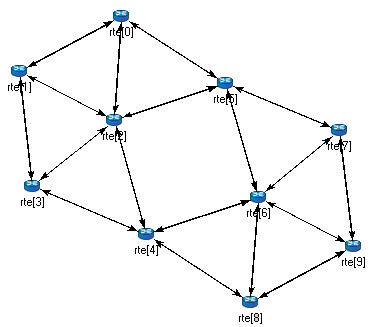
The network
The corresponding NED description would be as follows:
//
// A network
//
network Network
{
    submodules:
        node1: Node;
        node2: Node;
        node3: Node;
        ...
    connections:
        node1.port++ <--> {datarate=100Mbps;} <--> node2.port++;
        node2.port++ <--> {datarate=100Mbps;} <--> node4.port++;
        node4.port++ <--> {datarate=100Mbps;} <--> node6.port++;
        ...
}
The above code defines a network type named Network. Note that the NED
language uses the customary curly brace syntax and // to denote comments.
Note
Comments in NED not only enhance the readability of the source code, but also appear at various places (tooltips, content assist, etc) in the OMNeT++ IDE and become part of the documentation extracted from the NED files. The NED documentation system, similar to JavaDoc or Doxygen, will be described in Chapter Documenting NED and Messages.
The network contains several nodes named node1, node2, etc. from the
NED module type Node. We will define Node in the following sections.
The second half of the declaration specifies how the nodes are connected. The
double arrow represents a bidirectional connection. The connection points of
modules are called gates, and the notation port++ adds a new gate to the
port[] gate vector. Gates and connections will be discussed in more detail
in sections Gates and Connections. The
nodes are connected with a channel that has a data rate of 100Mbps.
Note
In many other systems, the equivalent of OMNeT++ gates are called ports. We have chosen to retain the term gate to avoid confusion with other uses of the word port: router port, TCP port, I/O port, etc.
The above code would be placed in a file named Net6.ned. It is
conventional to put each NED definition in its own file and name the file
accordingly, but it is not mandatory.
Any number of networks can be defined in the NED files, and for each simulation,
the user needs to specify which network to set up. The usual way to specify the
network is to include the network option in the configuration (usually
the omnetpp.ini file):
[General]
network = Network
Introducing a Channel
It is inconvenient to repeat the data rate for every connection. Fortunately, NED provides a convenient solution: it allows the creation of a new channel type that encapsulates the data rate setting. This channel type can be defined inside the network so that it does not clutter the global namespace.
The improved network would look like this:
//
// A Network
//
network Network
{
    types:
        channel C extends ned.DatarateChannel {
            datarate = 100Mbps;
        }
    submodules:
        node1: Node;
        node2: Node;
        node3: Node;
        ...
    connections:
        node1.port++ <--> C <--> node2.port++;
        node2.port++ <--> C <--> node4.port++;
        node4.port++ <--> C <--> node6.port++;
        ...
}
Later sections will cover the concepts used (inner types, channels, the
DatarateChannel built-in type, inheritance) in detail.
The App, Routing, and Queue Simple Modules
Simple modules are the basic building blocks for other (compound) modules,
denoted by the simple keyword. All active behavior in the model is
encapsulated in simple modules. Behavior is defined by a C++ class;
NED files only declare the externally visible interface of the module (gates,
parameters).
In our example, we could define Node as a simple module. However, its
functionality is quite complex (such as traffic generation, routing, etc.), so
it is better to implement it with several smaller simple module types. We will
assemble these modules into a compound module. We will have one simple module
for traffic generation (App), one for routing (Routing), and one for
queueing up packets to be sent out (Queue). For brevity, we omit the
bodies of the latter two in the following code.
simple App
{
    parameters:
        int destAddress;
        ...
        @display("i=block/browser");
    gates:
        input in;
        output out;
}

simple Routing
{
    ...
}

simple Queue
{
    ...
}
According to convention, the above simple module declarations go into
App.ned, Routing.ned, and Queue.ned files.
Note
Note that module type names (App, Routing, Queue) begin
with a capital letter, while parameter and gate names begin with lowercase.
This is the recommended naming convention. Capitalization matters because
the language is case-sensitive.
Let’s consider the first simple module type declaration. App has a
parameter called destAddress (with others omitted for now) and two gates
named out and in for sending and receiving application packets.
The argument of @display() is called a display string, which
defines the rendering of the module in graphical environments. In
@display("i=..."), "i=..." defines the default icon.
In general, attributes starting with @ like @display are called
properties in NED. They are used to annotate various objects with
metadata. Properties can be attached to files, modules, parameters, gates,
connections, and other objects, and parameter values have a flexible syntax.
The Node Compound Module
Now we can assemble App, Routing, and Queue into the compound
module Node. A compound module can be thought of as a “cardboard box” that
groups other modules into a larger unit, which can further be used as a building
block for other modules. Networks are also a kind of compound module.
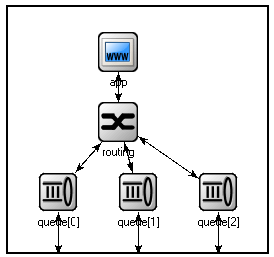
The Node compound module
module Node
{
    parameters:
        int address;
        @display("i=misc/node_vs,gold");
    gates:
        inout port[];
    submodules:
        app: App;
        routing: Routing;
        queue[sizeof(port)]: Queue;
    connections:
        routing.localOut --> app.in;
        routing.localIn <-- app.out;
        for i=0..sizeof(port)-1 {
            routing.out[i] --> queue[i].in;
            routing.in[i] <-- queue[i].out;
            queue[i].line <--> port[i];
        }
}
Compound modules, like simple modules, may have parameters and gates. Our
Node module contains an address parameter and a gate vector named
port of unspecified size. The actual gate vector size will be determined
implicitly by the number of neighbors when we create a network from nodes of
this type. The type of port[] is inout, which allows bidirectional
connections.
The modules that make up the compound module are listed under
submodules. Our Node compound module type has an app and
a routing submodule, plus a queue[] submodule vector that contains
one Queue module for each port, as specified by [sizeof(port)].
(Referring to [sizeof(port)] is allowed because the network is built in a
top-down order, and the node is already created and connected at the network
level when its submodule structure is built out.)
In the connections section, the submodules are connected to each
other and to the parent module. Single arrows are used to connect input and
output gates, while double arrows connect inout gates. A for loop is
utilized to connect the routing module to each queue module and to
connect the outgoing/incoming link (line gate) of each queue to the
corresponding port of the enclosing module.
Putting It Together
We have created the NED definitions for this example, but how are they used by
OMNeT++? When the simulation program is started, it loads the NED files. The
program should already include the C++ classes that implement the required
simple modules, App, Routing, and Queue. The C++ code for
these modules is either part of the executable or loaded from a shared library.
The simulation program also loads the configuration (omnetpp.ini)
and determines from it that the simulation model to be run is the Network
network. Then, the network is instantiated for simulation.
The simulation model is built in a top-down preorder fashion. Starting from an empty system module, all submodules are created, their parameters and gate vector sizes are assigned, and they are fully connected before the submodule internals are built.
* * *
In the following sections, we will delve deeper into the elements of the NED language and examine them in greater detail.
Simple Modules
Simple modules are the active components in the model.
Simple modules are defined with the simple keyword.
An example simple module:
simple Queue
{
    parameters:
        int capacity;
        @display("i=block/queue");
    gates:
        input in;
        output out;
}
Both the parameters and gates sections are optional, that is,
they can be left out if there are no parameters or gates. In addition, the
parameters keyword itself is optional too; it can be left out
even if there are parameters or properties.
Note that the NED definition doesn’t contain any code to define the
operation of the module: that part is expressed in C++. By default, OMNeT++
looks for C++ classes of the same name as the NED type (so here, Queue).
One can explicitly specify the C++ class with the @class property.
Classes with namespace qualifiers are also accepted, as shown in the following
example that uses the mylib::Queue class:
simple Queue
{
    parameters:
        int capacity;
        @class(mylib::Queue);
        @display("i=block/queue");
    gates:
        input in;
        output out;
}
If there are several modules whose C++ implementation classes are in the same
namespace, a better alternative to @class is the @namespace property.
The C++ namespace given with @namespace will be prepended to the normal
class name. In the following example, the C++ classes will be mylib::App,
mylib::Router and mylib::Queue:
@namespace(mylib);

simple App {
   ...
}

simple Router {
   ...
}

simple Queue {
   ...
}
The @namespace property may not only be specified at the file level as
in the above example, but for packages as well. When placed in a file
called package.ned, the namespace will apply to all components in
that package and below.
The implementation C++ classes need to be subclassed from the cSimpleModule library class; chapter Simple Modules of this manual describes in detail how to write them.
Simple modules can be extended (or specialized) via subclassing. The
motivation for subclassing can be to set some open parameters or gate sizes
to a fixed value (see Parameters and
Gates), or to replace the C++ class with a different
one. Now, by default, the derived NED module type will inherit the
C++ class from its base, so it is important to remember that you need to
write out @class if you want it to use the new class.
The following example shows how to specialize a module by setting a parameter to a fixed value (and leaving the C++ class unchanged):
simple Queue
{
   int capacity;
   ...
}

simple BoundedQueue extends Queue
{
   capacity = 10;
}
In the next example, the author wrote a PriorityQueue C++ class, and
wants to have a corresponding NED type, derived from Queue. However,
it does not work as expected:
simple PriorityQueue extends Queue // wrong! still uses the Queue C++ class
{
}
The correct solution is to add a @class property to override the
inherited C++ class:
simple PriorityQueue extends Queue
{
   @class(PriorityQueue);
}
Inheritance in general will be discussed in section Inheritance.
Compound Modules
A compound module groups other modules into a larger unit. A compound module may have gates and parameters like a simple module, but no active behavior is associated with it. [1]
Note
When there is a temptation to add code to a compound module, then encapsulate the code into a simple module, and add it as a submodule.
A compound module declaration may contain several sections, all of them optional:
module Host
{
   types:
       ...
   parameters:
       ...
   gates:
       ...
   submodules:
       ...
   connections:
       ...
}
Modules contained in a compound module are called submodules, and they are
listed in the submodules section. One can create arrays of submodules
(i.e. submodule vectors), and the submodule type may come from a parameter.
Connections are listed under the connections section of the
declaration. One can create connections using simple programming constructs
(loop, conditional). Connection behavior can be defined by associating a
channel with the connection; the channel type may also come from a
parameter.
Module and channel types only used locally can be defined in the
types section as inner types, so that they do not pollute the
namespace.
Compound modules may be extended via subclassing. Inheritance may add new submodules and new connections as well, not only parameters and gates. Also, one may refer to inherited submodules, inherited types, etc. What is not possible is to “de-inherit” or modify submodules or connections. [2]
In the following example, we show how to assemble common protocols into a “stub” for wireless hosts, and add user agents via subclassing. [3]
module WirelessHostBase
{
   gates:
       input radioIn;
   submodules:
       tcp: TCP;
       ip: IP;
       wlan: Ieee80211;
   connections:
       tcp.ipOut --> ip.tcpIn;
       tcp.ipIn <-- ip.tcpOut;
       ip.nicOut++ --> wlan.ipIn;
       ip.nicIn++ <-- wlan.ipOut;
       wlan.radioIn <-- radioIn;
}

module WirelessHost extends WirelessHostBase
{
   submodules:
       webAgent: WebAgent;
   connections:
       webAgent.tcpOut --> tcp.appIn++;
       webAgent.tcpIn <-- tcp.appOut++;
}
The WirelessHost compound module can further be extended,
for example with an Ethernet port:
module DesktopHost extends WirelessHost
{
   gates:
       inout ethg;
   submodules:
       eth: EthernetNic;
   connections:
       ip.nicOut++ --> eth.ipIn;
       ip.nicIn++ <-- eth.ipOut;
       eth.phy <--> ethg;
}
Channels
Channels encapsulate parameters and behavior associated with connections.
Channels are like simple modules, in the sense that there are C++ classes
behind them. The rules for finding the C++ class for a NED channel type are
the same as with simple modules: the default class name is the NED type
name unless there is a @class property (@namespace is also
recognized), and the C++ class is inherited when the channel is subclassed.
Thus, the following channel type would expect a CustomChannel C++ class
to be present:
channel CustomChannel  // requires a CustomChannel C++ class
{
}
The practical difference compared to modules is that one rarely needs to write
a custom channel C++ class because there are predefined channel types that one can
subclass from, inheriting their C++ code. The predefined types are:
ned.IdealChannel, ned.DelayChannel, and ned.DatarateChannel.
(“ned” is the package name; one can get rid of it by importing the types
with the import ned.* directive. Packages and imports are described in
section Packages.)
IdealChannel has no parameters and lets all messages through
without delay or any side effect. A connection without a channel object
and a connection with an IdealChannel behave in the same way.
Still, IdealChannel has its uses, for example, when a channel object
is required so that it can carry a new property or parameter that is
going to be read by other parts of the simulation model.
DelayChannel has two parameters:
delayis adoubleparameter that represents the propagation delay of the message. Values need to be specified together with a time unit (s,ms,us, etc.)disabledis a Boolean parameter that defaults tofalse; when set totrue, the channel object will drop all messages.
DatarateChannel has a few additional parameters compared to DelayChannel:
datarateis adoubleparameter that represents the data rate of the channel. Values need to be specified in bits per second or its multiples as a unit (bps,kbps,Mbps,Gbps, etc.) Zero is treated specially and results in zero transmission duration, i.e. it stands for infinite bandwidth. Zero is also the default. Data rate is used for calculating the transmission duration of packets.berandperstand for Bit Error Rate and Packet Error Rate and allow basic error modeling. They expect adoublein the \([0,1]\) range. When the channel decides (based on random numbers) that an error occurred during the transmission of a packet, it sets an error flag in the packet object. The receiver module is expected to check the flag and discard the packet as corrupted if it is set. The defaultberandperare zero.
Note
There is no channel parameter that specifies whether the channel delivers the message object to the destination module at the end or at the start of the reception; that is decided by the C++ code of the target simple module. See the setDeliverOnReceptionStart() method of cGate.
The following example shows how to create a new channel type by
specializing DatarateChannel:
channel Ethernet100 extends ned.DatarateChannel
{
    datarate = 100Mbps;
    delay = 100us;
    ber = 1e-10;
}
Note
The three built-in channel types are also used for connections where the channel type is not explicitly specified.
One may add parameters and properties to channels via subclassing and may modify existing ones. In the following example, we introduce distance-based calculation of the propagation delay:
channel DatarateChannel2 extends ned.DatarateChannel
{
    double distance @unit(m);
    delay = this.distance / 200000km * 1s;
}
Parameters are primarily intended to be read by the underlying C++ class,
but new parameters may also be added as annotations to be used by other
parts of the model. For example, a cost parameter may be used for
routing decisions in the routing module, as shown in the example below. The
example also shows annotation using properties (@backbone).
channel Backbone extends ned.DatarateChannel
{
    @backbone;
    double cost = default(1);
}
Parameters
Parameters are variables that belong to a module. Parameters can be used in building the topology (number of nodes, etc), and to supply input to C++ code that implements simple modules and channels.
Parameters can be of type double, int,
bool, string, xml, and object;
they can also be declared volatile. For the numeric types, a unit of
measurement can also be specified (@unit property).
Parameters can get their value from NED files or from the configuration
(omnetpp.ini). A default value can also be given (default(…)),
which is used if the parameter is not otherwise assigned.
The following example shows a simple module that has five parameters, three of which have default values:
simple App
{
    parameters:
        string protocol;       // protocol to use: "UDP" / "IP" / "ICMP" / ...
        int destAddress;       // destination address
        volatile double sendInterval @unit(s) = default(exponential(1s));
                               // time between generating packets
        volatile int packetLength @unit(byte) = default(100B);
                               // length of one packet
        volatile int timeToLive = default(32);
                               // maximum number of network hops to survive
    gates:
        input in;
        output out;
}
Assigning a Value
Parameters may get their values in several ways: from NED code, from the
configuration (omnetpp.ini), or even interactively from the user.
NED lets one assign parameters at several places: in subclasses via inheritance;
in submodule and connection definitions where the NED type is instantiated; and
in networks and compound modules that directly or indirectly contain the
corresponding submodule or connection.
For instance, one could specialize the above App module type via
inheritance with the following definition:
simple PingApp extends App
{
    parameters:
        protocol = "ICMP/ECHO"
        sendInterval = default(1s);
        packetLength = default(64byte);
}
This definition sets the protocol parameter to a fixed value
("ICMP/ECHO"), and changes the default values of the sendInterval
and packetLength parameters. protocol is now locked down in
PingApp, and its value cannot be modified via further subclassing or other
ways. sendInterval and packetLength are still unassigned here, and
only their default values have been overwritten.
Now, let us see the definition of a Host compound module that uses
PingApp as submodule:
module Host
{
    submodules:
        ping : PingApp {
            packetLength = 128B; // always ping with 128-byte packets
        }
        ...
}
This definition sets the packetLength parameter to a fixed value. It is
now hardcoded that Hosts send 128-byte ping packets; this setting cannot
be changed from NED or the configuration.
It is not only possible to set a parameter from the compound module that
contains the submodule, but also from modules higher up in the module tree. A
network that employs several Host modules could be defined like this:
network Network
{
    submodules:
        host[100]: Host {
            ping.timeToLive = default(3);
            ping.destAddress = default(0);
        }
        ...
}
Parameter assignment can also be placed into the parameters block of the
parent compound module, which provides additional flexibility. The following
definition sets up the hosts so that half of them ping host #50, and the other
half ping host #0:
network Network
{
    parameters:
        host[*].ping.timeToLive = default(3);
        host[0..49].ping.destAddress = default(50);
        host[50..].ping.destAddress = default(0);

    submodules:
        host[100]: Host;
        ...
}
Note the use of asterisk to match any index, and .. to match index ranges.
If there were a number of individual hosts instead of a submodule vector, the network definition could look like this:
network Network
{
    parameters:
        host*.ping.timeToLive = default(3);
        host{0..49}.ping.destAddress = default(50);
        host{50..}.ping.destAddress = default(0);

    submodules:
        host0: Host;
        host1: Host;
        host2: Host;
        ...
        host99: Host;
}
An asterisk matches any substring not containing a dot, and a .. within a
pair of curly braces matches a natural number embedded in a string.
In most assignments we have seen above, the left hand side of the equal sign contained a dot and often a wildcard as well (asterisk or numeric range); we call these assignments pattern assignments or deep assignments.
There is one more wildcard that can be used in pattern assignments, and this is the double asterisk; it matches any sequence of characters including dots, so it can match multiple path elements. An example:
network Network
{
    parameters:
        **.timeToLive = default(3);
        **.destAddress = default(0);
    submodules:
        host0: Host;
        host1: Host;
        ...
}
Note that some assignments in the above examples changed default values, while
others set parameters to fixed values. Parameters that received no fixed value
in the NED files can be assigned from the configuration
(omnetpp.ini).
Important
A non-default value assigned from NED cannot be overwritten later in NED or from ini files; it becomes “hardcoded” as far as ini files and NED usage are concerned.
A parameter can be assigned in the configuration using a similar syntax as NED pattern assignments (actually, it would be more historically accurate to say it the other way round, that NED pattern assignments use a similar syntax to ini files):
Network.host[*].ping.sendInterval = 500ms  # for the host[100] example
Network.host*.ping.sendInterval = 500ms    # for the host0,host1,... example
**.sendInterval = 500ms
One often uses the double asterisk to save typing. One can write
**.ping.sendInterval = 500ms
Or if one is certain that only ping modules have sendInterval parameters,
the following will suffice:
**.sendInterval = 500ms
Parameter assignments in the configuration are described in section Assigning Module Parameters.
One can also write expressions, including stochastic expressions, in NED files and in ini files as well. For example, here’s how one can add jitter to the sending of ping packets:
**.sendInterval = 1s + normal(0s, 0.001s) # or just: normal(1s, 0.001s)
If there is no assignment for a parameter in NED or in the ini file, the default
value (given with =default(...) in NED) will be applied implicitly. If
there is no default value, the user will be asked, provided the simulation
program is allowed to do that; otherwise there will be an error. (Interactive
mode is typically disabled for batch executions where it would do more harm than
good.)
It is also possible to explicitly apply the default (this can sometimes be useful):
**.sendInterval = default
Finally, one can explicitly ask the simulator to prompt the user interactively for the value (again, provided that interactivity is enabled; otherwise this will result in an error):
**.sendInterval = ask
Note
How can one decide whether to assign a parameter from NED or from an ini file? The advantage of ini files is that they allow a cleaner separation of the model and experiments. NED files (together with C++ code) are considered to be part of the model and to be more or less constant. Ini files, on the other hand, are for experimenting with the model by running it several times with different parameters. Thus, parameters that are expected to change (or make sense to be changed) during experimentation should be put into ini files.
Expressions
Parameter values may be given with expressions. NED language expressions have a
C-like syntax, with additions like quantities (numbers with measurement units,
e.g., 100Gbps) and JSON constructs. Compared to C, there are some
variations on operator names: binary and logical XOR are # and
##, while ^ has been reassigned to power-of instead. The
+ operator does string concatenation as well as numeric addition. There
are two extra operators: <=> (“spaceship”) and =~
(string match). The JSON constructs are the array and the
object syntaxes, which will be covered in section
Object Parameters and Structured Data. Keyword constants include true,
false, nan (floating-point Not-a-Number), inf
(infinity), null and its synonym nullptr, and also
undefined which represents the missing value.
The spaceship operator <=> compares its two arguments and returns the
result (“less”, “equal”, “greater” and “not applicable”) in the form of
a negative, zero, positive or nan double number, respectively.
2 <=> 2  // --> 0
10 <=> 5  // --> 1
2 <=> nan // --> nan
The string match operator =~ is used as string =~ pattern,
and returns a boolean that indicates whether if the
second argument (the pattern) matches the first one (the string). Pattern syntax
and rules are similar to those used in omnetpp.ini files: case
sensitive, full-string match, where an asterisk * matches zero or more of
any character except dot, and a double asterisk ** matches zero or more
characters (including dot), and other notations also exist to express embedded
numbers and square-bracketed numeric indices within a numeric range.
"foo" =~ "f*" // --> true
"foo" =~ "b*" // --> false
"foo" =~ "F*" // --> false
"foo.bar.baz" =~ "*.baz" // --> false
"foo.bar.baz" =~ "**.baz" // --> true
"foo[15]" =~ "foo[5..20]" // --> true
"foo15" =~ "foo{5..20}" // --> true
Expressions may refer to module parameters, gate vector and module vector sizes
(using the sizeof operator), existence of a submodule or submodule
vector (exists operator), and the index of the current module in a
submodule vector (index).
The special operator expr() can be used to pass a formula into a
module as a parameter (Passing a Formula as Parameter).
Expressions may also utilize various numeric, string, stochastic, and
miscellaneous other functions (fabs(), uniform(), lognormal(),
etc.).
Note
The list of NED functions can be found in Appendix Appendix: NED Functions. The user can also extend NED with new functions.
Parameter References
Expressions may refer to parameters of the compound module being defined,
parameters of the current submodule or channel, and parameters of already
defined submodules, with the syntax submodule.parametername (or
submodule[index].parametername).
Unqualified parameter names refer to the nearest enclosing scope: inside a
submodule or channel block they refer to the submodule’s or channel’s own
parameters; outside, they refer to parameters of the compound
module. [4] Use the parent qualifier to refer to
the compound module’s parameters from within a submodule block, and the
this qualifier to make a reference to the local submodule explicit.
network Network
{
    parameters:
        double foo;
        double bar = foo;  // refers to Network.foo
    submodules:
        node[10]: Node {
            baz = parent.foo;  // refers to Network.foo
            datarate = amount / duration;  // refers to node[i]'s params
        }
    ...
}
For the full scoping rules (including gates, submodule references, and loop variables), see Referencing Parameters, Gates and Loop Variables.
Volatile Parameters
Volatile parameters are those marked with the volatile modifier
keyword. Normally, expressions assigned to parameters are evaluated once, and
the resulting values are stored in the parameters. In contrast, a volatile
parameter holds the expression itself, and it is evaluated every time the
parameter is read. Therefore, if the expression contains a stochastic or
changing component, such as normal(0,1) (a random value from the unit
normal distribution) or simTime() (the current simulation time), reading
the parameter may yield a different value every time.
Note
Technically, non-volatile parameters may also contain stochastic values. However, the result of that would be that the simulation use a constant value throughout, chosen randomly at the beginning of the simulation. This is akin to running a randomly selected simulation rather than performing a Monte-Carlo simulation, hence, it is rarely desirable.
If a parameter is marked volatile, the C++ code that implements the
corresponding module is expected to re-read the parameter every time a new value
is needed, as opposed to reading it once and caching the value in a variable.
To demonstrate the use of volatile, suppose we have a Queue
simple module that has a volatile double parameter named
serviceTime.
simple Queue
{
    parameters:
        volatile double serviceTime;
}
Because of the volatile modifier, the C++ code underlying the queue
module is supposed to read the serviceTime parameter for every job
serviced. Thus, if a stochastic value like uniform(0.5s, 1.5s) is assigned
to the parameter, the expression will be evaluated every time, and every job
will likely have a different, random service time.
As another example, here’s how one can have a time-varying parameter by
exploiting the simTime() NED function:
**.serviceTime = simTime()<1000s ? 1s : 2s # queue that slows down after 1000s
Mutable Parameters
A parameter is marked as mutable by adding the @mutable property to it.
Mutable parameters can be set to a different value during runtime, whereas
normal, i.e., non-mutable parameters cannot be changed after their initial
assignment (attempts to do so will result in an error being raised).
Parameter mutability addresses the fact that although it would be technically possible to allow changing the value of any parameter to a different value during runtime, it only really makes sense to do so if the change actually takes effect. Otherwise, users doing the change could be mislead.
For example, if a module is implemented in C++ in a way that it only reads a
parameter once and then uses the cached value throughout, it would be misleading
to allow changing the parameter’s value during simulation. For a parameter to
rightfully be marked as @mutable, module’s implementation has to be
explicitly prepared to handle runtime parameter changes (see section
Reacting to Parameter Changes).
As a practical example, a drop-tail queue module could have a maxLength
parameter which controls the maximum number of elements the queue can hold. If
it was allowed to set the maxLength parameter to a different value at
runtime but the module would continue to operate according to the initially
configured value throughout the entire simulation, that could falsify simulation
results.
simple Queue
{
    parameters:
        int maxLength @mutable; // @mutable indicates that Queue's
                                // implementation is prepared for handling
                                // runtime changes in the value of the
                                // maximum queue length.
        ...
}
In a model framework that contains a large number of modules with many
parameters, the presence or absence of @mutable allows the user to know
which are the parameters whose runtime changes are properly handled by their
modules. This is an important input for determining what kinds of experiments
can be done with the model.
Hint
Note that although volatile and @mutable are two
different things, parameters marked volatile may often be marked
@mutable as well.
Note
@mutable affects backward compatibility. As it was introduced in
OMNeT++ version 6.0, models written before that do not contain
@mutable annotations. Such simulation models, if they rely on
runtime parameter changes, may be run under OMNeT++ 6.0 by setting the
parameter-mutability-check configuration option to false.
Units
One can declare a parameter to have an associated unit of measurement by adding
the @unit property. An example:
simple App
{
    parameters:
        volatile double sendInterval @unit(s) = default(exponential(350ms));
        volatile int packetLength @unit(byte) = default(4KiB);
    ...
}
The @unit(s) and @unit(byte) declarations specify the measurement
unit for the parameter. Values assigned to parameters must have the same or
compatible unit, i.e., @unit(s) accepts milliseconds, nanoseconds,
minutes, hours, etc., and @unit(byte) accepts kilobytes, megabytes, etc.,
as well.
Note
The list of units accepted by OMNeT++ is listed in the Appendix, see
Units of Measurement. Unknown units (bogomips, etc.) can also be
used, but there are no conversions for them, i.e., decimal prefixes will not
be recognized.
The OMNeT++ runtime does a full and rigorous unit check on parameters to ensure “unit safety” of models. Constants should always include the measurement unit.
The @unit property of a parameter cannot be added or overridden in
subclasses or in submodule declarations.
XML Parameters
OMNeT++ supports two explicit ways of passing structured data to a module using parameters: XML parameters and object parameters with JSON-style structured data. This section describes the former, and the next one the latter.
XML parameters are declared with the keyword xml. When using XML
parameters, OMNeT++ will read the XML document for you, validate it against its
DTD (if it contains one), and present the contents in a DOM-like object tree. It
is also possible to assign a part (i.e., a subtree) of the document to the
parameter; the subset can be selected using an XPath-subset notation. OMNeT++
caches the content of the document, so it is loaded only once even if it is
referenced by multiple parameters.
Values for an XML parameter can be produced using the xmldoc() and
the xml() functions. xmldoc() accepts a filename as an
argument, while xml() parses its string argument as XML content. Of
course, one can assign xml parameters both from NED and from
omnetpp.ini.
The following example declares an xml parameter and assigns the
contents of an XML file to it. The file name is understood as being relative to
the working directory.
simple TrafGen {
    parameters:
        xml profile;
    gates:
        output out;
}

module Node {
    submodules:
        trafGen1 : TrafGen {
            profile = xmldoc("data.xml");
        }
        ...
}
xmldoc() also lets one select an element within an XML
document. In case a simulation model contains numerous modules that need XML
input, this feature allows the user to get rid of many small XML files by
aggregating them into a single XML file. For example, the following XML file
contains two profiles identified with the IDs gen1 and gen2:
<root>
    <profile id="gen1">
          <param>1</param>
          <param>3</param>
    </profile>
    <profile id="gen2">
          <param>9</param>
    </profile>
</root>
And one can assign each profile to a corresponding submodule using an XPath-like expression:
module Node {
    submodules:
        trafGen1 : TrafGen {
            profile = xmldoc("all.xml", "/root/profile[@id='gen1']");
        }
        trafGen2 : TrafGen {
            profile = xmldoc("all.xml", "/root/profile[@id='gen2']");
        }
}
The following example shows how to specify XML content using a string literal
with the xml() function. This is especially useful for specifying a
default value.
simple TrafGen {
    parameters:
        xml profile = xml("<root/>"); // empty document as default
        ...
}
The xml() function, like xmldoc(), also supports an
optional second XPath parameter for selecting a subtree.
Object Parameters and Structured Data
Object parameters are declared with the keyword object. The values of
object parameters are C++ objects, which can hold arbitrary data and can be
constructed in various ways in NED. Although object parameters were introduced
in OMNeT++ only in version 6.0, they are now the preferred way of passing
structured data to modules.
There are two basic constructs in NED for creating objects: the array and the object syntax. The array syntax is a pair of square brackets that encloses the list of comma-separated array elements: [ value1, value2, … ]. The object (a.k.a. dictionary) syntax uses curly braces around key-value pairs, with the separators being colon and comma: { key1 : value1, key2 : value2, … }. These constructs can be composed, so an array may contain objects and further arrays as elements, and similarly, an object may contain arrays and further objects as values, and so on. This allows describing complex data structures, with a JSON-like notation.
The notation is only JSON-like, as the syntax rules are more relaxed
than in JSON. All valid JSON is accepted, but also more. The main difference is
that in JSON, values in arrays and objects may only be constants or null,
while OMNeT++ allows NED expressions as values: quantities,
nan/inf, parameter references, functions, arithmetic
operations, etc., are all accepted. Also, unlike strict JSON, NED allows quotation
marks around object keys to be left out, as long as the key complies with
the identifier syntax.
Another extension is that for objects, the desired C++ class may be specified in front of the open curly brace: classname { key1 : value1, … }. The object will be created and filled in using OMNeT++’s reflection features. This allows internal data structures of modules to be filled out directly, eliminating most of the “parsing” code which is otherwise necessary. More about this feature will be written in the chapter about C++ programming (section Object Parameters).
Object parameters with JSON-style values obsolete several workarounds that were used in pre-6.0 OMNeT++ versions for passing structured data to modules, such as using strings to specify numeric arrays or using text files of ad-hoc syntax as configuration or data files. JSON-style values are also more convenient than XML input.
After this introduction, let’s see some examples! We begin with a list of completely made-up object parameter assignments to show the syntax and possibilities:
simple Example {
    parameters:
        object array1 = []; // empty array
        object array2 = [2, 5, 3, -1]; // array of integers
        object array3 = [ 3, 24.5mW, "Hello", false, true ]; // misc array
        object array4 = [ nan, inf, inf s, null, nullptr ]; // special values
        object object1 = {};  // empty object
        object object2 = { foo: 100, bar: "Hello" }; // object with 2 fields
        object object3 = { "foo": 100, "bar": "Hello" }; // keys with quotes

        // composition of objects and arrays
        object array5 = [ [1,2,3], [4,5,6], [7,8,9] ];
        object array6 = [ { foo: 100, bar: "Hello" }, { baz: false } ];
        object object4 = { foo : [1,2,3], bar : [4,5,6] };
        object object5 = { obj : { foo: 1, bar: 2 }, array: [1, 2, 3 ] };

        // expression, parameter references
        double x = default(1);
        object misc = [ x, 2*x, floor(3.14), uniform(0,10) ]; // [1,2,3,?]

        // default values
        object default1 = default([]); // empty array by default
        object default2 = default({}); // empty object by default
        object default3 = default([1,2,3]); // some array by default
        object default4 = default(nullptr); // null pointer by default
}
The following, more practical example demonstrates how one could describe an IPv4 routing table. Each route is represented as an object, and the table itself is represented as an array of routes.
object routes = [
    { dest: "10.0.0.0", netmask: "255.255.0.0", interf: "eth0", metric:10 },
    { dest: "10.1.0.0", netmask: "255.255.0.0", interf: "eth1", metric:20 },
    { dest: "*", interf: "eth2" },
];
The next example shows the use of the extended object syntax for specifying a
“template” for the packets that a traffic source module should generate. Note
the stochastic expression for the byteLength field, and that the parameter
is declared as volatile. Every time the module needs to send a
packet, its C++ code should read the packetToSend parameter, which will
cause the expression to be evaluated and a new packet of random length to be
created that the module can send.
simple TrafficSource {
    parameters:
    volatile object packetToSend = default(cPacket {
        name: "data",
        kind: 10,
        byteLength: intuniform(64,4096)
    });
    volatile double sendInterval @unit(s) = default(exponential(100ms));
}
Another traffic source module that supports a predetermined schedule of what to send at which points in time could have the following parameter to describe the schedule:
object sendSchedule = [
    { time: 1s, pk: cPacket { name: "pk1", byteLength: 64 } },
    { time: 2s, pk: cPacket { name: "pk2", byteLength: 76 } },
    { time: 3s, pk: cPacket { name: "pk3", byteLength: 32 } },
];
In the next example, we want to pass a trail given with its waypoints to a
module. The module will get the data in an instance of a Trail C++ class
expressly created for this purpose. This means that the module will get the
trail data in a ready-to-use form just by reading the parameter, without having
to do any parsing or additional processing.
We use a message file (chapter Messages and Packets) to define the classes; the C++ classes will be automatically generated by OMNeT++ from it.
// file: Trail.msg
struct Point {
    double x;
    double y;
}

class Trail extends cObject {
    Point waypoints[];
}
An actual trail can be specified in NED like this:
object trail = Trail {
    waypoints: [
        { x: 1, y : 5 },
        { x: 4, y : 6 },
        { x: 3, y : 8 },
        { x: 5, y : 3 }
    ]
  };
Values for object parameters may also be placed in ini files, just like values
for other parameter types. In ini files, indented lines are treated as
continuations of the previous line, so the above example doesn’t need trailing
backslashes when moved to omnetpp.ini:
**.trail = Trail {
        waypoints: [
            { x: 1, y : 5 },
            { x: 4, y : 6 },
            { x: 3, y : 8 },
            { x: 5, y : 3 }
        ]
      }
Passing a Formula as Parameter
The special operator expr() allows one to pass a formula into a
module as a parameter. expr() takes an expression as an argument,
which syntactically must correspond to the general syntax of NED
expressions. However, it is not a normal NED expression: it will not be
interpreted and evaluated as one. Instead, it will be encapsulated into, and
returned as, an object, and typically assigned to a module parameter.
The module may access the object via the parameter and may evaluate the expression encapsulated in it any number of times during simulation. While doing so, the module’s code can freely determine how various identifiers and other syntactical elements in the expression are interpreted.
Let us see a practical example. In the model of a wireless network, one of the tasks is to compute the path loss suffered by each wirelessly transmitted frame as part of the procedure to determine whether the frame could be successfully received by the receiver node. There are several formulas for computing the path loss (free space, two-ray ground reflection, etc.), and it depends on multiple factors which one to use. If the model author wants to leave it open for their users to specify the formula they want to use, they might define the model like so:
simple RadioMedium {
    parameters:
        object pathLoss; // =expr(...): formula to compute path loss
    ...
}
The pathLoss parameter expects the formula to be given with
expr(). The formula is expected to contain two variables,
distance and frequency, which stand for the distance between the
transmitter and the receiver and the packet transmission frequency,
respectively. The module would evaluate the expression for each frame, binding
values that correspond to the current frame to those variables.
Given the above, free space path loss would be specified to the module with the following formula (assuming isotropic antennas with the same polarization, etc.):
**.pathLoss = expr((4 * 3.14159 * distance * frequency / c) ^ 2)
The next example is borrowed from the INET Framework, which extensively uses
expr() for specifying packet filter conditions. A few examples:
expr(hasBitError)
expr(name == "P1")
expr(name =~ "P*")
expr(totalLength == 128B)
expr(ipv4.destAddress.str() == "10.0.0.1" && udp.destPort == 42)
The interesting part is that the packet itself does not appear explicitly in the
expressions. Instead, identifiers like hasBitError and name are
interpreted as attributes of the packet, as if the user had written e.g.
pk.hasBitError and pk.name. Similarly, ipv4 and udp
stand for the IPv4 and UDP headers of the packet. The last line also shows that
the interpretation of member accesses and method calls is also in the hands of
the module’s code.
The details of implementing expr() support in modules will be
described as part of the simulation library, in section
Dynamic Expression Evaluation.
Gates
Gates are the connection points of modules. OMNeT++ has three types of gates: input, output, and inout, the latter being essentially an input and an output gate glued together.
A gate, whether input or output, can only be connected to one other gate. (For compound module gates, this means one connection “outside” and one “inside”.) It is possible, though generally not recommended, to connect the input and output sides of an inout gate separately (see section Connections).
One can create single gates and gate vectors. The size of a gate vector
can be given inside square brackets in the declaration, but it is also possible
to leave it open by just writing a pair of empty brackets (”[]”).
When the gate vector size is left open, one can still specify it later
when subclassing the module or when using the module for a submodule in a
compound module. However, it does not need to be specified because
one can create connections with the \(gate\)++ operator that
automatically expands the gate vector.
The gate size can be queried from various NED expressions with the
sizeof() operator.
NED normally requires that all gates be connected. To relax this
requirement, one can annotate selected gates with the @loose
property, which turns off the connectivity check for that gate. Also, input
gates that solely exist so that the module can receive messages via
sendDirect() (see Direct Message Sending) should
be annotated with @directIn. It is also possible to turn off the connectivity
check for all gates within a compound module by specifying the
allowunconnected keyword in the module’s connections section.
Let us see some examples.
In the following example, the Classifier module has one input for
receiving jobs, which it will send to one of the outputs. The number of
outputs is determined by a module parameter:
simple Classifier {
    parameters:
        int numCategories;
    gates:
        input in;
        output out[numCategories];
}
The following Sink module also has its in[] gate defined
as a vector, so that it can be connected to several modules:
simple Sink {
    gates:
        input in[];
}
The following lines define a node for building a square grid. Gates around
the edges of the grid are expected to remain unconnected; hence, the
@loose annotation:
simple GridNode {
    gates:
        inout neighbour[4] @loose;
}
WirelessNode below is expected to receive messages (radio transmissions)
via direct sending, so its radioIn gate is marked with @directIn.
simple WirelessNode {
    gates:
        input radioIn @directIn;
}
In the following example, we define TreeNode as having gates to connect
any number of children, then subclass it to get a BinaryTreeNode to
set the gate size to two:
simple TreeNode {
    gates:
        inout parent;
        inout children[];
}

simple BinaryTreeNode extends TreeNode {
    gates:
        children[2];
}
An example for setting the gate vector size in a submodule, using the same
TreeNode module type as above:
module BinaryTree {
    submodules:
        nodes[31]: TreeNode {
            gates:
                children[2];
        }
    connections:
        ...
}
Submodules
Modules that compose a compound module are called its submodules. A submodule has a name, and it is an instance of a compound or simple module type. In the NED definition of a submodule, this module type is usually given statically, but it is also possible to specify the type with a string expression. (The latter feature, parametric submodule types, will be discussed in section Parametric Submodule Types.)
NED also supports submodule arrays (vectors) and conditional submodules. Submodule vector size, unlike gate vector size, must always be specified and cannot be left open as with gates.
It is possible to add new submodules to an existing compound module via subclassing; this has been described in section Compound Modules.
The basic syntax of submodules is shown below:
module Node
{
    submodules:
        routing: Routing;   // a submodule
        queue[sizeof(port)]: Queue;  // submodule vector
        ...
}
As seen in previous code examples, a submodule may also have a
curly brace block as a body, where one can assign parameters, set the size of
gate vectors, and add/modify properties like the display string
(@display). It is not possible to add new parameters and gates.
Display strings specified here will be merged with the display string from the type to get the effective display string. The merge algorithm is described in chapter Graphics and Visualization.
module Node
{
    gates:
        inout port[];
    submodules:
        routing: Routing {
            parameters:   // this keyword is optional
                routingTable = "routingtable.txt"; // assign parameter
            gates:
                in[sizeof(parent.port)];  // set gate vector size
                out[sizeof(parent.port)];
        }
        queue[sizeof(port)]: Queue {
            @display("t=queue id $id"); // modify display string
            id = 1000+index;  // use submodule index to generate different IDs
        }
    connections:
        ...
}
An empty body may be omitted, that is,
queue: Queue;
is the same as
queue: Queue {
}
A submodule or submodule vector can be conditional. The if
keyword and the condition itself go after the submodule type, as shown in the
example below:
module Host
{
    parameters:
        bool withTCP = default(true);
    submodules:
        tcp : TCP if withTCP;
        ...
}
Note that with submodule vectors, setting a zero vector size can be used as an
alternative to the if condition.
Connections
Connections are defined in the connections section of compound
modules. Connections cannot span across hierarchy levels; one can connect
two submodule gates, a submodule gate and the “inside” of the parent
(compound) module’s gates, or two gates of the parent module (though this
is rarely useful), but it is not possible to connect to any gate outside the
parent module, or inside compound submodules.
Input and output gates are connected with a normal arrow, and inout gates
with a double-headed arrow “<-->”. To connect the two gates
with a channel, use two arrows and put the channel specification in between.
The same syntax is used to add properties such as @display to the
connection.
Some examples have already been shown in the NED Quickstart section (NED Quickstart); let’s see some more.
It has been mentioned that an inout gate is basically an input and an
output gate glued together. These sub-gates can also be addressed (and
connected) individually if needed, as port$i and port$o (or
for vector gates, as port$i[\(k\)] and port$o[\(k\)]).
Gates are specified as modulespec.gatespec (to connect a submodule),
or as gatespec (to connect the compound module). modulespec
is either a submodule name (for scalar submodules), or a submodule name plus
an index in square brackets (for submodule vectors). For scalar gates,
gatespec is the gate name; for gate vectors it is either the gate name
plus an index in square brackets, or gatename++.
The gatename++ notation causes the first unconnected gate index
to be used. If all gates of the given gate vector are connected, the behavior
is different for submodules and for the enclosing compound module.
For submodules, the gate vector expands by one. For a compound module,
after the last gate is connected, ++ will stop with an error.
Note
Why is it not possible to expand a gate vector of the compound module? The model structure is built in top-down order, so new gates would be left unconnected on the outside, as there is no way in NED to “go back” and connect them afterwards.
When the ++ operator is used with $i or $o
(e.g. g$i++ or g$o++, see later), it will actually add
a gate pair (input+output) to maintain equal gate sizes for the two
directions.
Channel Specification
Channel specifications (--><channelspec>--> inside a connection)
are similar to submodules in many respects. Let’s see some examples!
The following connections use two user-defined channel types,
Ethernet100 and Backbone. The code shows the syntax
for assigning parameters (cost and length) and specifying
a display string (and NED properties in general):
a.g++ <--> Ethernet100 <--> b.g++;
a.g++ <--> Backbone {cost=100; length=52km; ber=1e-8;} <--> b.g++;
a.g++ <--> Backbone {@display("ls=green,2");} <--> b.g++;
When using built-in channel types, the type name can be omitted; it will be inferred from the parameter names.
a.g++ <--> {delay=10ms;} <--> b.g++;
a.g++ <--> {delay=10ms; ber=1e-8;} <--> b.g++;
a.g++ <--> {@display("ls=red");} <--> b.g++;
If datarate, ber or per is assigned,
ned.DatarateChannel will be chosen. Otherwise, if delay or
disabled is present, it will be ned.DelayChannel; otherwise it
is ned.IdealChannel. Naturally, if other parameter names are assigned
in a connection without an explicit channel type, it will be an error (with
“ned.DelayChannel has no such parameter” or similar message).
Connection parameters, similarly to submodule parameters, can also
be assigned using pattern assignments, although the channel names
to be matched with patterns are a little more complicated and less
convenient to use. A channel can be identified with the name of its
source gate plus the channel name; the channel name is currently always
channel. It is illustrated by the following example:
module Queueing
{
    parameters:
        source.out.channel.delay = 10ms;
        queue.out.channel.delay = 20ms;
    submodules:
        source: Source;
        queue: Queue;
        sink: Sink;
    connections:
        source.out --> ned.DelayChannel --> queue.in;
        queue.out --> ned.DelayChannel <--> sink.in;
Using bidirectional connections is a bit trickier, because both directions must be covered separately:
network Network
{
    parameters:
        hostA.g$o[0].channel.datarate = 100Mbps; // the A -> B connection
        hostB.g$o[0].channel.datarate = 100Mbps; // the B -> A connection
        hostA.g$o[1].channel.datarate = 1Gbps;   // the A -> C connection
        hostC.g$o[0].channel.datarate = 1Gbps;   // the C -> A connection
    submodules:
        hostA: Host;
        hostB: Host;
        hostC: Host;
    connections:
        hostA.g++ <--> ned.DatarateChannel <--> hostB.g++;
        hostA.g++ <--> ned.DatarateChannel <--> hostC.g++;
Also, with the ++ syntax it is not always easy to figure out which
gate indices map to the connections one needs to configure. If connection
objects could be given names to override the default name
“channel”, that would make it easier to identify connections in
patterns. This feature is described in the next section.
Reconnecting Gates
Normally, it is an error for NED connection to refer to a gate which is already
connected. This behavior can be overridden with the @reconnect
property. A syntax example:
a.out --> {@reconnect;} --> b.in;
When a connection with the @reconnect property is encountered by the
network builder, it first checks whether any of the involved gates are connected.
If they are, it will unconnect them before proceeding to create the new connection.
The usefulness of @reconnect lies with inheritance, as it allows one
to modify connections in the base compound module. For example, it is possible
to insert a new submodule in the path between two connected submodules, which
eliminates the need for “hook” submodules in compound modules that are meant
to be very configurable. This is illustrated in the following example:
module Base {
    submodules:
        a: A;
        b: B;
    connections:
        a.out --> b.in;
}

module Derived extends Base {
    submodules:
        c: C; // inserted between a and b
    connections:
        a.out --> {@reconnect;} --> c.in;
        c.out --> {@reconnect;} --> b.in;
}
Channel Names
The default name given to channel objects is "channel". Since OMNeT++ 4.3,
it is possible to specify the name explicitly and also to override
the default name per channel type. The purpose of custom channel names is to make
addressing easier when channel parameters are assigned from ini files.
The syntax for naming a channel in a connection is similar to submodule syntax: name: type. Since both name and type are optional, the colon must be there after name even if type is missing, in order to remove the ambiguity.
Examples:
r1.pppg++ <--> eth1: EthernetChannel <--> r2.pppg++;
a.out --> foo: {delay=1ms;} --> b.in;
a.out --> bar: --> b.in;
In the absence of an explicit name, the channel name comes from the
@defaultname property of the channel type if that exists.
channel Eth10G extends ned.DatarateChannel like IEth {
    @defaultname(eth10G);
}
There’s a catch with @defaultname though: if the channel type is
specified with a **.<channel-name>.liketype= line in an ini file, then
the channel type’s @defaultname cannot be used as channelname
in that configuration line because the channel type would only be known as a
result of using that very configuration line. To illustrate the problem,
consider the above Eth10G channel and a compound module containing the
following connection:
r1.pppg++ <--> <> like IEth <--> r2.pppg++;
Then consider the following ini file:
**.eth10G.typename = "Eth10G"   # Won't match! The eth10G name would come from
                                #   the Eth10G type - catch-22!
**.channel.typename = "Eth10G"  # OK, as lookup assumes the name "channel"
**.eth10G.datarate = 10.01Gbps  # OK, channel already exists with name "eth10G"
The anomaly can be avoided by using an explicit channel name in the connection,
not using @defaultname, or by specifying the type via a module parameter
(e.g. writing <param> like ... instead of <> like ...).
Multiple Connections
Simple programming constructs (loop, conditional) allow for creating multiple connections easily.
This will be demonstrated in the following examples.
Examples
Chain
A chain of modules can be created as follows:
module Chain
    parameters:
        int count;
    submodules:
        node[count] : Node {
            gates:
                port[2];
        }
    connections allowunconnected:
        for i = 0..count-2 {
            node[i].port[1] <--> node[i+1].port[0];
        }
}
Binary Tree
A binary tree can be built in the following way:
simple BinaryTreeNode {
    gates:
        inout left;
        inout right;
        inout parent;
}

module BinaryTree {
    parameters:
        int height;
    submodules:
        node[2^height-1]: BinaryTreeNode;
    connections allowunconnected:
        for i=0..2^(height-1)-2 {
            node[i].left <--> node[2*i+1].parent;
            node[i].right <--> node[2*i+2].parent;
        }
}
Note that not every gate of the modules will be connected. By default,
an unconnected gate produces a run-time error message when the
simulation is started, but this error message is turned off here with
the allowunconnected modifier.
Consequently, it is the simple modules’ responsibility not to send
on an unconnected gate.
Random Graph
Conditional connections can be used to generate random topologies, for example. The following code generates a random subgraph of a full graph:
module RandomGraph {
    parameters:
        int count;
        double connectedness; // 0.0<x<1.0
    submodules:
        node[count]: Node {
            gates:
                in[parent.count];
                out[parent.count];
        }
    connections allowunconnected:
        for i=0..count-1, for j=0..count-1 {
            node[i].out[j] --> node[j].in[i]
                if i!=j && uniform(0,1)<connectedness;
        }
}
Note the use of the allowunconnected modifier
here as well, to turn off error messages produced by the network setup code
for unconnected gates.
Connection Patterns
Several approaches can be used to create complex topologies with a regular structure; three of them are described below.
“Subgraph of a Full Graph”
This pattern takes a subset of the connections of a full graph. A condition is used to “carve out” the necessary interconnection from the full graph:
for i=0..N-1, for j=0..N-1 {
    node[i].out[...] --> node[j].in[...] if condition(i,j);
}
The RandomGraph compound module (presented earlier) is an example of this pattern, but the pattern can generate any graph where an appropriate \(condition(i,j)\) can be formulated. For example, when generating a tree structure, the condition would determine whether node \(j\) is a child of node \(i\) or vice versa.
Though this pattern is very general, its usage can be prohibitive if the number of nodes \(N\) is high and the graph is sparse (having much fewer than \(N^2\) connections). The following two patterns do not suffer from this drawback.
“Connections of Each Node”
The pattern loops through all nodes and creates the necessary connections for each one. It can be generalized as follows:
for i=0..Nnodes, for j=0..Nconns(i)-1 {
    node[i].out[j] --> node[rightNodeIndex(i,j)].in[j];
}
The Hypercube compound module (to be presented later) is a clear example of this approach. The BinaryTree can also be regarded as an example of this pattern, with the inner j loop being unrolled.
The applicability of this pattern depends on how easily the \(rightNodeIndex(i,j)\) function can be determined.
“Enumerate All Connections”
A third pattern is to list all connections within a loop:
for i=0..Nconnections-1 {
    node[leftNodeIndex(i)].out[...] --> node[rightNodeIndex(i)].in[...];
}
This pattern can be used if the \(leftNodeIndex(i)\) and \(rightNodeIndex(i)\) mapping functions can be adequately formulated.
The Chain module is an example of this approach where the mapping
functions are extremely simple: \(leftNodeIndex(i)=i\) and \(rightNodeIndex(i) = i+1\).
This pattern can also be used to create a random subset of a full
graph with a fixed number of connections.
In the case of irregular structures where none of the above patterns can be employed, one can resort to listing all connections, as one would do in most existing simulators.
Parametric Submodule and Connection Types
Parametric Submodule Types
A submodule type can be specified with a module parameter of type
string, or in general, with any string-typed expression. The syntax
uses the like keyword.
Let us begin with an example:
network Net6
{
    parameters:
        string nodeType;
    submodules:
        node[6]: <nodeType> like INode {
            address = index;
        }
    connections:
        ...
}
This code creates a submodule vector whose module type will come from the
nodeType parameter. For example, if nodeType is set to "SensorNode",
then the module vector will consist of sensor nodes, provided such module
type exists and it qualifies. What this means is that the INode must be
an existing module interface, which the SensorNode
module type must implement (more about this later).
As already mentioned, one can write an expression between the angle brackets. The expression may use the parameters of the parent module and previously defined submodules, and it must yield a string value. For example, the following code is also valid:
network Net6
{
    parameters:
        string nodeTypePrefix;
        int variant;
    submodules:
        node[6]: <nodeTypePrefix + "Node" + string(variant)> like INode {
           ...
}
The corresponding NED declarations:
moduleinterface INode
{
    parameters:
        int address;
    gates:
        inout port[];
}

module SensorNode like INode
{
    parameters:
        int address;
        ...
    gates:
        inout port[];
        ...
}
The syntax “<nodeType> like INode” has an issue when used with submodule
vectors: it does not allow specifying different types for different indices. The
following syntax is better suited for submodule vectors:
The expression between the angle brackets may be left out altogether, leaving a
pair of empty angle brackets, <>:
module Node
{
    submodules:
        nic: <> like INic;  // type name expression left unspecified
        ...
}
Now the submodule type name is expected to be defined via typename pattern
assignments. Typename pattern assignments look like pattern assignments for the
submodule’s parameters, except that the parameter name is replaced by the
typename keyword. Typename pattern assignments may also be written in
the configuration file. In a network that uses the above Node NED type,
typename pattern assignments would look like this:
network Network
{
    parameters:
        node[*].nic.typename = "Ieee80211g";
    submodules:
        node: Node[100];
}
A default value may also be specified between the angle brackets; it will be used if there is no typename assignment for the module:
module Node
{
    submodules:
        nic: <default("Ieee80211b")> like INic;
        ...
}
There must be exactly one module type that goes by the simple name
Ieee80211b and also implements the module interface INic, otherwise,
an error message will be issued. (The imports in Node’s NED file play no
role in the type resolution.) If there are two or more such types, one can
remove the ambiguity by specifying the fully qualified module type name, i.e.,
one that also includes the package name:
module Node
{
    submodules:
        nic: <default("acme.wireless.Ieee80211b")> like INic; // made-up name
        ...
}
Conditional Parametric Submodules
When creating reusable compound modules, it is often useful to be able to make a parametric submodule optional. One solution is to let the user define the submodule type with a string parameter and not create the module when the parameter is set to the empty string. Like this:
module Node
{
    parameters:
        string tcpType = default("Tcp");
    submodules:
        tcp: <tcpType> like ITcp if tcpType != "";
}
However, this pattern, when used extensively, can lead to a large number of
string parameters. Luckily, it is also possible to achieve the same effect with
typename, without using extra parameters:
module Node
{
    submodules:
        tcp: <default("Tcp")> like ITcp if typename != "";
}
The typename operator in a submodule’s if condition
evaluates to the would-be type of the submodule. By using the condition, we can let the user eliminate the tcp submodule by setting
its typename to the empty string. For example, in a network that uses the above
NED type, typename pattern assignments could look like this:
network Network
{
    parameters:
        node1.tcp.typename = "TcpExt"; // let node1 use a custom TCP
        node2.tcp.typename = ""; // no TCP in node2
    submodules:
        node1: Node;
        node2: Node;
}
Note that this trick does not work with submodule vectors. The reason is that the condition applies to the vector as a whole, while the type is per-element.
It is often also useful to be able to check, e.g., in the connections section,
whether a conditional submodule has been created or not. This can be done with
the exists() operator. An example:
module Node
{
    ...
    connections:
        ip.tcpOut --> tcp.ipIn if exists(ip) && exists(tcp);
}
Limitation: exists() may only be used after the submodule’s
occurrence in the compound module.
Parametric Connection Types
Parametric connection types work similarly to parametric submodule types, and the syntax is similar as well. A basic example that uses a parameter of the parent module:
a.g++ <--> <channelType> like IMyChannel <--> b.g++;
a.g++ <--> <channelType> like IMyChannel {@display("ls=red");} <--> b.g++;
The expression may use loop variables, parameters of the parent module, and
parameters of submodules (e.g., host[2].channelType).
The type expression may also be absent, and then the type is expected to be specified using typename pattern assignments:
a.g++ <--> <> like IMyChannel <--> b.g++;
a.g++ <--> <> like IMyChannel {@display("ls=red");} <--> b.g++;
A default value may also be given:
a.g++ <--> <default("Ethernet100")> like IMyChannel <--> b.g++;
a.g++ <--> <default(channelType)> like IMyChannel <--> b.g++;
The corresponding type pattern assignments:
a.g$o[0].channel.typename = "Ethernet1000";  // A -> B channel
b.g$o[0].channel.typename = "Ethernet1000";  // B -> A channel
Metadata Annotations (Properties)
NED properties are metadata annotations that can be added to modules,
parameters, gates, connections, NED files, packages, and virtually anything in
NED. @display, @class, @namespace, @mutable,
@unit, @prompt, @loose, and @directIn are all properties
that have been mentioned in previous sections, but those examples only scratch
the surface of what properties are used for.
Using properties, one can attach extra information to NED elements. Some properties are interpreted by NED, by the simulation kernel; other properties may be read and used from within the simulation model, or provide hints for NED editing tools.
Properties are attached to the type, so one cannot have different properties defined per-instance. All instances of modules, connections, parameters, etc. created from any particular location in the NED files have identical properties.
The following example shows the syntax for annotating various NED elements:
@namespace(foo);  // file property

module Example
{
    parameters:
       @node;   // module property
       @display("i=device/pc");   // module property
       int a @unit(s) = default(1); // parameter property
    gates:
       output out @loose @labels(pk);  // gate properties
    submodules:
       src: Source {
           parameters:
              @display("p=150,100");  // submodule property
              count @prompt("Enter count:"); // adding a property to a parameter
           gates:
              out[] @loose;  // adding a property to a gate
       }
       ...
    connections:
       src.out++ --> { @display("ls=green,2"); } --> sink1.in; // connection prop.
       src.out++ --> Channel { @display("ls=green,2"); } --> sink2.in;
}
Property Indices
Sometimes it is useful to have multiple properties with the same name, for example for declaring multiple statistics produced by a simple module. Property indices make this possible.
A property index is an identifier or a number in square brackets after the
property name, such as eed and jitter in the following example:
simple App {
    @statistic[eed](title="end-to-end delay of received packets";unit=s);
    @statistic[jitter](title="jitter of received packets");
}
This example declares two statistics as @statistic properties,
@statistic[eed] and @statistic[jitter]. Property values within the
parentheses are used to supply additional information, like a more descriptive
name (title="...") or a unit (unit=s). Property indices can be
conveniently accessed from the C++ API as well; for example, it is possible to
ask what indices exist for the "statistic" property, and it will return a
list containing "eed" and "jitter").
In the @statistic example, the index was textual and meaningful, but
neither is actually required. The following dummy example shows the use of
numeric indices which may be ignored altogether by the code that interprets the
properties:
simple Dummy {
    @foo[1](what="apples";amount=2);
    @foo[2](what="oranges";amount=5);
}
Note that without the index, the lines would actually define the same @foo
property and would overwrite each other’s values.
Indices also make it possible to override entries via inheritance:
simple DummyExt extends Dummy {
    @foo[2](what="grapefruits"); // 5 grapefruits instead of 5 oranges
}
Data Model
Properties may contain data given in parentheses; the data model is quite flexible. To begin with, properties may contain no value or a single value:
@node;
@node(); // same as @node
@class(FtpApp2);
Properties may contain lists:
@foo(Sneezy,Sleepy,Dopey,Doc,Happy,Bashful,Grumpy);
They may contain key-value pairs separated by semicolons:
@foo(x=10.31; y=30.2; unit=km);
In key-value pairs, each value can be a (comma-separated) list:
@foo(coords=47.549,19.034;labels=vehicle,router,critical);
The above examples are special cases of the general data model. According to the data model, properties contain key-value list pairs separated by semicolons. Items in the value list are separated by commas. Wherever key is missing, values go on the value list of the default key, the empty string.
Value items may contain words, numbers, string constants, and some other
characters, but not arbitrary strings. Whenever the syntax does not permit some
value, it should be enclosed in quotes. This quoting does not affect the value
because the parser automatically drops one layer of quotes; thus,
@class(TCP) and @class("TCP") are exactly the same. If the quotes
themselves need to be part of the value, an extra layer of quotes and escaping
are the solution: @foo("\"some string\"").
There are also some conventions. One can use properties to tag NED elements; for
example, a @host property could be used to mark all module types that
represent various hosts. This property could be recognized, e.g. by editing
tools, by topology discovery code inside the simulation model, etc.
The convention for such a “marker” property is that any extra data in it (i.e.,
within parentheses) is ignored, except a single word false, which has the
special meaning of “turning off” the property. Thus, any simulation model or
tool that interprets properties should handle all the following forms as
equivalent to @host: @host(), @host(true),
@host(anything-but-false), @host(a=1;b=2); and @host(false)
should be interpreted as the lack of the @host tag.
Overriding and Extending Property Values
Properties defined on a module or channel type may be updated both by subclassing and when using type as a submodule or connection channel. One can add new properties and also modify existing ones.
When modifying a property, the new property is merged with the old one. The rules of merging are fairly simple. New keys simply get added. If a key already exists in the old property, items in its value list overwrite items on the same position in the old property. A single hyphen (\(-\)) as a value list item serves as an “antivalue”; it removes the item at the corresponding position.
Some examples:
\(base\) |
|
\(new\) |
|
\(result\) |
|
\(base\) |
|
\(new\) |
|
\(result\) |
|
\(base\) |
|
\(new\) |
|
\(result\) |
|
Note
The above merge rules are part of NED, but the code that interprets
properties may have special rules for certain properties. For example, the
@unit property of parameters is not allowed to be overridden, and
@display is merged with special although similar rules (see Chapter
Graphics and Visualization).
Known Properties
Here is a list of known NED properties in OMNeT++, grouped by the place of their usage. Note that simulation models, such as the INET Framework, may define and use additional properties for their purposes.
File / package level properties:
@namespace(<name>): Defines a namespace for the C++ classes of NED components in the file or package tree. See Simple Modules, Resolving the C++ Implementation Class.
Module, channel, submodule, and connection properties:
@display(<string>): Determines the visual representation in graphical user interfaces like Qtenv. See Display Strings.@class(<classname>): Together with@namespace, specifies the C++ class to be used for modules defined in the NED file. See Simple Modules, Resolving the C++ Implementation Class.@isNetwork: Marks a compound module as a network, making it a candidate for being the top-level module. See The @isNetwork Property.@dynamic: Submodules declared dynamic will not be instantiated automatically; it is expected that they will be created at runtime by other modules. See The @dynamic Property.@omittedTypename: For submodules and connections with parametric type (like), specifies the type name to use (or suppresses creation) when the type name expression evaluates to an empty string. See The @omittedTypename Property.@reconnect: On a connection, allows reconnecting gates that are already connected, by first disconnecting them. See Reconnecting Gates, The @reconnect Property.@signal[<signalname>](...): Declares a signal that can be emitted by modules of this type. See Signal Declarations.@statistic[<name>](...): Defines a statistic, including its recording modes and possibly associated signals. See Declaring Statistics.@statisticTemplate[<name>](...): Defines a template for statistics set up programmatically. See Statistics Recording for Dynamically Registered Signals.@figure[<name>](...): Defines a graphical element to be displayed in the graphical user interface. See Creating and Manipulating Figures from NED and C++.@defaultStatistic: Denotes the default statistic to be displayed on the module’s axis in the Sequence Chart tool in the IDE.
Parameter properties:
@unit(<string>): Specifies the measurement unit for a parameter, e.g., “s” for seconds. See Units.@prompt(<string>): Provides a user-friendly prompt string for input parameters, enhancing model usability. See The @prompt Property.@mutable: Indicates that the value of a parameter can change during the simulation, supporting dynamic behavior in models. See Mutable Parameters, The @mutable Property.@enum(<strings>): Defines a list of valid values for the parameter. See The @enum Property.@class(<classname>): Forobjectparameters, specifies the expected C++ class of the parameter’s value. See The @class Property on Parameters.
Gate properties:
@directIn: Marks an input gate for receiving direct messages, bypassing the standard message passing mechanism. See Direct Message Sending, Recognized Gate Properties.@loose: Declares that the gate is not required to be connected in the connections section of the compound module. See Recognized Gate Properties.@labels(<strings>): Assigns a set of labels to the gate, which are used for matching gates to be connected in the graphical editor.
Inheritance
Inheritance support in the NED language is only briefly described here because several details and examples have already been presented in previous sections.
In NED, a type may only extend (extends keyword) an element of the
same component type: a simple module may extend a simple module, a channel may
extend a channel, a module interface may extend a module interface, and so on.
However, there is one irregularity: a compound module may extend a simple module
(and inherit its C++ class), but the reverse is not true.
Single inheritance is supported for modules and channels, and multiple
inheritance is supported for module interfaces and channel interfaces. A network
is a shorthand for a compound module with the @isNetwork property set,
so the same rules apply to it as to compound modules.
However, a simple or compound module type may implement (like
keyword) several module interfaces, and similarly, a channel type may implement
several channel interfaces.
Important
When extending a simple module type both in NED and in C++, the
@class property must be used to specify the new C++ class.
Otherwise, the new module type will inherit the C++ class of the base!
Inheritance may:
add new properties, parameters, gates, inner types, submodules, and connections, as long as the names do not conflict with inherited names
modify inherited properties and properties of inherited parameters and gates
not modify inherited submodules, connections, and inner types
For details and examples, refer to the corresponding sections of this chapter (simple modules Simple Modules, compound modules Compound Modules, channels Channels, parameters Parameters, gates Gates, submodules Submodules, connections Connections, module interfaces and channel interfaces Parametric Submodule Types).
Packages
Having all NED files in a single directory is fine for small simulation projects. When a project grows, however, it sooner or later becomes necessary to introduce a directory structure and sort the NED files into them. NED natively supports directory trees with NED files and calls directories packages. Packages are also useful for reducing name conflicts because names can be qualified with the package name.
Note
NED packages are based on the Java package concept with minor enhancements. If you are familiar with Java, you’ll find little surprise in this section.
Overview
When a simulation is run, one must tell the simulation kernel the directory
which is the root of the package tree; let’s call it NED source folder.
The simulation kernel will traverse the whole directory tree and load all NED
files from every directory. One can have several NED directory trees, and their
roots (the NED source folders) should be given to the simulation kernel in the
NED path variable. The NED path can be specified in several ways: as an
environment variable (NEDPATH), as a configuration option
(ned-path), or as a command-line option to the simulation runtime
(-n). NEDPATH is described in detail in Chapter Running Simulations.
Directories in a NED source tree correspond to packages. If NED files are in the
<root>/a/b/c directory (where <root> is listed in NED path), then
the package name is a.b.c. The package name has to be explicitly declared
at the top of the NED files as well, like this:
package a.b.c;
The package name that follows from the directory name and the declared package
must match; it is an error if they don’t. (The only exception is the root
package.ned file, as described below.)
By convention, package names are all lowercase and begin with either the project
name (myproject) or the reversed domain name plus the project name
(org.example.myproject). The latter convention would cause the directory
tree to begin with a few levels of empty directories, but this can be eliminated
with a top-level package.ned.
NED files called package.ned have a special role, as they are meant
to represent the whole package. For example, comments in package.ned
are treated as documentation of the package. Also, a @namespace property
in a package.ned file affects all NED files in that directory and
all directories below.
The top-level package.ned file can be used to designate the root
package, which is useful for eliminating a few levels of empty directories
resulting from the package naming convention. For example, given a project where
all NED types are under the org.acme.foosim package, one can eliminate the
empty directory levels org, acme, and foosim by creating a
package.ned file in the source root directory with the package
declaration org.example.myproject. This will cause a directory foo
under the root to be interpreted as package org.example.myproject.foo, and
NED files in them must contain that as the package declaration. Only the root
package.ned can define the package, package.ned files in
subdirectories must follow it.
Let’s look at the INET Framework as an example, which contains hundreds of NED files in several dozen packages. The directory structure looks like this:
INET/
    src/
        base/
        transport/
            tcp/
            udp/
            ...
        networklayer/
        linklayer/
        ...
    examples/
        adhoc/
        ethernet/
        ...
The src and examples subdirectories are denoted as NED source
folders, so NEDPATH is the following (provided INET was unpacked in
/home/joe):
/home/joe/INET/src;/home/joe/INET/examples
Both src and examples contain package.ned files to define the root package:
// INET/src/package.ned:
package inet;
// INET/examples/package.ned:
package inet.examples;
And other NED files follow the package defined in package.ned:
// INET/src/transport/tcp/TCP.ned:
package inet.transport.tcp;
Name Resolution, Imports
We already mentioned that packages can be used to distinguish similarly named
NED types. The name that includes the package name (a.b.c.Queue for a
Queue module in the a.b.c package) is called a fully
qualified name; without the package name (Queue) it is called a
simple name.
Simple names alone are not enough to unambiguously identify a type. Here is how one can refer to an existing type:
By fully qualified name. This is often cumbersome though, as names tend to be too long;
Import the type, then the simple name will be enough;
If the type is in the same package, then it doesn’t need to be imported; it can be referred to by simple name
Types can be imported with the import keyword by either the fully
qualified name or by a wildcard pattern. In wildcard patterns, one asterisk
(”*”) stands for “any character sequence not containing a period”, and two
asterisks (”**”) mean “any character sequence which may contain a period”.
So, any of the following lines can be used to import a type called
inet.protocols.networklayer.ip.RoutingTable:
import inet.protocols.networklayer.ip.RoutingTable;
import inet.protocols.networklayer.ip.*;
import inet.protocols.networklayer.ip.Ro*Ta*;
import inet.protocols.*.ip.*;
import inet.**.RoutingTable;
If an import explicitly names a type with its exact fully qualified name, then that type must exist; otherwise, it is an error. Imports containing wildcards are more permissive; it is allowed for them not to match any existing NED type (although that might generate a warning).
Inner types may not be referred to outside their enclosing types, so they cannot be imported either.
Name Resolution With “like”
The situation is a little different for submodule and connection channel
specifications using the like keyword, when the type name comes from
a string-valued expression (see Section Parametric Submodule Types about
submodule and channel types as parameters). Imports are not much use here: at
the time of writing the NED file, it is not yet known what NED types will be
suitable for being “plugged in” there, so they cannot be imported in advance.
There is no problem with fully qualified names, but simple names need to be
resolved differently. What NED does is this: it determines which interface the
module or channel type must implement (i.e. ... like INode), and then
collects the types that have the given simple name AND implement the given
interface. There must be exactly one such type, which is then used. If there is
none or there are more than one, it will be reported as an error.
Let us see the following example:
module MobileHost
{
    parameters:
        string mobilityType;
    submodules:
        mobility: <mobilityType> like IMobility;
        ...
}
and suppose that the following modules implement the IMobility module
interface: inet.mobility.RandomWalk, inet.adhoc.RandomWalk,
inet.mobility.MassMobility. Also, suppose that there is a type called
inet.examples.adhoc.MassMobility, but it does not implement the interface.
So if mobilityType="MassMobility", then inet.mobility.MassMobility
will be selected; the other MassMobility doesn’t interfere. However, if
mobilityType="RandomWalk", then it is an error because there are two
matching RandomWalk types. Both RandomWalk’s can still be used, but
one must explicitly choose one of them by providing a package name:
mobilityType="inet.adhoc.RandomWalk".
The Default Package
It is not mandatory to make use of packages: if all NED files are in a single directory listed on the NEDPATH, then package declarations (and imports) can be omitted. Those files are said to be in the default package.