The Simulation Library
OMNeT++ has an extensive C++ class library available to the user for implementing simulation models and model components. Part of the class library’s functionality has already been covered in the previous chapters, including discrete event simulation basics, the simple module programming model, module parameters and gates, scheduling events, sending and receiving messages, channel operation and programming model, finite state machines, dynamic module creation, signals, and more.
This chapter discusses the rest of the simulation library. Topics will include logging, random number generation, queues, topology discovery and routing support, and statistics and result collection. This chapter also covers some of the conventions and internal mechanisms of the simulation library to allow one extending it and using it to its full potential.
Fundamentals
Using the Library
Classes in the OMNeT++ simulation library are part of the omnetpp
namespace. To use the OMNeT++ API, one must include the omnetpp.h
header file and either import the namespace with , or qualify names with the omnetpp:: prefix.
Thus, simulation models will contain the
#include <omnetpp.h>
line, and often also
using namespace omnetpp;
When writing code that should work with various versions of OMNeT++, it is often useful to have compile-time access to the OMNeT++ version in a numeric form. The OMNETPP_VERSION macro exists for that purpose, and it is defined by OMNeT++ to hold the version number in the form major*256+minor. For example, in OMNeT++ 4.6 it was defined as
#define OMNETPP_VERSION 0x406
The cObject Base Class
Most classes in the simulation library are derived from cObject, or its subclasses cNamedObject and cOwnedObject. cObject defines several virtual member functions that are either inherited or redefined by subclasses. Otherwise, cObject is a zero-overhead class as far as memory consumption goes: it purely defines an interface but has no data members. Thus, having cObject as a base class does not add anything to the size of a class if it already has at least one virtual member function.
cObject is the base class for most of the simulation library
The subclasses cNamedObject and cOwnedObject add data members to implement more functionality. The following sections discuss some of the practically important functionality defined by cObject.
Name and Full Name
The most useful and most visible member functions of cObject are getName() and getFullName(). The idea behind them is that many objects in OMNeT++ have names by default (for example, modules, parameters and gates), and even for other objects, having a printable name is a huge gain when it comes to logging and debugging.
getFullName() is important for gates and modules, which may be part
of gate or module vectors. For them, getFullName() returns the name
with the index in brackets, while getName() only returns the name
of the module or gate vector. That is, for a gate out[3] in the gate
vector out[10], getName() returns "out", and
getFullName() returns "out[3]". For other objects,
getFullName() simply returns the same string as getName().
An example:
cGate *gate = gate("out", 3);  // out[3]
EV << gate->getName();  // prints "out"
EV << gate->getFullName();  // prints "out[3]"
Note
When printing out the name of an object, prefer getFullName() to getName(), especially if the runtime type is not known. This will ensure that the vector index will also be printed if the object has one.
cObject merely defines these member functions, but they return an empty string. Actual storage for a name string and a setName() method is provided by the class cNamedObject, which is also an (indirect) base class for most library classes. Thus, one can assign names to nearly all user-created objects. It is also recommended to do so, because a name makes an object easier to identify in graphical runtimes like Qtenv.
By convention, the object name is the first argument to the constructor
of every class, and it defaults to the empty string. To create an object with
a name, pass the name string (a const char* pointer) as the first
argument of the constructor. For example:
cMessage *timeoutMsg = new cMessage("timeout");
To change the name of an object, use setName():
timeoutMsg->setName("timeout");
Both the constructor and setName() make an internal copy of the string, instead of just storing the pointer passed to them. [1]
For convenience and efficiency reasons, the empty string ""
and nullptr are treated as interchangeable by library objects.
That is, "" is stored as nullptr but returned as "".
If one creates a message object with either nullptr
or "" as its name string, it will be stored as nullptr,
and getName() will return a pointer to a static "".
Hierarchical Name
getFullPath() returns the object’s hierarchical name. This name is
produced by prepending the full name (getFullName()) with
the parent or owner object’s getFullPath(), separated by a dot. For
example, if the out[3] gate in the previous example belongs to a
module named classifier, which in turn is part of a network called
Queueing, then the gate’s getFullPath() method will return
"Queueing.classifier.out[3]".
cGate *gate = gate("out", 3);  // out[3]
EV << gate->getName();  // prints "out"
EV << gate->getFullName();  // prints "out[3]"
EV << gate->getFullPath();  // prints "Queueing.classifier.out[3]"
The getFullName() and getFullPath() methods are extensively used in graphical runtime environments like Qtenv, and also when assembling runtime error messages.
In contrast to getName() and getFullName() which return
const char * pointers, getFullPath() returns
std::string. This makes no difference when logging via EV<<,
but when getFullPath() is used as a "%s" argument to
sprintf(), one needs to write getFullPath().c_str().
char buf[100];
sprintf("msg is '%80s'", msg->getFullPath().c_str()); // note c_str()
Class Name
The getClassName() member function returns the class name as a string, including the namespace. getClassName() internally relies on C++ RTTI.
An example:
const char *className = msg->getClassName(); // returns "omnetpp::cMessage"
Cloning Objects
The dup() member function creates an exact copy of the object, duplicating contained objects also if necessary. This is especially useful in the case of message objects.
cMessage *copy = msg->dup();
dup() delegates to the copy constructor. Classes also declare an assignment operator (operator=()) which can be used to copy the contents of an object into another object of the same type. dup(), the copy constructor and the assignment operator all perform deep copying: objects contained in the copied object will also be duplicated if necessary.
operator=() differs from the other two in that it does not copy the object’s name string, i.e. does not invoke setName(). The rationale is that the name string is often used for identifying the particular object instance, as opposed to being considered part of its contents.
Iterators
There are several container classes in the library (cQueue, cArray, etc.) For many of them, there is a corresponding iterator class that one can use to loop through the objects stored in the container.
For example:
cQueue queue;

//...
for (cQueue::Iterator it(queue); !it.end(); ++it) {
    cObject *containedObject = *it;
    //...
}
Runtime Errors
When library objects detect an error condition, they throw a C++ exception. This exception is then caught by the simulation environment, which pops up an error dialog or displays the error message.
At times it can be useful to be able to stop the simulation at the place of
the error (just before the exception is thrown) and use a C++ debugger to
look at the stack trace and examine variables. Enabling the
debug-on-errors or the debugger-attach-on-error
configuration option lets you do that – check it in section
Debugging.
Logging from Modules
In a simulation, there are often thousands of modules which simultaneously carry out non-trivial tasks. In order to understand a complex simulation, it is essential to know the inputs and outputs of algorithms, the information on which decisions are based, and the performed actions along with their parameters. In general, logging facilitates understanding which module is doing what and why.
OMNeT++ makes logging easy and consistent among simulation models by providing its own C++ API and configuration options. The API provides efficient logging with several predefined log levels, global compile-time and runtime filters, per-component runtime filters, automatic context information, log prefixes, and other useful features. In the following sections, we look at how to write log statements using the OMNeT++ logging API.
Log Output
The exact way log messages are displayed to the user depends on the user interface. In the command-line user interface (Cmdenv), the log is simply written to the standard output. In the Qtenv graphical user interface, the main window has an area for displaying the log output from the currently displayed compound module.
Log Levels
All logging must be categorized into one of the predefined log levels. The assigned log level determines how important and how detailed a log statement is. When deciding which log level is appropriate for a particular log statement, keep in mind that they are meant to be local to components. There’s no need for a global agreement among all components, because OMNeT++ provides per component filtering. Log levels are mainly useful because log output can be filtered based on them.
LOGLEVEL_OFF completely disables logging.
LOGLEVEL_FATAL is the highest log level. It should be used for fatal (unrecoverable) errors that prevent the component from further operation. It doesn’t mean that the simulation must stop immediately (because in such cases the code should throw a cRuntimeError), but rather that a component is unable to continue normal operation. For example, a special-purpose recording component may be unable to continue recording due to the disk being full.
LOGLEVEL_ERROR should be used for recoverable (non-fatal) errors that allow the component to continue normal operation. For example, a MAC layer protocol component could log unsuccessful packet receptions and unsuccessful packet transmissions using this level.
LOGLEVEL_WARN should be used for exceptional (non-error) situations that may be important for users and rarely occur in the component. For example, a MAC layer protocol component could log detected bit errors using this level.
LOGLEVEL_INFO should be used for high-level protocol-specific details that are most likely important for the users of the component. For example, a MAC layer protocol component could log successful packet receptions and successful packet transmissions using this level.
LOGLEVEL_DETAIL should be used for low-level protocol-specific details that may be useful and understandable to the users of the component. These messages may help to track down various protocol-specific issues without actually looking too deeply into the code. For example, a MAC layer protocol component could log state machine updates, acknowledge timeouts, and selected back-off periods using this level.
LOGLEVEL_DEBUG should be used for high-level implementation-specific technical details that are most likely important for the developers of the component. These messages may help to debug various issues when one is looking at the code. For example, a MAC layer protocol component could log updates to internal state variables, updates to complex data structures using this level.
LOGLEVEL_TRACE is the lowest log level. It should be used for low-level implementation-specific technical details that are mostly useful for the developers of the component. For example, a MAC layer protocol component could log control flow in loops and if statements, and entering/leaving methods and code blocks using this level.
Log Statements
OMNeT++ provides several C++ macros for the actual logging. Each one of these macros acts like a C++ stream, so they can be used similarly to std::cout with operator<< (shift operator).
EV_WARN for LOGLEVEL_WARN
EV_INFO for LOGLEVEL_INFO
EV is provided for backward compatibility, and defaults to EV_INFO
The actual logging is as simple as writing information into one of these special log streams as follows:
EV_ERROR << "Connection to server is lost.\n";
EV_WARN << "Queue is full, discarding packet.\n";
EV_INFO << "Packet received, sequence number = " << seqNum << "." << endl;
EV_TRACE << "routeUnicastPacket(" << packet << ");" << endl;
Note
It is not recommended to use plain printf() or std::cout for
logging. Output from EV_INFO and the other log macros can be controlled
more easily from omnetpp.ini, and it is more convenient to view
using Qtenv.
The above C++ macros work well from any C++ class, including OMNeT++ modules. In
fact, they automatically capture several context-specific information such
as the current event, current simulation time, context module, this
pointer, source file, and line number. The final log lines will be automatically
extended with a prefix that is created from the captured information (see
section Logging).
In static class member functions or in non-class member functions, an extra EV_STATICCONTEXT macro must be present to make sure that normal log macros compile. [2]
void findModule(const char *name, cModule *from)
{
    EV_STATICCONTEXT;
    EV_TRACE << "findModule(" << name << ", " << from << ");" << endl;
Log Categories
Sometimes it might be useful to further classify log statements into user-defined log categories. In the OMNeT++ logging API, a log category is an arbitrary string provided by the user.
For example, a module test may check for a specific log message in the test’s
output. Putting the log statement into the test category ensures that
extra care is taken when someone changes the wording in the statement to match
the one in the test.
Similarly to the normal C++ log macros, there are separate log macros for each log level which also allow specifying the log category. Their name is the same as the normal variants’ but simply extended with the _C suffix. They take the log category as the first parameter before any shift operator calls:
EV_INFO_C("test") << "Received " << numPacket << " packets in total.\n";
Composition and New Lines
Occasionally it’s easier to produce a log line using multiple statements. Mostly because some computation has to be done between the parts. This can be achieved by omitting the new line from the log statements which are to be continued. And then subsequent log statements must use the same log level, otherwise, an implicit new line would be inserted.
EV_INFO << "Line starts here, ";
... // some other code without logging
EV_INFO << "and it continues here" << endl;
Assuming a simple log prefix that prints the log level in brackets, the above code fragment produces the following output in Cmdenv:
[INFO] Line starts here, and it continues here
Sometimes it might be useful to split a line into multiple lines to achieve better formatting. In such cases, there’s no need to write multiple log statements. Simply insert new lines into the sequence of shift operator calls:
EV_INFO << "First line" << endl << "second line" << endl;
In the produced output, each line will have the same log prefix, as shown below:
[INFO] First line
[INFO] Second line
The OMNeT++ logging API also supports direct printing to a log stream. This is mainly useful when printing is really complicated algorithmically (e.g., printing a multi-dimensional value). The following code could produce multiple log lines each having the same log prefix.
void Matrix::print(std::stream &output) { ... }
void Matrix::someFunction()
{
   print(EV_INFO);
Implementation
OMNeT++ does its best to optimize the performance of logging. The implementation fully supports conditional compilation of log statements based on their log level. It automatically checks whether the log is recorded anywhere. It also checks global and per-component runtime log levels. The latter is efficiently cached in the components for subsequent checks. See section Logging for more details on how to configure these log levels.
The implementation of the C++ log macros makes use of the fact that the
operator<< is bound more loosely than the conditional operator
(?:). This solves conditional compilation, and also helps runtime
checks by redirecting the output to a null stream. Unfortunately, the
operator<< calls are still evaluated on the null stream, even if
the log level is disabled.
Rarely, just the computation of log statement parameters may be very expensive,
and thus it must be avoided if possible. In this case, it is a good idea to
make the log statement conditional on whether the output is actually being
displayed or recorded anywhere. The cEnvir::isLoggingEnabled() call
returns false when the output is disabled, such as in “express” mode. Thus,
one can write code like this:
if (!getEnvir()->isLoggingEnabled())
    EV_DEBUG << "CRC: " << computeExpensiveCRC(packet) << endl;
Random Number Generators
Random numbers in simulations are usually not truly random. Rather, they are produced using deterministic algorithms. Based on some internal state, the algorithm performs some deterministic computation to produce a “random” number and the next state. Such algorithms and their implementations are called random number generators or RNGs, or sometimes pseudo-random number generators (PRNGs) to highlight their deterministic nature. The algorithm’s internal state is usually initialized from a smaller seed value.
Starting from the same seed, RNGs always produce the same sequence of random numbers. This is a useful and significantly important property, because it makes simulation runs repeatable.
RNGs are rarely used directly because they produce uniformly distributed random numbers. When non-uniform random numbers are needed, mathematical transformations are used to produce random numbers from RNG input that correspond to specific distributions. This is called random variate generation, and it will be covered in the next section, Generating Random Variates.
It is often advantageous for simulations to use random numbers from multiple RNG instances. For example, a wireless network simulation may use one RNG for generating traffic and another RNG for simulating transmission errors in the noisy wireless channel. Since seeds for individual RNGs can be configured independently, this arrangement allows one to perform several simulation runs with the same traffic but with bit errors occurring in different places. A simulation technique called variance reduction is also related to the use of different random number streams. OMNeT++ makes it easy to use multiple RNGs in various flexible configurations.
When assigning seeds, it is important that different RNGs and also different simulation runs use non-overlapping series of random numbers. Overlap in the generated random number sequences can introduce unwanted correlation in the simulation results.
RNG Implementations
OMNeT++ comes with the following RNG implementations.
Mersenne Twister
By default, OMNeT++ uses the Mersenne Twister RNG (MT) by M. Matsumoto and
T. Nishimura (Matsumoto and Nishimura 1998). MT has a period of \(2^{19937}-1\),
and a 623-dimensional equidistribution property is assured. MT is
also very fast: as fast or faster than ANSI C’s rand().
The “Minimal Standard” RNG
OMNeT++ releases prior to 3.0 used a linear congruential generator
(LCG) with a cycle length of \(2^{31}-2\), described in
(Jain 1991), pp. 441-444,455. This RNG is still available
and can be selected from omnetpp.ini (Chapter Running Simulations).
This RNG is only suitable for small-scale simulation studies.
As shown by Karl Entacher et al. in (Entacher et al. 2002),
the cycle length of about \(2^{31}\) is too small (on today’s
fast computers it is easy to exhaust all random numbers), and
the structure of the generated “random” points is too regular.
The (Hellekalek 1998) paper provides a broader overview of issues
associated with RNGs used for simulation, and it is well worth reading.
It also contains useful links and references on the topic.
The Akaroa RNG
When a simulation is executed under Akaroa control (see section
Akaroa Support: Multiple Replications in Parallel), it is also possible to let OMNeT++ use Akaroa’s
RNG. This needs to be configured in omnetpp.ini (section
Configuring the Random Number Generators).
Other RNGs
OMNeT++ allows the plugging in of your own RNGs as well. This mechanism, based on the cRNG interface, is described in section Defining a New Random Number Generator. For example, one candidate to include could be L’Ecuyer’s CMRG (L’Ecuyer et al. 2002) which has a period of about \(2^{191}\) and can provide a large number of guaranteed independent streams.
Global and Component-Local RNGs
OMNeT++ can be configured to make several RNGs available for the simulation model. These global or physical RNGs are numbered from \(0\) to \(numRNGs-1\), and can be seeded independently.
However, usually model code doesn’t directly work with those RNGs. Instead, there is an indirection step introduced for additional flexibility. When random numbers are drawn in a model, the code usually refers to component-local or logical RNG numbers. These local RNG numbers are mapped to global RNG indices to arrive at actual RNG instances. This mapping occurs on a per-component basis. That is, each module and channel object contains a mapping table similar to the following:
Local RNG index |
Global RNG |
|
|---|---|---|
0 |
\(\rightarrow\) |
0 |
1 |
\(\rightarrow\) |
0 |
2 |
\(\rightarrow\) |
2 |
3 |
\(\rightarrow\) |
1 |
4 |
\(\rightarrow\) |
1 |
5 |
\(\rightarrow\) |
3 |
In the example, the module or channel in question has 6 local (logical) RNGs that map to 4 global (physical) RNGs.
Note
Local RNG number 0 is special in the sense that all random number functions use that RNG, unless explicitly told otherwise by specifying an rng=k argument.
The local-to-global mapping, as well as the number of global
RNGs and their seeding can be configured in omnetpp.ini (see
section Configuring the Random Number Generators).
The mapping can be set up arbitrarily, with the default being an identity mapping (that is, local RNG \(k\) refers to global RNG \(k\).) The mapping allows for flexibility in RNG and random number streams configuration – even for simulation models that were not written with RNG awareness. For example, even if modules in a simulation only use the default, local RNG number 0, one can set up a mapping so that different groups of modules use different physical RNGs.
In theory, RNGs could also be instantiated and used directly from C++ model
code. However, doing so is not recommended because the model would lose
configurability via omnetpp.ini.
Accessing the RNGs
RNGs are represented via subclasses of the abstract class cRNG. In addition to random number generation methods like intRand() and doubleRand(), the cRNG interface also includes methods like selfTest() for basic integrity checking and getNumbersDrawn() to query the number of random numbers generated.
RNGs can be accessed by local RNG number via cComponent’s getRNG(k) method. To access global RNGs directly by their indices, one can use cEnvir’s getRNG(k) method. However, RNGs rarely need to be accessed directly. Most simulations will only use them via random variate generation functions, described in the next section.
Generating Random Variates
Random numbers produced by RNGs are uniformly distributed. This section describes how to obtain streams of non-uniformly distributed random numbers from various distributions.
The simulation library supports the following distributions:
Distribution |
Description |
|---|---|
Continuous distributions |
|
uniform(a, b) |
uniform distribution in the range [a,b) |
exponential(mean) |
exponential distribution with the given mean |
normal(mean, stddev) |
normal distribution with the given mean and standard deviation |
truncnormal(mean, stddev) |
normal distribution truncated to nonnegative values |
gamma_d(alpha, beta) |
gamma distribution with parameters alpha>0, beta>0 |
beta(alpha1, alpha2) |
beta distribution with parameters alpha1>0, alpha2>0 |
erlang_k(k, mean) |
Erlang distribution with k>0 phases and the given mean |
chi_square(k) |
chi-square distribution with k>0 degrees of freedom |
student_t(i) |
student-t distribution with i>0 degrees of freedom |
cauchy(a, b) |
Cauchy distribution with parameters a,b where b>0 |
triang(a, b, c) |
triangular distribution with parameters a<=b<=c, a!=c |
lognormal(m, s) |
lognormal distribution with mean m and variance s>0 |
weibull(a, b) |
Weibull distribution with parameters a>0, b>0 |
pareto_shifted(a, b, c) |
generalized Pareto distribution with parameters a, b and shift c |
Discrete distributions |
|
intuniform(a, b) |
uniform integer from a..b |
bernoulli(p) |
result of a Bernoulli trial with probability 0<=p<=1 (1 with probability p and 0 with probability (1-p)) |
binomial(n, p) |
binomial distribution with parameters n>=0 and 0<=p<=1 |
geometric(p) |
geometric distribution with parameter 0<=p<=1 |
negbinomial(n, p) |
negative binomial distribution with parameters n>0 and 0<=p<=1 |
poisson(lambda) |
Poisson distribution with parameter lambda |
Some notes:
intuniform() generates integers including both the lower and upper limit, so for example the outcome of tossing a coin could be written as
intuniform(1,2).truncnormal() is the normal distribution truncated to nonnegative values; its implementation generates a number with normal distribution and if the result is negative, it keeps generating other numbers until the outcome is nonnegative.
There are several ways to generate random numbers from these distributions, as described in the next sections.
Component Methods
The preferred way is to use methods defined on cComponent, the common base class of modules and channels:
double uniform(double a, double b, int rng=0) const;
double exponential(double mean, int rng=0) const;
double normal(double mean, double stddev, int rng=0) const;
...
These methods work with the component’s local RNGs, and accept the RNG
index (default 0) in their extra int parameter.
Since most simulation code is located in methods of simple modules, these methods can usually be called in a concise way, without an explicit module or channel pointer. An example:
scheduleAt(simTime() + exponential(1.0), msg);
There are two additional methods, intrand() and dblrand(). intrand(n) generates random integers in the range \([0, n-1]\), and dblrand() generates a random double on \([0,1)\). They also accept an additional local RNG index that defaults to 0.
Random Number Stream Classes
It is sometimes useful to be able to pass around random variate generators as objects. The classes cUniform, cExponential, cNormal, etc. fulfill this need.
These classes subclass from the cRandom abstract class. cRandom was designed to encapsulate random number streams. Its most important method is draw() that returns a new random number from the stream. cUniform, cExponential and other classes essentially bind the distribution’s parameters and an RNG to the generation function.
Random number stream classes
Let us see for example cNormal. The constructor expects an RNG (cRNG pointer) and the parameters of the distribution, mean and standard deviation. It also has a default constructor, as it is a requirement for Register_Class(). When the default constructor is used, the parameters can be set with setRNG(), setMean() and setStddev(). setRNG() is defined on cRandom. The draw() method, of course, is redefined to return a random number from the normal distribution.
An example that shows the use of a random number stream as an object:
cNormal *normal = new cNormal(getRNG(0), 0, 1); // unit normal distr.
printRandomNumbers(normal, 10);
...

void printRandomNumbers(cRandom *rand, int n)
{
    EV << "Some numbers from a " << rand->getClassName() << ":" << endl;
    for (int i = 0; i < n; i++)
        EV << rand->draw() << endl;
}
Another important property of cRandom is that it can encapsulate state. That is, subclasses can be implemented that, for example, return autocorrelated numbers, numbers from a stochastic process, or simply elements of a stored sequence (e.g. one loaded from a trace file).
Generator Functions
Both the cComponent methods and the random number stream classes described above have been implemented with the help of standalone generator functions. These functions take a cRNG pointer as their first argument.
double uniform(cRNG *rng, double a, double b);
double exponential(cRNG *rng, double mean);
double normal(cRNG *rng, double mean, double stddev);
...
Random Numbers from Histograms
One can also specify a distribution as a histogram. The cHistogram, cKSplit and cPSquare classes can be used to generate random numbers from histograms. This feature is documented later, with the statistical classes.
Adding New Distributions
One can easily add support for new distributions. We recommend that you write a standalone generator function first. Then you can add a cRandom subclass that wraps it, and/or module (channel) methods that invoke it with the module’s local RNG. If the function is registered with the Define_NED_Function() macro (see Defining New NED Functions), it will be possible to use the new distribution in NED files and ini files, as well.
If you need a random number stream that has state, you need to subclass from cRandom.
Container Classes
Queue class: cQueue
Basic Usage
cQueue is a container class that acts as a queue. cQueue can hold objects of types derived from cObject (almost all classes from the OMNeT++ library), such as cMessage, cPar, etc. Normally, new elements are inserted at the back and removed from the front.
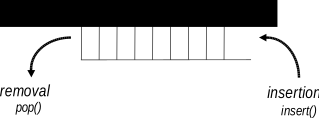
cQueue: insertion and removal
The member functions dealing with insertion and removal are insert() and pop().
cQueue queue("my-queue");
cMessage *msg;

// insert messages
for (int i = 0; i < 10; i++) {
    msg = new cMessage;
    queue.insert(msg);
}

// remove messages
while(!queue.isEmpty()) {
    msg = (cMessage *)queue.pop();
    delete msg;
}
The length() member function returns the number of items in the queue, and empty() tells whether there is anything in the queue.
There are other functions dealing with insertion and removal. The insertBefore() and insertAfter() functions insert a new item exactly before or after a specified one, regardless of the ordering function.
The front() and back() functions return pointers to the objects at the front and back of the queue, without affecting queue contents.
The pop() function can be used to remove items from the tail of the queue, and the remove() function can be used to remove any item known by its pointer from the queue:
queue.remove(msg);
Priority Queue
By default, cQueue implements a FIFO, but it can also act as a priority queue; that is, it can keep the inserted objects ordered. To use this feature, one needs to provide a comparison function that takes two cObject pointers and returns -1, 0, or 1 (see the reference for details). An example of setting up an ordered cQueue:
cQueue queue("queue", someCompareFunc);
If the queue object is set up as an ordered queue, the insert() function uses the ordering function: it searches the queue contents from the head until it reaches the position where the new item needs to be inserted and inserts it there.
Iterators
The cQueue::Iterator class lets one iterate over the contents of the queue and examine each object.
The cQueue::Iterator constructor expects the queue object in the
first argument. Normally, forward iteration is assumed, and the iteration
is initialized to point at the front of the queue. For reverse iteration,
specify reverse=true as the optional second argument. After that, the
class acts as any other OMNeT++ iterator: one can use the ++ and
-- operators to advance it, the * operator to get a pointer
to the current item, and the end() member function to check
whether the iterator has reached the end (or the beginning) of the queue.
Forward iteration:
for (cQueue::Iterator iter(queue); !iter.end(); iter++) {
    cMessage *msg = (cMessage *) *iter;
    //...
}
Reverse iteration:
for (cQueue::Iterator iter(queue, true); !iter.end(); iter--) {
    cMessage *msg = (cMessage *) *iter;
    //...
}
Expandable Array: cArray
Basic Usage
cArray is a container class that holds objects derived from cObject. cArray implements a dynamic-size array: its capacity grows automatically when it becomes full. cArray stores pointers to objects inserted instead of making copies.
Creating an array:
cArray array("array");
Adding an object at the first free index:
cMsgPar *p = new cMsgPar("par");
int index = array.add(p);
Adding an object at a given index (if the index is occupied, you will get an error message):
cMsgPar *p = new cMsgPar("par");
int index = array.addAt(5,p);
Finding an object in the array:
int index = array.find(p);
Getting a pointer to an object at a given index:
cPar *p = (cPar *) array[index];
You can also search the array or get a pointer to an object by the object’s name:
int index = array.find("par");
Par *p = (cPar *) array["par"];
You can remove an object from the array by calling remove() with the object name, the index position, or the object pointer:
array.remove("par");
array.remove(index);
array.remove(p);
The remove() function doesn’t deallocate the object; it returns the object pointer. If you also want to deallocate it, you can write:
delete array.remove(index);
Iteration
cArray has no iterator, but it is easy to loop through all the indices with an integer variable. The size() member function returns the largest index plus one.
for (int i = 0; i < array.size(); i++) {
  if (array[i]) { // is this position used?
    cObject *obj = array[i];
    EV << obj->getName() << endl;
  }
}
Routing Support: cTopology
Overview
The cTopology class was designed primarily to support routing in communication networks.
A cTopology object stores an abstract representation of the network in a graph form:
each cTopology node corresponds to a module (simple or compound), and
each cTopology edge corresponds to a link or series of connecting links.
One can specify which modules to include in the graph. Compound modules may also be selected. The graph will include all connections among the selected modules. In the graph, all nodes are at the same level; there is no submodule nesting. Connections that span across compound module boundaries are also represented as one graph edge. Graph edges are directed, just as module gates are.
If you are writing a router or switch model, the cTopology graph can help you determine what nodes are available through which gate and also find optimal routes. The cTopology object can calculate shortest paths between nodes for you.
The mapping between the graph (nodes, edges) and the network model (modules, gates, connections) is preserved: one can find the corresponding module for a cTopology node and vice versa.
Basic Usage
The cTopology class provides powerful functionality for extracting and analyzing network topology. It creates a graph representation where nodes correspond to modules (simple or compound) and edges correspond to connections between these modules.
Extracting the Topology
The network topology can be extracted into a cTopology object with a single method call. There are several ways to specify which modules should be included in the topology:
By NED types: Include modules based on their NED type names
By module paths: Include modules whose paths match specified patterns
By property: Include modules that have a specific property
By parameter: Include modules with a specific parameter (optionally with a specific value)
By predicate function: Include modules that satisfy a custom condition
The cTopology class provides a corresponding extraction method for each approach:
// Extract by fully qualified NED type name
std::vector<std::string> types = {"acme.Host", "acme.Router"}; // made-up names
topo.extractByNedTypeName(types);

// Extract by module path pattern
std::vector<std::string> patterns = {"**.host[*]", "**.router*"};
topo.extractByModulePath(patterns);

// Extract by property
topo.extractByProperty("networkNode");  // modules with @networkNode property

// Extract by parameter
topo.extractByParameter("forwarding", "true");  // modules with forwarding=true
The most flexible approach is using a predicate function with extractFromNetwork(), which accepts a lambda function in modern C++. This allows for complex selection criteria:
// Select all top-level modules of type "Node"
cModule *root = getSimulation()->getSystemModule();
topo.extractFromNetwork([=](cModule *mod) {
    return mod->getParentModule() == root && mod->getNedTypeName()=="Node";
});

// Select modules that have a submodule named 'ipv4' whose
// 'forwarding' parameter is set to true
topo.extractFromNetwork([](cModule *mod) {
    cModule *ipv4 = mod->getSubmodule("ipv4");
    if (!ipv4)
        return false;
    return ipv4->par("forwarding").boolValue();
});
Exploring the Topology
A cTopology object uses the following classes to represent the graph:
cTopology::Node: Represents a module in the network
cTopology::Link: Base class for edges in the graph
cTopology::LinkIn and cTopology::LinkOut: Specialized views of a Link that provide convenient access to the “local” and “remote” ends of a connection
Once you have extracted the topology, you can explore it using the following methods:
// Create and extract the topology
cTopology topo("network topology");
topo.extractByProperty("node");  // extract all modules with @node property

// Iterate through all nodes
for (int i = 0; i < topo.getNumNodes(); i++) {
    cTopology::Node *node = topo.getNode(i);

    // Get the corresponding module
    cModule *mod = node->getModule();
    EV << "Node " << i << ": " << mod->getFullPath() << endl;

    // Examine outgoing connections
    EV << "  Outgoing connections: " << node->getNumOutLinks() << endl;
    for (int j = 0; j < node->getNumOutLinks(); j++) {
        cTopology::LinkOut *link = node->getLinkOut(j);

        // Get the remote node and the connecting gates
        cTopology::Node *neighborNode = link->getRemoteNode();
        cModule *neighbor = neighborNode->getModule();
        cGate *localGate = link->getLocalGate();
        cGate *remoteGate = link->getRemoteGate();

        EV << "    -> " << neighbor->getFullPath()
           << " via " << localGate->getFullName()
           << " -> " << remoteGate->getFullName() << endl;
    }

    // Examine incoming connections
    EV << "  Incoming connections: " << node->getNumInLinks() << endl;
    for (int j = 0; j < node->getNumInLinks(); j++) {
        cTopology::LinkIn *link = node->getLinkIn(j);

        // Get the remote node and the connecting gates
        cTopology::Node *neighborNode = link->getRemoteNode();
        cModule *neighbor = neighborNode->getModule();
        cGate *localGate = link->getLocalGate();
        cGate *remoteGate = link->getRemoteGate();

        EV << "    <- " << neighbor->getFullPath()
           << " via " << localGate->getFullName()
           << " <- " << remoteGate->getFullName() << endl;
    }
}
Several functions used in the above code fragment will be explained in the next sections.
Finding Specific Nodes
You can find the topology node that corresponds to a specific module using the getNodeFor() method:
// Find a specific module in the network
cModule *targetModule = getModuleByPath("Network.server");

// Get the corresponding node in the topology
cTopology::Node *node = topo.getNodeFor(targetModule);

if (node != nullptr) {
    // The module is part of the extracted topology
    EV << "Found node for " << targetModule->getFullPath() << endl;

    // Now we can analyze its connections
    EV << "It has " << node->getNumOutLinks() << " outgoing connections" << endl;
} else {
    // The module was not included in the extracted topology
    EV << targetModule->getFullPath() << " is not part of the topology" << endl;
}
Understanding LinkIn and LinkOut
The cTopology::Link class represents a connection in the graph, but it is rarely used directly. Instead, cTopology::LinkIn and cTopology::LinkOut provide convenient views of the same link from the perspective of a specific node:
LinkOut: Represents an outgoing connection from the current node’s perspective
LinkIn: Represents an incoming connection from the current node’s perspective
Both classes provide methods like getLocalNode(), getRemoteNode(), getLocalGate(), and getRemoteGate() that return the appropriate ends of the connection relative to the current node. This makes traversing the graph more intuitive:
// For an outgoing link from node A to node B:
cTopology::LinkOut *outLink = nodeA->getLinkOut(j);
cTopology::Node *nodeB = outLink->getRemoteNode();  // Returns node B
cGate *localGate = outLink->getLocalGate();         // Returns gate in node A
cGate *remoteGate = outLink->getRemoteGate();       // Returns gate in node B

// For the same link, but viewed as an incoming link to node B:
cTopology::LinkIn *inLink = nodeB->getLinkIn(k);
cTopology::Node *nodeA = inLink->getRemoteNode();   // Returns node A
cGate *localGate = inLink->getLocalGate();          // Returns gate in node B
cGate *remoteGate = inLink->getRemoteGate();        // Returns gate in node A
This design makes it easy to traverse the graph in either direction while maintaining a consistent “local” and “remote” terminology.
Shortest Paths
The real power of cTopology is in finding shortest paths in the network to support optimal routing. cTopology finds the shortest paths from all nodes to a target node. The algorithm is computationally inexpensive. In the simplest case, all edges are assumed to have the same weight.
A real-life example assumes we have the target module pointer; finding the shortest path to the target looks like this:
cModule *targetmodulep =...;
cTopology::Node *targetnode = topo.getNodeFor(targetmodulep);
topo.calculateUnweightedSingleShortestPathsTo(targetnode);
This performs the Dijkstra algorithm and
stores the result in the cTopology object. The result can
then be extracted using cTopology and
cTopology::Node methods. Naturally, each call to
calculateUnweightedSingleShortestPathsTo() overwrites the results of
the previous call.
Walking along the path from our module to the target node:
cTopology::Node *node = topo.getNodeFor(this);

if (node == nullptr) {
  EV << "We (" << getFullPath() << ") are not included in the topology.\n";
}
else if (node->getNumPaths()==0) {
  EV << "No path to destination.\n";
}
else {
  while (node != topo.getTargetNode()) {
    EV << "We are in " << node->getModule()->getFullPath() << endl;
    EV << node->getDistanceToTarget() << " hops to go\n";
    EV << "There are " << node->getNumPaths()
       << " equally good directions, taking the first one\n";
    cTopology::LinkOut *path = node->getPath(0);
    EV << "Taking gate " << path->getLocalGate()->getFullName()
       << " we arrive in " << path->getRemoteNode()->getModule()->getFullPath()
       << " on its gate " << path->getRemoteGate()->getFullName() << endl;
    node = path->getRemoteNode();
  }
}
The purpose of the getDistanceToTarget() member function of a node is self-explanatory. In the unweighted case, it returns the number of hops. The getNumPaths() member function returns the number of edges that are part of a shortest path, and path(i) returns the ith edge of them as cTopology::LinkOut. If the shortest paths were created by the …SingleShortestPaths() function, getNumPaths() will always return 1 (or 0 if the target is not reachable), that is, only one of the several possible shortest paths is found. The …MultiShortestPathsTo() functions find all paths at increased run-time cost. The cTopology’s getTargetNode() function returns the target node of the last shortest path search.
You can enable/disable nodes or edges in the graph. This is done by calling their enable() or disable() member functions. Disabled nodes or edges are ignored by the shortest paths calculation algorithm. The isEnabled() member function returns the state of a node or edge in the topology graph.
One usage of disable() is when you want to determine how many hops the target node can be reached from our node through a particular output gate. To compute this, you compute the shortest paths to the target from the neighbor node while disabling the current node to prevent the shortest paths from going through it:
cTopology::Node *thisnode = topo.getNodeFor(this);
thisnode->disable();
topo.calculateUnweightedSingleShortestPathsTo(targetnode);
thisnode->enable();

for (int j = 0; j < thisnode->getNumOutLinks(); j++) {
  cTopology::LinkOut *link = thisnode->getLinkOut(i);
  EV << "Through gate " << link->getLocalGate()->getFullName() << " : "
     << 1 + link->getRemoteNode()->getDistanceToTarget() << " hops" << endl;
}
In the future, other shortest path algorithms will also be implemented:
unweightedMultiShortestPathsTo(cTopology::Node *target);
weightedSingleShortestPathsTo(cTopology::Node *target);
weightedMultiShortestPathsTo(cTopology::Node *target);
Manipulating the graph
cTopology also has methods that let one manipulate the stored graph, or even, build a graph from scratch. These methods are addNode(), deleteNode(), addLink() and deleteLink().
When extracting the topology from the network, cTopology uses
the factory methods createNode() and createLink() to instantiate
the node and link objects. These methods may be overridden by subclassing
cTopology if the need arises, for example when it is useful to be
able to store additional information in those objects.
Pattern Matching
Since version 4.3, OMNeT++ contains two utility classes for pattern matching, cPatternMatcher and cMatchExpression.
cPatternMatcher is a glob-style pattern matching class, adapted to special OMNeT++ requirements. It recognizes wildcards, character ranges, and numeric ranges, and supports options such as case sensitivity and whole string matching. cMatchExpression builds on top of cPatternMatcher and extends it in two ways: first, it allows you to combine patterns with AND, OR, NOT into boolean expressions, and second, it applies the pattern expressions to objects instead of text. These classes are especially useful for making model-specific configuration files more concise or more powerful by introducing patterns.
cPatternMatcher
cPatternMatcher holds a pattern string and several option flags, and has a matches() boolean function that determines whether the string passed as an argument matches the pattern with the given flags. The pattern and the flags can be set via the constructor or by calling the setPattern() member function.
The pattern syntax is a variation on Unix glob-style patterns. The
most apparent differences from globbing rules are the distinction between
* and **, and that character ranges should be written with
curly braces instead of square brackets; that is, any-letter is
expressed as {a-zA-Z} and not as [a-zA-Z], because square
brackets are reserved for the notation of module vector indices.
The following option flags are supported:
dottedpath: controls whether some wildcards (
?,*) will match dotsfullstring: controls whether to do a full string or substring match
casesensitive: whether matching is case sensitive or case insensitive
Patterns may contain the following elements:
question mark,
?: matches any character (except dot if dottedpath=true)asterisk,
*: matches zero or more characters (except dots if dottedpath=true)double asterisk,
**: matches zero or more characters, including dotsset, e.g.
{a-zA-Z}: matches any character that is contained in the setnegated set, e.g.
{^a-z}: matches any character that is NOT contained in the setnumeric range, e.g.
{38..150}: matches any number (i.e. sequence of digits) in the given rangenumeric index range, e.g.
[38..150]: matches any number in square brackets in the given rangebackslash, \ : takes away the special meaning of the subsequent character
Note
The dottedpath option was introduced to make matching OMNeT++
module paths more powerful. When it is off (dottedpath=false),
there is no difference between * and **; they both match any
character sequence. However, when matching OMNeT++ module paths or other
strings where dot is a separator character, it is useful to turn on the
dottedpath mode (dottedpath=true). In that mode, *, not
being able to cross a dot, can match only a single path component (or part
of it), and ** can match multiple path components.
Sets and negated sets can contain several character ranges and also
enumerations of characters, for example {_a-zA-Z0-9} or
{xyzc-f}. To include a hyphen in the set, place it at a position
where it cannot be interpreted as a character range, for example
{a-z-} or {-a-z}. To include a close brace in
the set, it must be the first character: {}a-z}, or for a negated
set: {^}a-z}. A backslash is always taken as a
literal backslash (and NOT as an escape character) within set definitions.
When doing case-insensitive matches, avoid ranges that include both alpha and
non-alpha characters, because they might cause funny results.
For numeric ranges and numeric index ranges, ranges are inclusive, and both
the start and the end of the range are optional; that is, {10..},
{..99}, and {..} are all valid numeric ranges (the last one
matches any number). Only nonnegative integers can be matched. Caveat:
{17..19} will match "a17", "117", and also "963217"!
The cPatternMatcher constructor and the setPattern() member function have similar signatures:
cPatternMatcher(const char *pattern, bool dottedpath, bool fullstring,
                bool casesensitive);
void setPattern(const char *pattern, bool dottedpath, bool fullstring,
                bool casesensitive);
The matcher function:
bool matches(const char *text);
There are also some more utility functions for printing the pattern, determining whether a pattern contains wildcards, etc.
Example:
cPatternMatcher matcher("**.host[*]", true, true, true);
EV << matcher.matches("Net.host[0]") << endl;  // -> true
EV << matcher.matches("Net.area1.host[0]") << endl;  // -> true
EV << matcher.matches("Net.host") << endl;  // -> false
EV << matcher.matches("Net.host[0].tcp") << endl;  // -> false
cMatchExpression
The cMatchExpression class builds on top of cPatternMatcher, and lets one determine whether an object matches a given pattern expression.
A pattern expression consists of elements in the
fieldname =~ pattern syntax; they check whether the string
representation of the given field of the object matches the pattern.
[3]
For example, srcAddr(192.168.0.*) will match if the srcAddr
field of the object starts with 192.168.0. A naked pattern
(without the field name and the =~ operator) is also accepted,
and it will be matched against the default field of the object,
which will usually be its name.
These elements can be combined with the AND, OR, NOT operators, accepted in both lowercase and uppercase. AND has higher precedence than OR, but parentheses can be used to change the evaluation order.
Pattern examples:
"node*""node* or host*""packet-* and className =~PPPFrame""className =~TCPSegment and byteLength =~{4096..}""className=~TCPSegment and (SYN or DATA-*) and not kind=~{0..2}"
The cMatchExpression class has a constructor and setPattern() method similar to those of cPatternMatcher:
cMatchExpression(const char *pattern, bool dottedpath, bool fullstring,
                bool casesensitive);
void setPattern(const char *pattern, bool dottedpath, bool fullstring,
                bool casesensitive);
However, the matcher function takes a cMatchExpression::Matchable instead of string:
bool matches(const Matchable *object);
This means that objects to be matched must either be subclassed from cMatchExpression::Matchable, or be wrapped into some adapter class that does. cMatchExpression::Matchable is a small abstract class with only a few pure virtual functions:
/**
 * Objects to be matched must implement this interface
 */
class SIM_API Matchable
{
  public:
    /**
     * Return the default string to match. The returned pointer will not be
     * cached by the caller, so it is OK to return a pointer to a static buffer.
     */
    virtual const char *getAsString() const = 0;

    /**
     * Return the string value of the given attribute, or nullptr if the object
     * doesn't have an attribute with that name. The returned pointer will not
     * be cached by the caller, so it is OK to return a pointer to a static buffer.
     */
    virtual const char *getAsString(const char *attribute) const = 0;

    /**
     * Virtual destructor.
     */
    virtual ~Matchable() {}
};
To be able to match instances of an existing class that is not already a
Matchable, one needs to write an adapter class. An adapter class that
we can look at as an example is cMatchableString. cMatchableString
makes it possible to match strings with a cMatchExpression, and is part
of OMNeT++:
/**
 * Wrapper to make a string matchable with cMatchExpression.
 */
class cMatchableString : public cMatchExpression::Matchable
{
  private:
    std::string str;
  public:
    cMatchableString(const char *s) {str = s;}
    virtual const char *getAsString() const {return str.c_str();}
    virtual const char *getAsString(const char *name) const {return nullptr;}
};
An example:
cMatchExpression expr("foo* or bar*", true, true, true);
cMatchableString str1("this is a foo");
cMatchableString str2("something else");
EV << expr.matches(&str1) << endl; // -> true
EV << expr.matches(&str2) << endl; // -> false
Or, by using temporaries:
EV << expr.matches(&cMatchableString("this is a foo")) << endl; // -> true
EV << expr.matches(&cMatchableString("something else")) << endl; // -> false
Dynamic Expression Evaluation
The NED expr() operator encapsulates a formula in an object form.
On the C++ side, the object is an instance of cOwnedDynamicExpression.
The expression can be evaluated using the evaluate() method that returns a cValue, or one of the typed methods: boolValue(), intValue(), doubleValue(), stringValue(), xmlValue(). But before that, a custom resolver needs to be implemented, and installed using the setResolver(). The resolver subclasses from cDynamicExpression::IResolver, and its methods readVariable(), readMember(), callFunction(), callMethod() determine how to evaluate various constructs in the expression.
Collecting Summary Statistics and Histograms
There are several statistics and result collection classes: cStdDev, cHistogram, cPSquare, and cKSplit. They are all derived from the abstract base class cStatistic; histogram-like classes derive from cAbstractHistogram. [4]
cStdDev keeps summary statistics (mean, standard deviation, range) of weighted or unweighted observations.
cHistogram is for collecting observations into a histogram. cHistogram is highly configurable, supports adding/removing/merging bins dynamically, and can produce a good histogram from most distributions without requiring manual configuration.
cPSquare is a class that uses the \(P^{2}\) algorithm described in (Jain and Chlamtac 1985). The algorithm calculates quantiles without storing the observations; one can also think of it as a histogram with equiprobable cells.
cKSplit is an adaptive histogram-like algorithm that performs dynamic subdivision of the bins to refine resolution at the bulk of the distribution.
Statistics classes
All classes use the double type for representing observations,
and compute all metrics in the same data type (except the observation
count, which is int64_t.)
For weighted statistics, weights are also double. Being able to
handle non-integer weights is important because weighted statistics
are often used for computing time averages, e.g., average queue length
or average channel utilization.
cStdDev
The cStdDev class is meant to collect summary statistics of observations. If you also need to compute a histogram, use cHistogram (or cKSplit/cPSquare) instead, because those classes already include the functionality of cStdDev.
cStdDev can collect unweighted or weighted statistics. This needs
to be decided in the constructor call and cannot be changed later.
Specify true as the second argument for weighted statistics.
cStdDev unweighted("packetDelay");  // unweighted
cStdDev weighted("queueLength", true); // weighted
Observations are added to the statistics by using the collect() or the collectWeighted() methods. The latter takes two parameters, the value and the weight.
for (double value : values)
    unweighted.collect(value);

for (double value : values2) {
    double weight = ...
    weighted.collectWeighted(value, weight);
}
Statistics can be obtained from the object with the following methods: getCount(), getMin(), getMax(), getMean(), getStddev(), getVariance().
There are two getter methods that only work for unweighted statistics: getSum() and getSqrSum(). Plain (unweighted) sum and sum of squares are not computed for weighted observations, and it is an error to call these methods in the weighted case.
Other getter methods are primarily meant for weighted statistics: getSumWeights(), getWeightedSum(), getSqrSumWeights(), getWeightedSqrSum(). When called on unweighted statistics, these methods simply assume a weight of 1.0 for all observations.
An example:
EV << "count = " << unweighted.getCount() << endl;
EV << "mean = " << unweighted.getMean() << end;
EV << "stddev = " << unweighted.getStddev() << end;
EV << "min = " << unweighted.getMin() << end;
EV << "max = " << unweighted.getMax() << end;
cHistogram
cHistogram is able to represent both uniform and non-uniform bin histograms and supports both weighted and unweighted observations. The histogram can be modified dynamically: it can be extended with new bins, and adjacent bins can be merged. In addition to the bin values (which mean count in the unweighted case, and sum of weights in the weighted case), the histogram object also keeps the number (or sum of weights) of the lower and upper outliers (“underflows” and “overflows”).

Histograms keep track of outliers as well
Setting up and managing the bins based on the collected observations is usually delegated to a strategy object. However, for most use cases, histogram strategies are not something the user needs to be concerned with. The default constructor of cHistogram sets up the histogram with a default strategy that usually produces a good quality histogram without requiring manual configuration or a-priori knowledge about the distribution. For special use cases, there are other histogram strategies, and it is also possible to write new ones.
Creating a Histogram
cHistogram has several constructor variants. Like with
cStdDev, it needs to be decided in the constructor call
by a boolean argument whether the histogram should collect
unweighted (false) or weighted (true) statistics;
the default is unweighted. Another argument is a number of bins
hint. (The actual number of bins produced might slightly differ,
due to dynamic range extensions and bin merging performed by
some strategies.)
cHistogram unweighted1("packetDelay");  // unweighted
cHistogram unweighted2("packetDelay", 10);  // unweighted, with ~10 bins
cHistogram weighted1("queueLength", true); // weighted
cHistogram weighted2("queueLength", 10, true); // weighted, with ~10 bins
It is also possible to provide a strategy object in a constructor call. (The strategy object may also be set later though, using setStrategy(). It must be called before the first observation is collected.)
cHistogram autoRangeHist("queueLength", new cAutoRangeHistogramStrategy());
This constructor can also be used to create a histogram without a strategy object, which is useful if you want to set up the histogram bins manually.
cHistogram hist("queueLength", nullptr, true); // weighted, no strategy
cHistogram also has methods where you can provide constraints and hints for setting up the bins: setMode(), setRange(), setRangeExtensionFactor(), setAutoExtend(), setNumBinsHint(), setBinSizeHint(). These methods delegate to similar methods of cAutoRangeHistogramStrategy.
Collecting Observations
Observations are added to the histogram in the same way as with cStdDev: using the collect() and collectWeighted() methods.
Querying the Bins
Histogram bins can be accessed with three member functions: getNumBins() returns the number of bins, getBinEdge(int k) returns the kth bin edge, getBinValue(int k) returns the count or sum of weights in bin k, and getBinPDF(int k) returns the PDF value in the bin (i.e. between getBinEdge(k) and getBinEdge(k+1)). The getBinInfo(k) method returns multiple bin data (edges, value, relative frequency) packed together in a struct. Four other methods, getUnderflowSumWeights(), getOverflowSumWeights(), getNumUnderflows(), getNumOverflows(), provide access to the outliers.
These functions, being defined on cHistogramBase, are not only
available on cHistogram but also for cPSquare and cKSplit.
For cHistogram, bin edges and bin values can also be accessed
as a vector of doubles, using the getBinEdges() and
getBinValues() methods.
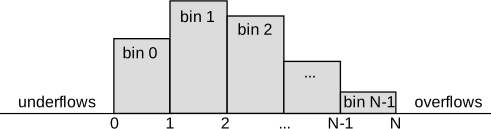
Bin edges and bins of an \(N\)-bin histogram
An example:
EV << "[" << hist.getMin() << "," << hist.getBinEdge(0) << "): "
   << hist.getUnderflowSumWeights() << endl;
int numBins = hist.getNumBins();
for (int i = 0; i < numBins; i++) {
  EV << "[" << hist.getBinEdge(i) << "," << hist.getBinEdge(i+1) << "): "
     << hist.getBinValue(i) << endl;
}
EV << "[" << hist.getBinEdge(numBins) << "," << hist.getMax() << "]: "
   << hist.getOverflowSumWeights() << endl;
The getPDF(x) and getCDF(x) member functions return the value of the Probability Density Function and the Cumulative Density Function at a given x, respectively.
Note that bins may not be immediately available during observation collection, because some histogram strategies use precollection to gather information about the distribution before setting up the bins. Use binsAlreadySetUp() to figure out whether bins are set up already. Setting up the bins can be forced with the setupBins() method.
Setting Up and Managing the Bins
The cHistogram class has several methods for creating and manipulating bins. These methods are primarily intended to be called from strategy classes, but are also useful if you want to manage the bins manually, i.e., without a strategy class.
For setting up the bins, you can either use createUniformBins()
with the range (lo, hi) and the step size as parameters, or specify
all bin edges explicitly in a vector of doubles to setBinEdges().
When the bins have already been set up, the histogram can be extended with new bins down or up using the prependBins() and appendBins() methods that take a list of new bin edges to add. There is also an extendBinsTo() method that extends the histogram with equal-sized bins at either end to make sure that a supplied value falls into the histogram range. Of course, extending the histogram is only possible if there are no outliers in that direction. (The positions of the outliers are not preserved, so it is not known how many would fall in each of the newly created bins.)
If the histogram has too many bins, adjacent ones (pairs, triplets, or groups of size \(n\)) can be merged, using the mergeBins() method.
Example code which sets up a histogram with uniform bins:
cHistogram hist("queueLength", nullptr); // create w/o strategy object
hist.createUniformBins(0, 100, 10); // 10 bins over (0,100)
The following code achieves the same, but uses setBinEdges():
std::vector<double> edges = {0,10,20,30,40,50,60,70,80,90,100}; // C++11
cHistogram hist("queueLength", nullptr);
hist.setBinEdges(edges);
Strategy Concept
Histogram strategies subclass from cIHistogramStrategy, and are responsible for setting up and managing the bins.
A cHistogram is created with a cDefaultHistogramStrategy by default, which works well in most cases. Other cHistogram constructors allow passing in an arbitrary histogram strategy.
The collect() and collectWeighted() methods of a cHistogram delegate to similar methods of the strategy object, which in turn decide when and how to set up the bins, and how to manage the bins later. (Setting up the bins may be postponed until a few observations have been collected, to gather more information for it.) The histogram strategy uses public histogram methods like createUniformBins() to create and manage the bins.
Available Histogram Strategies
The following histogram strategy classes exist:
cFixedRangeHistogramStrategy sets up uniform bins over a predetermined interval. The number of bins and the histogram mode (integers or reals) also need to be configured. This strategy does not use precollection, as all input for setting up the bins must be explicitly provided by the user.
cDefaultHistogramStrategy is used by the default setup of cHistogram. This strategy uses precollection to gather input information about the distribution before setting up the bins. Precollection is used to determine the initial histogram range and the histogram mode (integers vs. reals). In integers mode, bin edges will be whole numbers.
To keep up with distributions that change over time, this histogram strategy can auto-extend the histogram range by adding new bins as needed. It also performs bin merging when necessary, to keep the number of bins reasonably low.
cAutoRangeHistogramStrategy is a generic, very configurable, precollection-based histogram strategy that creates uniform bins and creates quality histograms for practical distributions.
Several constraints and hints can be specified for setting up the bins: range lower and/or upper endpoint, bin size, number of bins, mode (integers vs. reals), and whether bin size rounding is to be used.
This histogram strategy can auto-extend the histogram range by adding new bins at either end. One can also set up an upper limit on the number of histogram bins to prevent it from growing indefinitely. Bin merging can also be enabled: it will cause every two (or N) adjacent bins to be merged to reduce the number of bins if their number grows too high.
Random Number Generation from Distributions
The draw() member function generates random numbers from the distribution stored by the object:
double rnd = histogram.draw();
Storing and Loading Distributions
The statistic classes have loadFromFile() member functions that read the histogram data from a text file. If you need a custom distribution that cannot be written (or it is inefficient) as a C++ function, you can describe it in histogram form stored in a text file, and use a histogram object with loadFromFile().
You can also use saveToFile() that writes out the distribution collected by the histogram object:
FILE *f = fopen("histogram.dat","w");
histogram.saveToFile(f); // save the distribution
fclose(f);

cHistogram restored;
FILE *f2 = fopen("histogram.dat","r");
restored.loadFromFile(f2); // load stored distribution
fclose(f2);
cPSquare
The cPSquare class implements the \(P^{2}\) algorithm described in (Jain and Chlamtac 1985). \(P^{2}\) is a heuristic algorithm for the dynamic calculation of the median and other quantiles. The estimates are produced dynamically as the observations arrive. The observations are not stored; therefore, the algorithm has a very small and fixed storage requirement regardless of the number of observations. The \(P^{2}\) algorithm operates by adaptively shifting bin edges as observations arrive.
cPSquare only needs the number of cells, for example, in the constructor:
cPSquare psquare("endToEndDelay", 20);
Afterward, observations can be added and the resulting histogram can be queried with the same cAbstractHistogram methods as with cHistogram.
cKSplit
Motivation
The k-split algorithm is an on-line distribution estimation method. It was designed for on-line result collection in simulation programs. The method was proposed by Varga and Fakhamzadeh in 1997. The primary advantage of k-split is that without having to store the observations, it gives a good estimate without requiring a-priori information about the distribution, including the sample size. The k-split algorithm can be extended to multi-dimensional distributions, but here we deal with the one-dimensional version only.
The k-split Algorithm
The k-split algorithm is an adaptive histogram-type estimate which maintains a good partitioning by doing cell splits. We start out with a histogram range \([x_{lo}, x_{hi})\) with \(k\) equal-sized histogram cells with observation counts \(n_1,n_2, \cdots n_k\). Each collected observation increments the corresponding observation count. When an observation count \(n_i\) reaches a split threshold, the cell is split into \(k\) smaller, equal-sized cells with observation counts \(n_{i,1}, n_{i,2}, \cdots n_{i,k}\) initialized to zero. The \(n_i\) observation count is remembered and is called the mother observation count to the newly created cells. Further observations may cause cells to be split further (e.g. \(n_{i,1,1},...n_{i,1,k}\) etc.), thus creating a \(k\)-order tree of observation counts where leaves contain live counters that are actually incremented by new observations, and intermediate nodes contain mother observation counts for their children. If an observation falls outside the histogram range, the range is extended in a natural manner by inserting new level(s) at the top of the tree. The fundamental parameter to the algorithm is the split factor \(k\). Experience has shown that \(k=2\) works best.
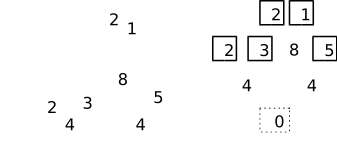
Illustration of the k-split algorithm, \(k=2\). The numbers in boxes represent the observation count values
For density estimation, the total number of observations that fell into each cell of the partition has to be determined. For this purpose, mother observations in each internal node of the tree must be distributed among its child cells and propagated up to the leaves.
Let \(n_{...,i}\) be the (mother) observation count for a cell, \(s_{...,i}\) be the total observation count in a cell \(n_{...,i}\) plus the observation counts in all its sub-, sub-sub-, etc. cells), and \(m_{...,i}\) the mother observations propagated to the cell. We are interested in the \(\tilde{n}_{...,i} = n_{...,i} + m_{...,i}\) estimated amount of observations in the tree nodes, especially in the leaves. In other words, if we have \(\tilde{n}_{...,i}\) estimated observation amount in a cell, how to divide it to obtain \(m_{...,i,1}, m_{...,i,2} \cdots m_{...,i,k}\) that can be propagated to child cells. Naturally, \(m_{...,i,1} + m_{...,i,2} + \cdots + m_{...,i,k} = \tilde{n}_{...,i}\).
Two natural distribution methods are even distribution (when \(m_{...,i,1} = m_{...,i,2} = \cdots = m_{...,i,k}\)) and proportional distribution (when \(m_{...,i,1} : m_{...,i,2} : \cdots : m_{...,i,k} = s_{...,i,1} : s_{...,i,2} : \cdots : s_{...,i,k}\)). Even distribution is optimal when the \(s_{...,i,j}\) values are very small, and proportional distribution is good when the \(s_{...,i,j}\) values are large compared to \(m_{...,i,j}\). In practice, a linear combination of them seems appropriate, where \(\lambda=0\) means even and \(\lambda=1\) means proportional distribution:
\(m_{\cdots,i,j} = (1-\lambda)\tilde{n}_{\cdots,i}/k + \lambda \tilde{n}_{\cdots,i} s_{...,i,j} / s_{\cdots,i}\) where \(\lambda\in[0,1]\)
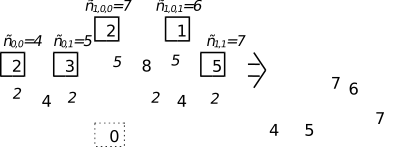
Density estimation from the k-split cell tree. We assume \(\lambda=0\), i.e. we distribute mother observations evenly.
K-split can also be used in semi-online mode, when the algorithm is only used to create an optimal partition from a larger number of \(N_{pre}\) observations. When the partition has been created, the observation counts are cleared and the \(N_{pre}\) observations are fed into k-split once again. This way all mother (non-leaf) observation counts will be zero and the cell division error is eliminated. It has been shown that the partition created by k-split can be better than both the equi-distant and the equal-frequency partition.
OMNeT++ contains an implementation of the k-split algorithm, the cKSplit class.
The cKSplit Class
The cKSplit class is an implementation of the k-split method. It is a subclass of cAbstractHistogram, so configuring, adding observations and querying histogram cells is done the same way as with other histogram classes.
Specific member functions allow one to fine-tune the k-split algorithm. setCritFunc() and setDivFunc() let one replace the split criteria and the cell division function, respectively. setRangeExtension() lets one enable/disable range extension. (If range extension is disabled, out-of-range observations will simply be counted as underflows or overflows.)
The class also allows one to access the k-split data structure, directly, via methods like getTreeDepth(), getRootGrid(), getGrid(i), and others.
Recording Simulation Results
Output Vectors: cOutVector
Objects of type cOutVector are responsible for writing time series data (referred to as output vectors) to a file. The record() method is used to output a value (or a value pair) with a timestamp. The object’s name will serve as the name of the output vector.
The vector name can be passed in the constructor,
cOutVector responseTimeVec("response time");
but in the usual arrangement, you’d make the cOutVector a member of the module class and set the name in initialize(). You’d record values from handleMessage() or from a function called from handleMessage().
The following example is a Sink module that records the lifetime
of every message that arrives at it.
class Sink : public cSimpleModule
{
  protected:
    cOutVector endToEndDelayVec;

    virtual void initialize();
    virtual void handleMessage(cMessage *msg);
};

Define_Module(Sink);

void Sink::initialize()
{
    endToEndDelayVec.setName("End-to-End Delay");
}

void Sink::handleMessage(cMessage *msg)
{
    simtime_t eed = simTime() - msg->getCreationTime();
    endToEndDelayVec.record(eed);
    delete msg;
}
There is also a recordWithTimestamp() method to make it possible to record values into output vectors with a timestamp other than simTime(). Increasing timestamp order is still enforced though.
All cOutVector objects write to a single output vector file
that has a file extension .vec.
[5]
The format and processing of output vector files are described in section
cha:ana-sim.
You can configure output vectors from omnetpp.ini:
you can disable individual vectors or limit recording to certain
simulation time intervals (see sections
Enabling/Disabling Result Items,
Output Vectors Recording Intervals).
If the output vector object is disabled or the simulation time is outside the specified interval, record() doesn’t write anything to the output file. However, if you have a Qtenv inspector window open for the output vector object, the values will be displayed there, regardless of the state of the output vector object.
Output Scalars
While output vectors are used to record time series data and thus they typically record a large volume of data during a simulation run, output scalars are supposed to record a single value per simulation run. You can use output scalars
to record summary data at the end of the simulation run
to perform several runs with different parameter settings/random seeds and determine the dependence of some measures on the parameter settings. For example, multiple runs and output scalars are the way to produce Throughput vs. Offered Load plots.
Output scalars are recorded with the record() method of cSimpleModule, and you will usually want to insert this code into the finish() function. An example:
void Transmitter::finish()
{
    double avgThroughput = totalBits / simTime();
    recordScalar("Average throughput", avgThroughput);
}
You can record whole statistic objects by calling their record()
methods, declared as part of cStatistic. In the following example,
we create a Sink module that calculates the mean, standard
deviation, minimum, and maximum values of a variable, and records them at the
end of the simulation.
class Sink : public cSimpleModule
{
  protected:
    cStdDev eedStats;

    virtual void initialize();
    virtual void handleMessage(cMessage *msg);
    virtual void finish();
};

Define_Module(Sink);

void Sink::initialize()
{
    eedStats.setName("End-to-End Delay");
}

void Sink::handleMessage(cMessage *msg)
{
    simtime_t eed = simTime() - msg->getCreationTime();
    eedStats.collect(eed);
    delete msg;
}

void Sink::finish()
{
    recordScalar("Simulation duration", simTime());
    eedStats.record();
}
The above calls record the data into an output scalar file,
a line-oriented text file that has the file extension .sca.
The format and processing of output vector files are described in chapter
cha:ana-sim.
Watches and Snapshots
Basic Watches
Unfortunately, variables of type int, long, double
do not show up by default in Qtenv; neither do STL classes
(std::string, std::vector, etc.) or your own structs and
classes. This is because the simulation kernel, being a library, knows
nothing about types and variables in your source code.
OMNeT++ provides WATCH() and a set of other macros to allow variables to be inspectable in Qtenv and to be output into the snapshot file. WATCH() macros are usually placed into initialize() (to watch instance variables) or at the top of the activity() function (to watch its local variables); the point being that they should only be executed once.
long packetsSent;
double idleTime;

WATCH(packetsSent);
WATCH(idleTime);
Of course, members of classes and structs can also be watched:
WATCH(config.maxRetries);
The Qtenv runtime environment lets you inspect and also change the values of inspected variables.
The WATCH() macro can be used with any type that has a
stream output operator (operator<<) defined. By default,
this includes all primitive types and std::string, but since
you can write operator<< for your classes/structs and basically
any type, WATCH() can be used with anything. The only limitation
is that since the output should more or less fit on a single line, the
amount of information that can be conveniently displayed is limited.
An example stream output operator:
std::ostream& operator<<(std::ostream& os, const ClientInfo& cli)
{
    os << "addr=" << cli.clientAddr << "  port=" << cli.clientPort; // no endl!
    return os;
}
And the WATCH() line:
WATCH(currentClientInfo);
Read-write Watches
Watches for primitive types and std::string allow for changing
the value from the GUI as well, but for other types, you need to explicitly
add support for that. What you need to do is define a stream input
operator (operator>>) and use the WATCH_RW() macro instead of
WATCH().
The stream input operator:
std::ostream& operator>>(std::istream& is, ClientInfo& cli)
{
    // read a line from "is" and parse its contents into "cli"
    return is;
}
And the WATCH_RW() line:
WATCH_RW(currentClientInfo);
Structured Watches
WATCH() and WATCH_RW() are basic watches; they allow one
line of (unstructured) text to be displayed. However, if you have a
data structure generated from message definitions (see Chapter Messages and Packets),
then there is a better approach. The message compiler automatically generates
meta-information describing individual fields of the class or struct,
which makes it possible to display the contents on the field level.
The WATCH macros to be used for this purpose are WATCH_OBJ()
and WATCH_PTR(). Both expect the object to be subclassed from
cObject; WATCH_OBJ() expects a reference to such a class,
and WATCH_PTR() expects a pointer variable.
ExtensionHeader hdr;
ExtensionHeader *hdrPtr;
...
WATCH_OBJ(hdr);
WATCH_PTR(hdrPtr);
CAUTION: With WATCH_PTR(), the pointer variable must point to a valid
object or be nullptr at all times, otherwise the GUI may crash
while trying to display the object. This practically means that
the pointer should be initialized to nullptr even if not used, and
should be set to nullptr when the object to which it points is deleted.
delete watchedPtr;
watchedPtr = nullptr;  // set to nullptr when object gets deleted
STL Watches
The standard C++ container classes (vector, map, set, etc.)
also have structured watches, available via the following macros:
WATCH_VECTOR(), WATCH_PTRVECTOR(), WATCH_LIST(), WATCH_PTRLIST(), WATCH_SET(), WATCH_PTRSET(), WATCH_MAP(), WATCH_PTRMAP().
The PTR-less versions expect the data items (“T”) to have
stream output operators (operator <<), because that is how
they will display them. The PTR versions assume that
data items are pointers to some type that has operator <<.
WATCH_PTRMAP() assumes that only the value type (“second”)
is a pointer, the key type (“first”) is not. (If you happen to use
pointers as keys, then define operator << for the pointer type
itself.)
Examples:
std::vector<int> intvec;
WATCH_VECTOR(intvec);

std::map<std::string,Command*> commandMap;
WATCH_PTRMAP(commandMap);
Watching Expressions
The WATCH_EXPR() macro makes the result of a formula or calculation
inspectable in Qtenv without requiring a separate variable. The expression is
evaluated as often as needed, providing real-time monitoring of derived metrics.
Unlike other WATCH macros that monitor single variables, WATCH_EXPR()
can display the result of operations combining multiple variables, function
calls, or any valid expression.
Example:
WATCH_EXPR("totalPks", numTransmitted + queue.length() + numDropped);
WATCH_EXPR() operates by internally wrapping the expression into a
lambda function. Class members will be captured by reference (via the this
pointer). In contrast, local variables will be captured by value, that is, their
current values will be used in all subsequent evaluations. If this is not
what you need, there also is a WATCH_LAMBDA() macro that explicitly takes a
lambda function, giving you more control over the way variables are captured.
WATCH_LAMBDA() also allows for supplying a multi-statement function body
instead of a single expression.
Example:
WATCH_LAMBDA("totalPks", [this]() {
     return numTransmitted + queue.length() + numDropped;
});
Snapshots
The snapshot() function outputs textual information about all or selected objects of the simulation (including the objects created in module functions by the user) into the snapshot file.
bool snapshot(cObject *obj=nullptr, const char *label=nullptr);
The function can be called from module functions, like this:
snapshot();     // dump the network
snapshot(this); // dump this simple module and all its objects
snapshot(getSimulation()->getFES()); // dump the future events set
snapshot() will append to the end of the snapshot file. The snapshot
file name has an extension of .sna.
The snapshot file output is detailed enough to be used for debugging the simulation: by regularly calling snapshot(), one can trace how the values of variables and objects changed over the simulation. The arguments: label is a string that will appear in the output file; obj is the object whose inside is of interest. By default, the whole simulation (all modules, etc.) will be written out.
If you run the simulation with Qtenv, you can also create a snapshot from the menu.
An example snapshot file (some abbreviations have been applied):
<?xml version="1.0" encoding="ISO-8859-1"?>
<snapshot object="simulation" label="Long queue" simtime="9.038229311343"
network="FifoNet">
<object class="cSimulation" fullpath="simulation">
<info></info>
<object class="cModule" fullpath="FifoNet">
<info>id=1</info>
<object class="fifo::Source" fullpath="FifoNet.gen">
<info>id=2</info>
<object class="cPar" fullpath="FifoNet.gen.sendIaTime">
<info>exponential(0.01s)</info>
</object>
<object class="cGate" fullpath="FifoNet.gen.out">
<info>--> fifo.in</info>
</object>
</object>
<object class="fifo::Fifo" fullpath="FifoNet.fifo">
<info>id=3</info>
<object class="cPar" fullpath="FifoNet.fifo.serviceTime">
<info>0.01</info>
</object>
<object class="cGate" fullpath="FifoNet.fifo.in">
<info><-- gen.out</info>
</object>
<object class="cGate" fullpath="FifoNet.fifo.out">
<info>--> sink.in</info>
</object>
<object class="cQueue" fullpath="FifoNet.fifo.queue">
<info>length=13</info>
<object class="cMessage" fullpath="FifoNet.fifo.queue.job">
<info>src=FifoNet.gen (id=2) dest=FifoNet.fifo (id=3)</info>
</object>
<object class="cMessage" fullpath="FifoNet.fifo.queue.job">
<info>src=FifoNet.gen (id=2) dest=FifoNet.fifo (id=3)</info>
</object>
</object>
<object class="fifo::Sink" fullpath="FifoNet.sink">
<info>id=4</info>
<object class="cGate" fullpath="FifoNet.sink.in">
<info><-- fifo.out</info>
</object>
</object>
</object>
<object class="cEventHeap" fullpath="simulation.scheduled-events">
<info>length=3</info>
<object class="cMessage" fullpath="simulation.scheduled-events.job">
<info>src=FifoNet.fifo (id=3) dest=FifoNet.sink (id=4)</info>
</object>
<object class="cMessage" fullpath="...sendMessageEvent">
<info>at T=9.0464.., in dt=0.00817..; selfmsg for FifoNet.gen (id=2)</info>
</object>
<object class="cMessage" fullpath="...end-service">
<info>at T=9.0482.., in dt=0.01; selfmsg for FifoNet.fifo (id=3)</info>
</object>
</object>
</object>
</snapshot>
Getting Coroutine Stack Usage
It is important to choose the correct stack size for modules. If the stack is too large, it unnecessarily consumes memory; if it is too small, a stack violation occurs.
OMNeT++ contains a mechanism that detects stack
overflows. It checks the intactness of a
predefined byte pattern (0xdeadbeef) at the stack boundary,
and reports a “stack violation” if it was
overwritten. The mechanism usually works fine, but occasionally it can
be fooled by large – and not fully used – local variables (e.g. char
buffer[256]): if the byte pattern happens to fall in the middle of
such a local variable, it may be preserved intact and OMNeT++ does not
detect the stack violation.
To be able to make a good guess about stack size, you can use the getStackUsage() call, which tells you how much stack the module actually uses. It is most conveniently called from finish():
void FooModule::finish()
{
    EV << getStackUsage() << " bytes of stack used\n";
}
The value includes the extra stack added by the user interface library (see extraStackforEnvir in envir/envirbase.h), which is currently 8K for Cmdenv and at least 80K for Qtenv. [6]
getStackUsage() also works by checking the existence of predefined byte patterns in the stack area, so it is also subject to the above effect with local variables.
Defining New NED Functions
It is possible to extend the NED language with new functions beyond the built-in ones. New functions are implemented in C++, and then compiled into the simulation model. When a simulation program starts up, the new functions are registered in the NED runtime and become available for use in NED and ini files.
There are two methods to define NED functions. The Define_NED_Function() macro is the more flexible, preferred method of the two. Define_NED_Math_Function() is the older one, and it supports only certain cases. Both macros have several variants. [7]
Define_NED_Function()
The Define_NED_Function() macro lets you define new functions that
can accept arguments of various data types (bool, double,
string, etc.), support optional arguments and also variable
argument lists (variadic functions).
The macro has two variants:
Define_NED_Function(FUNCTION,SIGNATURE);
Define_NED_Function2(FUNCTION,SIGNATURE,CATEGORY,DESCRIPTION);
The two variants are basically equivalent; the only difference is that the
second one allows you to specify two more parameters, CATEGORY and
DESCRIPTION. These two parameters expect human-readable strings that
are displayed when listing the available NED functions.
The common parameters, FUNCTION and SIGNATURE are the important
ones. FUNCTION is the name of (or pointer to) the C++ function that
implements the NED function, and SIGNATURE is the function signature
as a string; it defines the name, argument types and return type of the NED
function.
You can list the available NED functions by running opp_run or any simulation executable with the -h nedfunctions option. The result will be similar to what you can see in Appendix Appendix: NED Functions.
$ opp_run -h nedfunctions
OMNeT++ Discrete Event Simulation...
Functions that can be used in NED expressions and in omnetpp.ini:

 Category "conversion":
  double : double double(any x)
    Converts x to double, and returns the result. A boolean argument becomes
    0 or 1; a string is interpreted as a number; an XML argument causes an error.
 ...
Seeing the above output, it should now be obvious what the CATEGORY
and DESCRIPTION macro arguments are for. OMNeT++ uses the following
category names: "conversion", "math", "misc",
"ned", "random/continuous", "random/discrete",
"strings", "units", "xml". You can use these category names
for your own functions as well, when appropriate.
The Signature
The signature string has the following syntax:
returntype functionname(argtype1 argname1, argtype2 argname2, ...)
The functionname part defines the name of the NED function, and it must meet the syntactical requirements for NED identifiers (start with a letter or underscore, not be a reserved NED keyword, etc.)
The argument types and return type can be one of the following:
bool, int (maps to C/C++ long),
double, quantity, string, xml
or any; that is, any NED parameter type plus quantity
and any. quantity means double with an
optional measurement unit (double and int only
accept dimensionless numbers), and any stands for any type. The
argument names are presently ignored.
To make arguments optional, append a question mark to the argument name.
Like in C++, optional arguments may only occur at the end of the argument
list, i.e. all arguments after an optional argument must also be optional.
The signature string does not have syntax for supplying default values for
optional arguments; that is, default values have to be built into the C++
code that implements the NED function. To let the NED function accept any
number of additional arguments of arbitrary types, add an ellipsis
(...) to the signature as the last argument.
Some examples:
"int factorial(int n)"
"bool isprime(int n)"
"double sin(double x)"
"string repeat(string what, int times)"
"quantity uniform(quantity a, quantity b, long rng?)"
"any choose(int index, ...)"
The first three examples define NED functions with the names factorial,
isprime and sin, with the obvious meanings. The fourth example
can be the signature for a function that repeats a string \(n\) times and
returns the concatenated result. The fifth example is the signature of the
existing uniform() NED function; it accepts numbers both with and without
measurement units (of course, when invoked with measurement units, both a
and b must have one, and the two must be compatible – this should be checked
by the C++ implementation). uniform() also accepts an optional third argument,
an RNG index. The sixth example can be the signature of a choose()
NED function that accepts an integer plus any number of additional arguments
of any type and returns the indexth one among them.
Implementing the NED Function
The C++ function that implements the NED function must have one of the following signatures, as defined by the NedFunction and NedFunctionExt typedefs:
cValue function(cComponent *context, cValue argv[], int argc);
cValue function(cExpression::Context *context, cValue argv[], int argc);
As you can see, the function accepts an array of cValue
objects and returns a cValue; the argc-argv style
argument list should be familiar to you from the declaration of the C/C++
main() function. cValue is a class that is used during
the evaluation of NED expressions and represents a value together with its
type. The context argument contains the module or channel in the
context of which the NED expression is being evaluated; it is useful for
implementing NED functions like getParentModuleIndex().
The function implementation does not need to worry too much about checking
the number and types of the incoming arguments, because the NED expression
evaluator already does that: inside the function you can be sure that the
number and types of arguments correspond to the function signature string.
Thus, argc is mostly useful only if you have optional arguments or a
variable argument list. The NED expression evaluator also checks that the
value you return from the function corresponds to the signature.
cValue can store all the needed data types (bool,
double, string, etc.), and is equipped with the functions
necessary to conveniently read and manipulate the stored value. The value can
be read via functions like boolValue(), intValue(),
doubleValue(), stringValue() (returns const char *),
stdstringValue() (returns const std::string&) and
xmlValue() (returns cXMLElement*), or by simply casting the
object to the desired data type, making use of the provided typecast
operators. Invoking a getter or typecast operator that does not match the
stored data type will result in a runtime error. For setting the stored
value, cValue provides a number of overloaded set()
functions, assignment operators and constructors.
Further cValue member functions provide access to the stored data type; yet other functions are associated with handling quantities, i.e. doubles with measurement units. There are member functions for getting and setting the number part and the measurement unit part separately; for setting the two components together; and for performing unit conversion.
Equipped with the above information, we can already write a simple NED function that returns the length of a string:
static cValue ned_strlen(cComponent *context, cValue argv[], int argc)
{
    return (long)argv[0].stdstringValue().size();
}

Define_NED_Function(ned_strlen, "int length(string s)");
Note that since Define_NED_Function() expects the C++ function to
be already declared, we place the function implementation in front of the
Define_NED_Function() line. We also declare the function to be
static, because its name doesn’t need to be visible to the linker.
In the function body, we use std::string’s size() method to
obtain the length of the string, and cast the result to long; the C++
compiler will convert that into a cValue using cValue’s
long constructor. Note that the int keyword in the signature
maps to the C++ type long.
The following example defines a choose() NED function that returns
its \(k\)th argument that follows the index (\(k\)) argument.
static cValue ned_choose(cComponent *context, cValue argv[], int argc)
{
    int index = (int)argv[0];
    if (index < 0 || index >= argc-1)
        throw cRuntimeError("choose(): index %d is out of range", index);
    return argv[index+1];
}

Define_NED_Function(ned_choose, "any choose(int index, ...)");
Here, the value of argv[0] is read using the typecast operator that
maps to intValue(). (Note that if the value of the index
argument does not fit into an int, the conversion will result
in data loss!) The code also shows how to report errors (by throwing a
cRuntimeError.)
The third example shows how the built-in uniform() NED function could
be reimplemented by the user:
static cValue ned_uniform(cComponent *context, cValue argv[], int argc)
{
    int rng = argc==3 ? (int)argv[2] : 0;
    double argv1converted = argv[1].doubleValueInUnit(argv[0].getUnit());
    double result = uniform((double)argv[0], argv1converted, rng);
    return cValue(result, argv[0].getUnit());
    // or: argv[0].setPreservingUnit(result); return argv[0];
}

Define_NED_Function(ned_uniform, "quantity uniform(quantity a, quantity b, int rng?)");
The first line of the function body shows how to supply default values for
optional arguments; for the rng argument in this case. The next line
deals with unit conversion. This is necessary because the a and
b arguments are both quantities and may come in with different
measurement units. We use the doubleValueInUnit() function to
obtain the numeric value of b in a’s measurement unit. If the
two units are incompatible or only one of the parameters has a unit, an
error will be raised. If neither parameter has a unit,
doubleValueInUnit() simply returns the stored double. Then we
call the uniform() C++ function to generate a random number,
and return it in a temporary object with a’s measurement unit.
Alternatively, we could have overwritten the numeric part of a with
the result using setPreservingUnit(), and returned just that. If
there is no measurement unit, getUnit() will return nullptr,
which is understood by both doubleValueInUnit() and the
cValue constructor.
Note
Note that it is OK to change the elements of the argv[] vector: they
will be discarded (popped off the evaluation stack) by the NED expression
evaluator anyway when your function returns.
cValue In More Detail
In the previous section, we have given an overview and demonstrated the basic use of the cValue class; here we go into further details.
The stored data type can be obtained with the getType() function.
It returns an enum (cValue::Type) that has the following values:
UNDEF, BOOL, INT, DOUBLE, STRING, XML.
UNDEF is synonymous with unset; the others correspond to data
types: bool, int64_t, double, const char *
(std::string), cXMLElement.
There is no separate QUANTITY type: quantities are also represented with
the DOUBLE type, which has an optional associated measurement unit.
The getTypeName() static function returns the string equivalent of
a cValue::Type. The utility function isSet() returns true
if the type is different from UNDEF; isNumeric() returns true
if the type is INT or DOUBLE.
cValue value = 5.0;
cValue::Type type = value.getType(); // ==> DOUBLE
EV << cValue::getTypeName(type) << endl; // ==> "double"
We have already seen that the DOUBLE type serves both the
double and quantity types of the NED function
signature, by storing an optional measurement unit (a string)
in addition to the double variable. A cValue can be set
to a quantity by creating it with a two-argument constructor that accepts
a double and a const char * for unit, or by invoking a similar
two-argument set() function. The measurement unit can be read with
getUnit(), and overwritten with setUnit(). If you assign a
double to a cValue or invoke the one-argument
set(double) method on it, that will clear the measurement unit. If you
want to overwrite the number part but preserve the original unit, you need
to use the setPreservingUnit(double) method.
There are several functions that perform unit conversion. The
doubleValueInUnit() method accepts a measurement unit, and attempts
to return the number in that unit. The convertTo() method also
accepts a measurement unit, and tries to permanently convert the value to
that unit; that is, if successful, it changes both the number and the
measurement unit part of the object. The convertUnit() static
cValue member function accepts three arguments: a quantity as a
double and a unit, and a target unit; and returns the number in the
target unit. A parseQuantity() static member function parses
a string that contains a quantity (e.g. "5min 48s"), and returns
both the numeric value and the measurement unit. Another version of
parseQuantity() tries to return the value in a unit you specify.
All functions raise an error if the unit conversion is not possible, e.g.
due to incompatible units.
For performance reasons, setUnit(), convertTo() and all other
functions that accept and store a measurement unit will only store the
const char* pointer, but do not copy the string itself.
Consequently, the passed measurement unit pointers must stay valid for at
least the lifetime of the cValue object, or even longer if the
same pointer propagates to other cValue objects. It is
recommended that you only pass pointers that stay valid during the entire
simulation. It is safe to use: (1) string constants from the code; (2) unit
strings from other cValues; and (3) pooled strings, e.g., from a
cStringPool or from cValue’s static getPooled()
function.
Example code:
// manipulating the number and the measurement unit
cValue value(250,"ms");    // initialize to 250ms
value = 300.0;                // ==> 300 (clears the unit!)
value.set(500,"ms");          // ==> 500ms
value.setUnit("s");           // ==> 500s (overwrites the unit)
value.setPreservingUnit(180); // ==> 180s (overwrites the number)
value.setUnit(nullptr);       // ==> 180 (clears the unit)

// unit conversion
value.set(500, "ms");         // ==> 500ms
value.convertTo("s");         // ==> 0.5s
double us = value.doubleValueInUnit("us"); // ==> 500000 (value is unchanged)
double bps = cValue::convertUnit(128, "kbps", "bps"); // ==> 128000
double ms = cValue::convertUnit("2min 15.1s", "ms"); // ==> 135100

// getting persistent measurement unit strings
const char *unit = argv[0].stringValue(); // cannot be trusted to persist
value.setUnit(cValue::getPooled(unit)); // use a persistent copy for setUnit()
Define_NED_Math_Function()
The Define_NED_Math_Function() macro lets you register a C/C++
“mathematical” function as a NED function. The registered C/C++ function
may take up to four double arguments, and must return a double;
the NED signature will be the same. In other words, functions registered
this way cannot accept any NED data type other than double; cannot
return anything else than double; cannot accept or return values with
measurement units; cannot have optional arguments or variable argument
lists; and are restricted to four arguments at most. In exchange for these
restrictions, the C++ implementation of the functions is a lot simpler.
Accepted function signatures for Define_NED_Math_Function():
double f();
double f(double);
double f(double, double);
double f(double, double, double);
double f(double, double, double, double);
The simulation kernel uses Define_NED_Math_Function() to expose
commonly used <math.h> functions in the NED language. Most <math.h>
functions (sin(), cos(), fabs(), fmod(), etc.)
can be directly registered without any need for wrapper code, because their
signatures is already one of the accepted ones listed above.
The macro has the following variants:
Define_NED_Math_Function(NAME,ARGCOUNT);
Define_NED_Math_Function2(NAME,FUNCTION,ARGCOUNT);
Define_NED_Math_Function3(NAME,ARGCOUNT,CATEGORY,DESCRIPTION);
Define_NED_Math_Function4(NAME,FUNCTION,ARGCOUNT,CATEGORY,DESCRIPTION);
All macros accept the NAME and ARGCOUNT parameters; they are
the intended name of the NED function and the number of double
arguments the function takes (0..3). NAME should be provided without
quotation marks (they will be added inside the macro.) Two macros also
accept a FUNCTION parameter, which is the name of (or pointer to) the
implementation C/C++ function. The macros that don’t have a FUNCTION
parameter simply use the NAME parameter for that as well. The last
two macros accept CATEGORY and DESCRIPTION, which have exactly
the same role as with Define_NED_Function().
Examples:
Define_NED_Math_Function3(sin, 1, "math", "Trigonometric function; see <math.h>");
Define_NED_Math_Function3(cos, 1, "math", "Trigonometric function; see <math.h>");
Define_NED_Math_Function3(pow, 2, "math", "Power-of function; see <math.h>");
Deriving New Classes
cObject or Not?
If you plan to implement a completely new class (as opposed to subclassing something already present in OMNeT++), you have to ask yourself whether you want the new class to be based on cObject or not. Note that we are not saying you should always subclass from cObject. Both solutions have advantages and disadvantages, which you have to consider individually for each class.
cObject already carries (or provides a framework for) significant functionality that is either relevant to your particular purpose or not. Subclassing cObject generally means you have more code to write (as you have to redefine certain virtual functions and adhere to conventions) and your class will be a bit more heavy-weight. However, if you need to store your objects in OMNeT++ objects like cQueue or you want to store OMNeT++ classes in your object, then you must subclass cObject. [8]
The most significant features of cObject are the name string (which has to be stored somewhere, so it has its overhead) and ownership management (see section Object Ownership Management), which also provides advantages at some cost.
As a general rule, small struct-like classes like IPAddress or
MACAddress are better not subclassed from cObject.
If your class has at least one virtual member function, consider
subclassing from cObject, which does not impose any
extra cost because it doesn’t have data members at all, only
virtual functions.
cObject Virtual Methods
Most classes in the simulation class library are descendants of cObject. When deriving a new class from cObject or a cObject descendant, one must redefine certain member functions so that objects of the new class can fully cooperate with the simulation library classes. A list of those methods is presented below.
Note
You don’t need to worry about the length of the list: most functions are not always required to implement. For example, forEachChild() is only important if the new class is a container.
The following methods must be implemented:
Constructor. At least two constructors should be provided: one that takes the object name string as
const char *(recommended by convention), and another one with no arguments (must be present). The two are usually implemented as a single method, withnullptras the default name string.Copy constructor, which must have the following signature for a class
X:X(const X&).Destructor.
Duplication function, X *dup() const. It should create and return an exact duplicate of the object. It is usually a one-line function that delegates to the copy constructor.
Assignment operator, that is,
X& operator=(const X&)for a classX. It should copy the contents of the other object into this one, except the name string. See later what to do if the object contains pointers to other objects.
If the new class contains other objects subclassed from cObject, either via pointers or as a data member, the following function should be implemented:
Iteration function,
void forEachChild(cVisitor *v). The implementation should call the function passed for each object it contains via pointer or as a data member; see the API Reference on cObject on how to implementforEachChild(). forEachChild() makes it possible for Qtenv to display the object tree, to perform searches on it, etc. It is also used by snapshot() and some other library functions.
Implementation of the following methods is recommended:
Object info, str(). The
str()function should return a one-line string describing the object’s contents or state. The text returned bystr()is displayed in several places in Qtenv. [9]Serialization, parsimPack() and parsimUnpack() methods. These methods are needed for parallel simulation, if you want objects of this type to be transmitted across partitions.
It is customary to implement the copy constructor and the assignment operator so that they delegate to the same function of the base class, and invoke a common private copy() function to copy the local members.
Class Registration
You should also use the Register_Class() macro to register the
new class. It is used by the createOne() factory function, which can
create any object given the class name as a string. createOne()
is used by the Envir library to implement omnetpp.ini options
such as rng-class="..." or scheduler-class="...".
(see Chapter Customizing and Extending OMNeT++)
For example, an omnetpp.ini entry such as
rng-class = "cMersenneTwister"
would result in something like the following code being executed to create the RNG objects:
cRNG *rng = check_and_cast<cRNG*>(createOne("cMersenneTwister"));
But for that to work, we needed to have the following line somewhere in the code:
Register_Class(cMersenneTwister);
createOne() is also needed by the parallel distributed simulation feature (Chapter Parallel Distributed Simulation) to create blank objects to unmarshal into on the receiving side.
Details
We’ll go through the details using an example. We will create a new
class NewClass, redefine all the above-mentioned cObject
member functions, and explain the conventions, rules and tips
associated with them.
To demonstrate as much as possible, the class will contain
an int data member, dynamically allocated non-cObject data
(an array of doubles),
an OMNeT++ object as a data member (a cQueue), and
a dynamically allocated OMNeT++ object (a cMessage).
The class declaration is as follows. It contains the declarations of all methods discussed in the previous section.
//
// file: NewClass.h
//
#include <omnetpp.h>

class NewClass : public cObject
{
  protected:
    int size;
    double *array;
    cQueue queue;
    cMessage *msg;
    ...
  private:
    void copy(const NewClass& other); // local utility function
  public:
    NewClass(const char *name=nullptr, int d=0);
    NewClass(const NewClass& other);
    virtual ~NewClass();
    virtual NewClass *dup() const;
    NewClass& operator=(const NewClass& other);

    virtual void forEachChild(cVisitor *v);
    virtual std::string str();
};
We’ll discuss the implementation method by method.
Here is the top of the .cc file:
//
// file: NewClass.cc
//
#include <cstdio>
#include <cstring>
#include <iostream>
#include "newclass.h"

Register_Class(NewClass);

NewClass::NewClass(const char *name, int sz) : cObject(name)
{
    size = sz;
    array = new double[size];
    take(&queue);
    msg = nullptr;
}
The constructor (above) calls the base class constructor with the name of the object, then initializes its own data members. You need to call take() for cOwnedObject-based data members.
NewClass::NewClass(const NewClass& other) : cObject(other)
{
    size = -1; // needed by copy()
    array = nullptr;
    msg = nullptr;
    take(&queue);
    copy(other);
}
The copy constructor relies on the private copy() function.
Note that pointer members have to be initialized (to nullptr or to an
allocated object/memory) before calling the copy() function.
You need to call take() for cOwnedObject-based data members.
NewClass::~NewClass()
{
    delete [] array;
    if (msg->getOwner()==this)
        delete msg;
}
The destructor should delete all data structures the object allocated. cOwnedObject-based objects should only be deleted if they are owned by the object – details will be covered in section Object Ownership Management.
NewClass *NewClass::dup() const
{
    return new NewClass(*this);
}
The dup() function is usually just one line, like the one above.
NewClass& NewClass::operator=(const NewClass& other)
{
    if (&other==this)
        return *this;

    cOwnedObject::operator=(other);
    copy(other);
    return *this;
}
The assignment operator (above) first makes sure it will not try to copy
the object to itself, because that can be disastrous. If so (that is,
&other==this), the function returns immediately without doing anything.
The base class part is copied via invoking the assignment operator of the base class. Then the method copies over the local members using the copy() private utility function.
void NewClass::copy(const NewClass& other)
{
    if (size != other.size) {
        size = other.size;
        delete array;
        array = new double[size];
    }
    for (int i = 0; i < size; i++)
        array[i] = other.array[i];

    queue = other.queue;
    queue.setName(other.queue.getName());

    if (msg && msg->getOwner()==this)
        delete msg;

    if (other.msg && other.msg->getOwner()==const_cast<cMessage*>(&other))
        take(msg = other.msg->dup());
    else
        msg = other.msg;
}
Complexity associated with copying and duplicating the object is concentrated in the copy() utility function.
Data members are copied in the normal C++ way. If the class contains pointers, you will most probably want to make a deep copy of the data where they point, and not just copy the pointer values.
If the class contains pointers to OMNeT++ objects, you need to take ownership into account. If the contained object is not owned then we assume it is a pointer to an “external” object, consequently, we only copy the pointer. If it is owned, we duplicate it and become the owner of the new object. Details of ownership management will be covered in section Object Ownership Management.
void NewClass::forEachChild(cVisitor *v)
{
    v->visit(queue);
    if (msg)
        v->visit(msg);
}
The forEachChild() function should call v->visit(obj)
for each obj member of the class. See the API Reference for more
information about forEachChild().
std::string NewClass::str()
{
    std::stringstream out;
    out << "data=" << data << ", array[0]=" << array[0];
    return out.str();

}
The str() method should produce a concise, one-line string about the object. You should try not to exceed 40-80 characters, since the string will be shown in tooltips and listboxes.
See the virtual functions of cObject and cOwnedObject
in the class library reference for more information. The sources of the
Sim library (include/, src/sim/) can serve as further examples.
Object Ownership Management
The Ownership Tree
OMNeT++ has a built-in ownership management mechanism which is used for sanity checks, and as part of the infrastructure supporting Qtenv inspectors.
Container classes like cQueue own the objects inserted into them, but this is not limited to objects inserted into a container: every :class:`cOwnedObject`-based object has an owner all the time. From the user’s point of view, ownership is managed transparently. For example, when you create a new cMessage, it will be owned by the simple module. When you send it, it will first be handed over to (i.e., change ownership to) the FES, and, upon arrival, to the destination simple module. When you encapsulate the message in another one, the encapsulating message will become the owner. When you decapsulate it again, the currently active simple module becomes the owner.
The getOwner() method, defined in cObject, returns the owner of the object:
cOwnedObject *o = msg->getOwner();
EV << "Owner of " << msg->getName() << " is: " <<
   << "(" << o->getClassName() << ") " << o->getFullPath() << endl;
The other direction, enumerating the objects owned, can be implemented with the forEachChild() method by looping through all contained objects and checking the owner of each object.
Why Do We Need This?
The traditional concept of object ownership is associated with the “right to delete” objects. In addition to that, keeping track of the owner and the list of objects owned also serves other purposes in OMNeT++:
enables methods like
getFullPath()to be implemented.prevents certain types of programming errors related to incorrect ownership handling.
enables Qtenv to display the list of simulation objects present within a simple module. This is extremely useful for finding memory leaks caused by forgetting to delete messages that are no longer needed.
Some examples of programming errors that can be caught by the ownership facility:
attempts to send a message while it is still in a queue, encapsulated in another message, etc.
attempts to send/schedule a message while it is still owned by the simulation kernel (i.e., scheduled as a future event)
attempts to send the same message object to multiple destinations at the same time (i.e., to all connected modules)
For example, the send() and scheduleAt() functions check
that the message being sent/scheduled is owned by the module.
If it is not, then it signals a programming error: the message is probably
owned by another module (already sent earlier?), or currently scheduled, or
inside a queue, a message or some other object – in either case, the
module does not have any authority over it. When you get the error message
("not owner of object"), you need to carefully examine the error
message to determine which object has ownership of the message and correct
the logic that caused the error.
The above errors are easy to make in the code, and if not detected automatically, they could cause random crashes which are usually very difficult to track down. Of course, some errors of the same kind still cannot be detected automatically, like calling member functions of a message object which has been sent to (and so is currently owned by) another module.
Managing Ownership
Ownership is managed transparently for the user, but this mechanism has to be supported by the participating classes themselves. It will be useful to look inside cQueue and cArray, because they might give you a hint of what behavior you need to implement when you want to use non-OMNeT++ container classes to store messages or other cOwnedObject-based objects.
Insertion
cArray and cQueue have internal data structures (array and linked list) to store the objects which are inserted into them. However, they do not necessarily own all of these objects. (Whether they own an object or not can be determined from that object’s getOwner() pointer.)
The default behavior of cQueue and cArray is to take ownership of the objects inserted. This behavior can be changed via the takeOwnership flag.
Here is what the insert operation of cQueue (or cArray) does:
inserts the object into the internal array/list data structure
if the takeOwnership flag is true, it takes ownership of the object, otherwise just leaves it with its original owner
The corresponding source code:
void cQueue::insert(cOwnedObject *obj)
{
    // insert into queue data structure
    ...

    // take ownership if needed
    if (getTakeOwnership())
        take(obj);

}
Removal
Here is what the remove family of operations in cQueue (or cArray) does:
removes the object from the internal array/list data structure
if the object is actually owned by this cQueue/cArray, releases ownership of the object, otherwise just leaves it with its current owner
After the object is removed from a cQueue/cArray, you may further use it, or if it is no longer needed, you can delete it.
The release ownership phrase requires further explanation. When you remove an object from a queue or array, the ownership is expected to be transferred to the simple module’s local objects list. This is accomplished by the drop() function, which transfers the ownership to the object’s default owner. getDefaultOwner() is a virtual method defined in cOwnedObject, and its implementation returns the currently executing simple module’s local object list.
As an example, the remove() method of cQueue is implemented like this: [10]
cOwnedObject *cQueue::remove(cOwnedObject *obj)
{
    // remove object from queue data structure
    ...

    // release ownership if needed
    if (obj->getOwner()==this)
        drop(obj);

    return obj;
}
Destructor
The concept of ownership is that the owner has the exclusive right and duty to delete the objects it owns. For example, if you delete a cQueue containing cMessages, all messages it contains and owns will also be deleted.
The destructor should delete all data structures the object allocated.
From the contained objects, only the owned ones are deleted – that is,
where obj->getOwner()==this.
Object Copying
The ownership mechanism also has to be taken into consideration when a cArray or cQueue object is duplicated (using dup() or the copy constructor.) The duplicate is supposed to have the same content as the original; however, the question is whether the contained objects should also be duplicated or only their pointers taken over to the duplicate cArray or cQueue. A similar question arises when an object is copied using the assignment operator (operator=()).
The convention followed by cArray/cQueue is that only owned objects are copied, and the contained but not owned ones will have their pointers taken over and their original owners left unchanged.
Entacher, K., B. Hechenleitner, and S. Wegenkittl. 2002. “A Simple OMNeT++ Queuing Experiment Using Parallel Streams.” PARALLEL NUMERICS’02 - Theory and Applications, 89–105.
Hellekalek, P. 1998. “Don’t Trust Parallel Monte Carlo.” ACM SIGSIM Simulation Digest 28 (1): 82–89.
Jain, Raj. 1991. The Art of Computer Systems Performance Analysis. Wiley, New York.
Jain, Raj, and Imrich Chlamtac. 1985. “The \(P^2\) Algorithm for Dynamic Calculation of Quantiles and Histograms without Storing Observations.” Communications of the ACM 28 (10): 1076–85.
L’Ecuyer, P., R. Simard, E. J. Chen, and W. D. Kelton. 2002. “An Objected-Oriented Random-Number Package with Many Long Streams and Substreams.” Operations Research 50 (6): 1073–75.
Matsumoto, M., and T. Nishimura. 1998. “Mersenne Twister: A 623-dimensionally Equidistributed Uniform Pseudorandom Number Generator.” ACM Trans. On Modeling and Computer Simulation 8 (1): 3–30.