Simple Modules
Simple modules are the active components in the model. Simple modules are programmed in C++, using the OMNeT++ class library. The following sections contain a brief introduction to discrete event simulation in general, explain how its concepts are implemented in OMNeT++, and give an overview and practical advice on how to design and code simple modules.
Simulation Concepts
This section contains a very brief introduction to how discrete event simulation (DES) works, in order to introduce terms we’ll use when explaining OMNeT++ concepts and implementation.
Discrete Event Simulation
A discrete event system is a system where state changes (events) happen at discrete instances in time, and events take zero time to happen. It is assumed that nothing (i.e. nothing interesting) happens between two consecutive events, that is, no state change takes place in the system between the events. This is in contrast to continuous systems where state changes are continuous. Systems that can be viewed as discrete event systems can be modeled using discrete event simulation, DES.
For example, computer networks are usually viewed as discrete event systems. Some of the events are:
start of a packet transmission
end of a packet transmission
expiry of a retransmission timeout
This implies that between two events such as start of a packet transmission and end of a packet transmission, nothing interesting happens. That is, the packet’s state remains being transmitted. Note that the definition of “interesting” events and states always depends on the intent and purposes of the modeler. If we were interested in the transmission of individual bits, we would have included something like start of bit transmission and end of bit transmission among our events.
The time when events occur is often called event timestamp; with OMNeT++ we use the term arrival time (because in the class library, the word “timestamp” is reserved for a user-settable attribute in the event class). Time within the model is often called simulation time, model time , or virtual time, as opposed to real time or CPU time, which refer to how long the simulation program has been running and how much CPU time it has consumed.
The Event Loop
Discrete event simulation maintains the set of future events in a data structure often called FES (Future Event Set) or FEL (Future Event List). Such simulators usually work according to the following pseudocode:
initialize -- this includes building the model and
              inserting initial events to FES

while (FES not empty and simulation not yet complete)
{
    retrieve first event from FES
    t:= timestamp of this event
    process event
    (processing may insert new events in FES or delete existing ones)
}
finish simulation (write statistical results, etc.)
The initialization step usually builds the data structures representing the simulation model, calls any user-defined initialization code, and inserts initial events into the FES to ensure that the simulation can start. Initialization strategies can differ considerably from one simulator to another.
The subsequent loop consumes events from the FES and processes them. Events are processed in strict timestamp order to maintain causality, that is, to ensure that no current event may have an effect on earlier events.
Processing an event involves calls to user-supplied code. For example, using the computer network simulation example, processing a “timeout expired” event may consist of re-sending a copy of the network packet, updating the retry count, scheduling another “timeout” event, and so on. The user code may also remove events from the FES, for example, when canceling timeouts.
The simulation stops when there are no events left (this rarely happens in practice) or when it isn’t necessary for the simulation to run further because the model time or the CPU time has reached a given limit, or because the statistics have reached the desired accuracy. At this time, before the program exits, the user will typically want to record statistics into output files.
Events and Event Execution Order in OMNeT++
OMNeT++ uses messages to represent events. [1] Messages are represented by instances of the cMessage class and its subclasses. Messages are sent from one module to another – this means that the place where the “event will occur” is the message’s destination module, and the model time when the event occurs is the arrival time of the message. Events like “timeout expired” are implemented by the module sending a message to itself.
Events are consumed from the FES in arrival time order, to maintain causality. More precisely, given two messages, the following rules apply:
The message with the earlier arrival time is executed first. If arrival times are equal,
the one with the higher scheduling priority (smaller numeric value) is executed first. If priorities are the same,
the one scheduled/sent earlier is executed first.
Scheduling priority is a user-assigned integer attribute of messages.
Simulation Time
The current simulation time can be obtained with the simTime() function.
Simulation time in OMNeT++ is represented by the C++ type simtime_t,
which is by default a typedef to the SimTime class.
SimTime class stores simulation time in a 64-bit integer,
using decimal fixed-point representation. The resolution is controlled
by the scale exponent global configuration variable; that is,
SimTime instances have the same resolution. The exponent can be
chosen between -18 (attosecond resolution) and 0 (seconds).
Some exponents with the ranges they provide are shown in the following table.
Exponent |
Resolution |
Approx. Range |
|---|---|---|
-18 |
\(10^{-18}\)s (1 as) |
\(\pm 9.22\)s |
-15 |
\(10^{-15}\)s (1 fs) |
\(\pm 153.72\) minutes |
-12 |
\(10^{-12}\)s (1 ps) |
\(\pm 106.75\) days |
-9 |
\(10^{-9}\)s (1 ns) |
\(\pm 292.27\) years |
-6 |
\(10^{-6}\)s (1 us) |
\(\pm 292271\) years |
-3 |
\(10^{-3}\)s (1 ms) |
\(\pm 2.9227e8\) years |
0 |
1s |
\(\pm 2.9227e11\) years |
Note that although simulation time cannot be negative, it is still useful to be able to represent negative numbers because they often arise during the evaluation of arithmetic expressions.
There is no implicit conversion from SimTime to double, mostly
because it would conflict with overloaded arithmetic operations of SimTime;
use the dbl() method of SimTime or the SIMTIME_DBL() macro
to convert. To reduce the need for dbl(), several functions and methods
have overloaded variants that directly accept SimTime, for example,
fabs(), fmod(), div(), ceil(), floor(),
uniform(), exponential(), and normal().
Other useful methods of SimTime include str(),
which returns the value as a string; parse(), which converts a
string to SimTime; raw(), which returns the
underlying 64-bit integer; getScaleExp(), which returns the
global scale exponent; isZero(), which tests whether the
simulation time is 0; and getMaxTime(), which returns the maximum
simulation time that can be represented at the current scale exponent.
Zero and the maximum simulation time are also accessible
via the SIMTIME_ZERO and SIMTIME_MAX macros.
// 340 microseconds in the future, truncated to the millisecond boundary
simtime_t timeout = (simTime() + SimTime(340, SIMTIME_US)).trunc(SIMTIME_MS);
Note
Converting a SimTime to double may lose precision because
double only has a 52-bit mantissa.
Earlier versions of OMNeT++ used double for the simulation
time, but that caused problems in long simulations that relied on fine-grained timing,
for example, MAC protocols. Other problems were the accumulation of
rounding errors, and non-associativity (often \((x+y)+z \neq x+(y+z)\), see
(Goldberg 1991)) which meant that two double simulation
times could not be reliably compared for equality.
FES Implementation
The implementation of the FES is a crucial factor in the performance of a discrete event simulator. In OMNeT++, the FES is replaceable, and the default FES implementation uses binary heap as the data structure. Binary heap is generally considered to be the best FES algorithm for discrete event simulation as it provides a good, balanced performance for most workloads. (Exotic data structures like skiplist may perform better than heap in some cases.)
Components, Simple Modules, Channels
OMNeT++ simulation models are composed of modules and connections. Modules may be simple (atomic) modules or compound modules; simple modules are the active components in a model, and their behavior is defined by the user as C++ code. Connections may have associated channel objects. Channel objects encapsulate channel behavior: propagation and transmission time modeling, error modeling, and possibly others. Channels are also programmable in C++ by the user.
Modules and channels are represented with the cModule and cChannel classes, respectively. cModule and cChannel are both derived from the cComponent class.
The user defines simple module types by subclassing cSimpleModule.
Compound modules are instantiated with cModule, although
the user can override it with @class in the NED file, and can even
use a simple module C++ class (i.e. one derived from cSimpleModule)
for a compound module.
The cChannel’s subclasses include the three built-in channel types: cIdealChannel, cDelayChannel, and cDatarateChannel. The user can create new channel types by subclassing cChannel or any other channel class.
The following inheritance diagram illustrates the relationship of the classes mentioned above.
Inheritance of component, module, and channel classes
Simple modules and channels can be programmed by redefining certain member functions and providing your own code in them. Some of those member functions are declared on cComponent, the common base class of channels and modules.
cComponent has the following member functions meant for redefining in subclasses:
initialize(). This method is invoked after OMNeT++ has set up the network (i.e., created modules and connected them according to the definitions) and provides a place for initialization code.
finish() is called when the simulation has terminated successfully, and it is recommended to use it for recording summary statistics.
initialize() and finish(), together with initialize()’s variants for multi-stage initialization, will be covered in detail in section Initialization and Finalization.
In OMNeT++, events occur inside simple modules. Simple modules encapsulate C++ code that generates events and reacts to events, implementing the behavior of the module.
To define the dynamic behavior of a simple module, one of the following member functions needs to be overridden:
handleMessage(cMessage *msg). It is invoked with the message as a parameter whenever the module receives a message. handleMessage() is expected to process the message and then return. Simulation time never elapses inside handleMessage() calls, only between them.
activity() is started as a coroutine [2] at the beginning of the simulation, and it runs until the end of the simulation (or until the function returns or otherwise terminates). Messages are obtained with receive() calls. Simulation time elapses inside receive() calls.
Modules written with activity() and handleMessage() can be freely mixed within a simulation model. Generally, handleMessage() should be preferred to activity(), due to scalability and other practical reasons. The two functions will be described in detail in sections handleMessage() and activity(), including their advantages and disadvantages.
The behavior of channels can also be modified by redefining member functions. However, the channel API is slightly more complicated than that of simple modules, so we’ll describe it in a later section (Channels).
Last, let us mention refreshDisplay(), which is related to updating the visual appearance of the simulation when run under a graphical user interface. refreshDisplay() is covered in the chapter that deals with simulation visualization (Placement of Visualization Code).
Note
refreshDisplay() has been added in OMNeT++ 5.0. Until then, visualization-related tasks were usually implemented as part of handleMessage(). refreshDisplay() provides a far superior and more efficient solution.
Defining Simple Module Types
Overview
As mentioned before, a simple module is nothing more than a C++ class which needs to be subclassed from cSimpleModule, with one or more virtual member functions redefined to define its behavior.
The class needs to be registered with OMNeT++ via the Define_Module() macro.
The Define_Module() line should always be placed in .cc or .cpp
files and not in the header file (.h), because the compiler generates code from it.
The following HelloModule is one of the simplest simple modules that can be written.
(We could have omitted the initialize() method as well to make it even smaller,
but then how would it say Hello?) Note the use of cSimpleModule as the base class,
and the Define_Module() line.
// file: HelloModule.cc
#include <omnetpp.h>
using namespace omnetpp;

class HelloModule : public cSimpleModule
{
  protected:
    virtual void initialize();
    virtual void handleMessage(cMessage *msg);
};

// register module class with OMNeT++
Define_Module(HelloModule);

void HelloModule::initialize()
{
    EV << "Hello World!\n";
}

void HelloModule::handleMessage(cMessage *msg)
{
    delete msg; // just discard everything we receive
}
In order to refer to this simple module type in NED files, an associated NED declaration is also needed, which might look like this:
// file: HelloModule.ned
simple HelloModule
{
    gates:
        input in;
}
Constructor
Simple modules are never directly instantiated by the user, but rather by the simulation kernel. This means that arbitrary constructors cannot be used: the signature must be what is expected by the simulation kernel. Luckily, this contract is very simple: the constructor must be public and must take no arguments:
public:
  HelloModule();  // constructor takes no arguments
cSimpleModule itself has two constructors:
cSimpleModule()– constructor without argumentscSimpleModule(size_t stacksize)– constructor that accepts the coroutine stack size
The first version should be used with handleMessage() simple modules,
and the second one with activity() modules.
(With the latter, the activity() method of the module class
runs as a coroutine that needs a separate CPU stack,
usually of 16..32K. This will be discussed in detail later.)
Passing zero stack size to the latter constructor also selects handleMessage().
Therefore, the following constructor definitions are all correct and select handleMessage() to be used with the module:
HelloModule::HelloModule() {...}
HelloModule::HelloModule() : cSimpleModule() {...}
It is also correct to omit the constructor altogether, because the compiler-generated one is suitable too.
The following constructor definition selects activity() to be used with the module, with 16K of coroutine stack:
HelloModule::HelloModule() : cSimpleModule(16384) {...}
Initialization and Finalization
Basic Usage
The initialize() and finish() methods are declared as part of cComponent and provide the user with the opportunity to run code at the beginning and successful termination of the simulation.
The reason initialize() exists is that simulation-related code cannot usually be placed in the simple module’s constructor, because the simulation model is still being set up when the constructor runs, and many required objects are not yet available. In contrast, initialize() is called just before the simulation starts executing, when everything else has already been set up.
finish() is used for recording statistics and is only called when the simulation has terminated normally. It does not get called when the simulation stops with an error message. The destructor always gets called at the end, regardless of how the simulation stopped, but at that time it is reasonable to assume that the simulation model has already been partly destroyed.
Based on the above considerations, the following conventions exist for these four methods:
Constructor:
Set pointer members of the module class to nullptr; postpone all other
initialization tasks to initialize().
Perform all initialization tasks: read module parameters, initialize
class variables, allocate dynamic data structures with new,
and allocate and initialize self-messages (timers) if needed.
Record statistics. Do not delete anything or cancel timers –
all cleanup must be done in the destructor.
Destructor:
Delete everything that was allocated by new and is still held
by the module class. When deleting self-messages (timers), use the
cancelAndDelete(msg) function! It is usually incorrect
to simply delete a self-message from the destructor, because it might be
in the scheduled events list. The cancelAndDelete(msg) function
first checks for that and cancels the message before deletion if necessary.
OMNeT++ prints the list of unreleased objects at the end of the simulation.
When a simulation model displays “undisposed object …” messages, it indicates
that the corresponding module destructors need to be fixed. As a temporary measure, these
messages can be hidden by setting print-undisposed=false in the
configuration.
Note
The perform-gc configuration option has been removed in OMNeT++ 4.0.
Automatic garbage collection cannot be reliably implemented due to the
limitations of the C++ language.
Invocation Order
The initialize() functions of the modules are invoked before the first event is processed, but after the initial events (starter messages) have been placed into the FES by the simulation kernel.
Both simple and compound modules have initialize() functions. The initialize() function of a compound module runs before that of its submodules.
The finish() functions are called when the event loop has terminated, but only if it terminated normally.
Note
finish() is not called if the simulation has terminated with a runtime error.
The calling order for finish() is the reverse of the order of initialize(): first the submodules, then the encompassing compound module. [3]
The following pseudocode summarizes this:
perform simulation run:
    build network
      (i.e., create the system module and its submodules recursively)
    insert starter messages for all submodules using activity()
    do callInitialize() on the system module
        enter event loop // (described earlier)
    if (event loop terminated normally) // i.e., no errors
        do callFinish() on the system module
    clean up

callInitialize()
{
    call to user-defined initialize() function
    if (module is compound)
        for (each submodule)
            do callInitialize() on the submodule
}

callFinish()
{
    if (module is compound)
        for (each submodule)
            do callFinish() on the submodule
    call to user-defined finish() function
}
Keep in mind that finish() is not always called, so it is not a suitable place for cleanup code that should run every time the module is deleted. finish() is only appropriate for writing statistics, result post-processing, and other operations that are intended to run only on successful completion. Cleanup code should be placed in the destructor.
Multi-Stage Initialization
In simulation models where one-stage initialization provided by initialize() is insufficient, multi-stage initialization can be used. Modules have two functions that can be redefined by the user:
virtual void initialize(int stage);
virtual int numInitStages() const;
The initialization of modules is orchestrated in stages. It starts with the call
to initialize(0) for every module, initiating the first setup stage. Once
this is completed across all modules, the system proceeds to the next steps,
initialize(1), initialize(2), and so on, effectively allowing
modules to undergo additional configuration in a controlled, sequential order.
To effectively manage this sequential setup, each module must declare how many initial stages it requires by overriding the numInitStages() function. For instance, if a module needs two phases of setup, this function should return 2. Subsequently, the module must also tailor the C++ function to specify the operations that occur at each stage, such as handling specific setups at stage=0 and stage=1. This organized approach to initialization ensures that each module is systematically readied according to its operational needs within the broader simulation context. [4]
The callInitialize() function performs the full multi-stage initialization for the module and all its submodules.
If the multi-stage initialization functions are not redefined, the
default behavior is single-stage initialization: the default
numInitStages() returns 1, and the default initialize(int stage)
simply calls initialize().
Adding Functionality to cSimpleModule
This section discusses cSimpleModule’s previously mentioned handleMessage() and activity() member functions, which are intended to be redefined by the user.
handleMessage()
Function Called for Each Event
The idea is that at each event (message arrival), we simply call a user-defined function. This function, handleMessage(cMessage *msg), is a virtual member function of cSimpleModule which does nothing by default – the user has to redefine it in subclasses and add the message processing code.
The handleMessage() function will be called for every message that arrives at the module. The function should process the message and return immediately after that. The simulation time is potentially different in each call. No simulation time elapses within a call to handleMessage().
The event loop inside the simulator handles both activity() and handleMessage() simple modules, and it corresponds to the following pseudocode:
while (FES not empty and simulation not yet complete)
{
    retrieve first event from FES
    t:= timestamp of this event
    m:= module containing this event
    if (m works with handleMessage())
        m->handleMessage( event )
    else // m works with activity()
        transferTo( m )
}
Modules with handleMessage() are NOT started automatically: the simulation kernel creates starter messages only for modules with activity(). This means that you have to schedule self-messages from the initialize() function if you want a handleMessage() simple module to start working “by itself”, without first receiving a message from other modules.
Programming with handleMessage()
To use the handleMessage() mechanism in a simple module, you must specify zero stack size for the module. This is important because this tells OMNeT++ that you want to use handleMessage(), not activity().
Message/event related functions you can use in handleMessage():
send() family of functions – to send messages to other modules
scheduleAt() – to schedule an event (the module “sends a message to itself”)
cancelEvent() – to delete an event scheduled with scheduleAt()
The receive() and wait() functions cannot be used in handleMessage() because they are coroutine-based by nature, as explained in the section about activity().
You have to add data members to the module class for every piece of information you want to preserve. This information cannot be stored in local variables of handleMessage() because they are destroyed when the function returns. Also, they cannot be stored in static variables in the function (or the class) because they would be shared between all instances of the class.
Data members to be added to the module class will typically include things like:
state (e.g. IDLE/BUSY, CONN_DOWN/CONN_ALIVE/…)
other variables which belong to the state of the module: retry counts, packet queues, etc.
values retrieved/computed once and then stored: values of module parameters, gate indices, routing information, etc.
pointers of message objects created once and then reused for timers, timeouts, etc.
variables/objects for statistics collection
These variables are often initialized from the initialize() method because the information needed to obtain the initial value (e.g. module parameters) may not yet be available at the time the module constructor runs.
Another task to be done in initialize() is to schedule initial event(s) which trigger the first call(s) to handleMessage(). After the first call, handleMessage() must take care to schedule further events for itself so that the “chain” is not broken. Scheduling events is not necessary if your module only has to react to messages coming from other modules.
finish() is normally used to record statistics information accumulated in data members of the class at the end of the simulation.
Application Area
handleMessage() is in most cases a better choice than activity():
When you expect the module to be used in large simulations involving several thousand modules. In such cases, the module stacks required by activity() would simply consume too much memory.
For modules that maintain little or no state information, such as packet sinks, handleMessage() is more convenient to program.
Other good candidates are modules with a large state space and many arbitrary state transition possibilities (i.e. where there are many possible subsequent states for any state). Such algorithms are difficult to program with activity() and better suited for handleMessage() (see rule of thumb below). This is the case for most communication protocols.
Example 1: Protocol Models
Models of protocol layers in a communication network tend to have a common structure on a high level because fundamentally they all have to react to three types of events: messages arriving from higher layer protocols (or apps), messages arriving from lower layer protocols (from the network), and various timers and timeouts (self-messages).
This usually results in the following source code pattern:
class FooProtocol : public cSimpleModule
{
  protected:
    // state variables
    // ...

    virtual void processMsgFromHigherLayer(cMessage *packet);
    virtual void processMsgFromLowerLayer(FooPacket *packet);
    virtual void processTimer(cMessage *timer);

    virtual void initialize();
    virtual void handleMessage(cMessage *msg);
};

// ...

void FooProtocol::handleMessage(cMessage *msg)
{
    if (msg->isSelfMessage())
        processTimer(msg);
    else if (msg->arrivedOn("fromNetw"))
        processMsgFromLowerLayer(check_and_cast<FooPacket *>(msg));
    else
        processMsgFromHigherLayer(msg);
}
The functions processMsgFromHigherLayer(), processMsgFromLowerLayer(),
and processTimer() are then usually split further: there are separate
methods to process separate packet types and separate timers.
Example 2: Simple Traffic Generators and Sinks
The code for simple packet generators and sinks programmed with handleMessage() might be as simple as the following pseudocode:
PacketGenerator::handleMessage(msg)
{
    create and send out a new packet;
    schedule msg again to trigger next call to handleMessage;
}

PacketSink::handleMessage(msg)
{
    delete msg;
}
Note that PacketGenerator will need to redefine initialize() to create m and schedule the first event.
The following simple module generates packets with exponential inter-arrival time. (Some details in the source haven’t been discussed yet, but the code is probably understandable nevertheless.)
class Generator : public cSimpleModule
{
  public:
    Generator() : cSimpleModule() {}
  protected:
    virtual void initialize();
    virtual void handleMessage(cMessage *msg);
};

Define_Module(Generator);

void Generator::initialize()
{
    // schedule first sending
    scheduleAt(simTime(), new cMessage);
}

void Generator::handleMessage(cMessage *msg)
{
    // generate & send packet
    cMessage *pkt = new cMessage;
    send(pkt, "out");
    // schedule next call
    scheduleAt(simTime()+exponential(1.0), msg);
}
Example 3: Bursty Traffic Generator
A bit more realistic example is to rewrite our Generator to create
packet bursts, each consisting of burstLength packets.
We add some data members to the class:
burstLengthwill store the parameter that specifies how many packets a burst must contain,burstCounterwill count how many packets are left to be sent in the current burst.
The code:
class BurstyGenerator : public cSimpleModule
{
  protected:
    int burstLength;
    int burstCounter;

    virtual void initialize();
    virtual void handleMessage(cMessage *msg);
};

Define_Module(BurstyGenerator);

void BurstyGenerator::initialize()
{
    // init parameters and state variables
    burstLength = par("burstLength");
    burstCounter = burstLength;
    // schedule first packet of first burst
    scheduleAt(simTime(), new cMessage);
}

void BurstyGenerator::handleMessage(cMessage *msg)
{
    // generate & send packet
    cMessage *pkt = new cMessage;
    send(pkt, "out");
    // if this was the last packet of the burst
    if (--burstCounter == 0) {
        // schedule next burst
        burstCounter = burstLength;
        scheduleAt(simTime()+exponential(5.0), msg);
    }
    else {
        // schedule next sending within burst
        scheduleAt(simTime()+exponential(1.0), msg);
    }
}
Pros and Cons of Using handleMessage()
Pros:
consumes less memory: no separate stack needed for simple modules
fast: function call is faster than switching between coroutines
Cons:
local variables cannot be used to store state information
need to redefine initialize()
Usually, handleMessage() should be preferred over activity().
activity()
Process-Style Description
With activity(), a simple module can be coded much like an operating system process or thread. One can wait for an incoming message (event) at any point in the code, suspend the execution for some time (model time!), etc. When the activity() function exits, the module is terminated (the simulation can continue if there are other modules that can run).
The most important functions that can be used in activity() are (they will be discussed in detail later):
receive() – to receive messages (events)
wait() – to suspend execution for some time (model time)
send() family of functions – to send messages to other modules
scheduleAt() – to schedule an event (the module “sends a message to itself”)
cancelEvent() – to delete an event scheduled with scheduleAt()
end() – to finish execution of this module (same as exiting the activity() function)
The activity() function normally contains an infinite loop, with at least a wait() or receive() call in its body.
Application Area
In general, you should prefer handleMessage() to activity(). The main problem with activity() is that it does not scale because every module needs a separate coroutine stack. It has also been observed that activity() does not encourage good programming style, and stack switching can confuse many debuggers.
There is one scenario where activity()’s process-style description is convenient: when the process has many states, but transitions are very limited, i.e., from any state the process can only go to one or two other states. For example, this is the case when programming a network application that uses a single network connection. The pseudocode of the application, which talks to a transport layer protocol, might look like this:
activity()
{
    while(true)
    {
        open the connection by sending OPEN command to the transport layer
        receive the reply from the transport layer
        if (the open is not successful)
        {
            wait(some time)
            continue // loop back to while()
        }

        while (there is more to do)
        {
            send data on the network connection
            if (the connection is broken)
            {
                continue outer loop // loop back to the outer while()
            }
            wait(some time)
            receive data on the network connection
            if (the connection is broken)
            {
                continue outer loop // loop back to the outer while()
            }
            wait(some time)
        }
        close the connection by sending CLOSE command to the transport layer
        if (the close is not successful)
        {
            // handle error
        }
        wait(some time)
    }
}
If there is a need to handle several connections concurrently, dynamically creating simple modules to handle each is an option. Dynamic module creation will be discussed later.
There are situations when you certainly do not want to use activity(). If the activity() function contains no wait() and has only one receive() at the top of a message handling loop, there is no point in using activity(), and the code should be written with handleMessage(). The body of the loop would then become the body of handleMessage(), state variables inside activity() would become data members in the module class, and they would be initialized in initialize().
For example, a Sink implementation:
void Sink::activity()
{
    while(true) {
        msg = receive();
        delete msg;
    }
}
should rather be programmed as:
void Sink::handleMessage(cMessage *msg)
{
    delete msg;
}
activity() Is Run as a Coroutine
activity() runs as a coroutine.
Coroutines are similar to threads, but are scheduled
non-preemptively (this is also called cooperative
multitasking).
One can switch from one coroutine to another by a
transferTo(otherCoroutine) call, causing the first coroutine
to be suspended and the second one to run. Later, when the
second coroutine performs a transferTo(firstCoroutine) call
to the first one, the execution of the first coroutine resumes
from the point of the transferTo(otherCoroutine) call.
The full state of the coroutine, including local variables, is preserved
while the thread of execution is in other coroutines. This implies that each
coroutine has its own CPU stack, and
transferTo() involves switching from one CPU stack to
another.
Coroutines are at the heart of OMNeT++, and the simulation programmer doesn’t ever need to call transferTo() or other functions in the coroutine library, nor does the programmer need to care about the coroutine library implementation. It is important to understand, however, how the event loop works with coroutines.
When using coroutines, the event loop looks like this (simplified):
while (FES not empty and simulation not yet complete)
{
    retrieve the first event from FES
    t:= the timestamp of this event
    m:= the module containing this event
    if (m works with :fun:`handleMessage()`)
        m->handleMessage(event)
    else // m works with :fun:`activity()`
        transferTo(m)
}
That is, when a module has an event, the simulation
kernel transfers control to the module’s coroutine. It is expected
that when the module “decides it has finished processing the
event”, it will transfer control back to the simulation kernel by
a transferTo(main) call. Initially,
simple modules using activity() are
booted by events (starter messages)
inserted into the FES by the simulation kernel before the
start of the simulation.
How does the coroutine know it has “finished processing the event”?
The answer: when it requests another event. The functions
that request events from the simulation kernel are receive() and
wait(), so their
implementations contain a transferTo(main) call
somewhere.
Their pseudocode, as implemented in OMNeT++, is:
receive()
{
    transferTo(main)
    retrieve the current event
    return the event // remember: events = messages
}

wait()
{
    create the event e
    schedule it at (current simulation time + wait interval)
    transferTo(main)
    retrieve the current event
    if (the current event is not e) {
        error
    }
    delete e  // note: actual implementation reuses events
    return
}
Thus, the receive() and wait() calls are special points in the activity() function because they are where
simulation time elapses in the module, and
other modules get a chance to execute.
Starter Messages
Modules written with activity() need starter messages to “boot”. These starter messages are inserted into the FES automatically by OMNeT++ at the beginning of the simulation, even before the initialize() functions are called.
Coroutine Stack Size
The simulation programmer needs to define the CPU stack size for coroutines. This cannot be automated.
16 or 32 kbytes is usually a good choice, but more space may be needed if the module uses recursive functions or has many/large local variables. OMNeT++ has a built-in mechanism that usually detects if the module stack is too small and overflows. OMNeT++ can also report how much stack space a module actually uses at runtime.
initialize() and finish() with activity()
Because local variables of activity() are preserved across events, you can store everything (state information, packet buffers, etc.) in them. Local variables can be initialized at the top of the activity() function, so there isn’t much need to use initialize().
You do need finish() if you want to write statistics at the end of the simulation. Because finish() cannot access the local variables of activity(), you have to put the variables and objects containing the statistics into the module class. You still don’t need initialize() because class members can also be initialized at the top of activity().
A typical setup looks like this in pseudocode:
class MySimpleModule...
{
    ...
    variables for statistics collection
    activity();
    finish();
};

MySimpleModule::activity()
{
    declare local variables and initialize them
    initialize statistics collection variables

    while(true)
    {
        ...
    }
}

MySimpleModule::finish()
{
    record statistics into file
}
Pros and Cons of Using activity()
Pros:
initialize() not needed; state can be stored in local variables of activity()
process-style description is a natural programming model in some cases
Cons:
limited scalability: coroutine stacks can unacceptably increase the memory requirements of the simulation program if there are many
activity()-based simple modules;run-time overhead: switching between coroutines is slower than a simple function call
does not encourage good programming style: as module complexity grows,
activity()tends to become a large, monolithic function.
In most cases, cons outweigh pros, and it is a better idea to use
handleMessage() instead.
Use Modules Instead of Global Variables
If possible, avoid using global variables, including static class members. They are prone to causing several problems. First, they are not reset to their initial values (to zero) when you rebuild the simulation in Qtenv or start another run in Cmdenv. This may produce surprising results. Second, they prevent you from parallelizing the simulation. When using parallel simulation, each partition of the model runs in a separate process, having its own copies of global variables. This is usually not what you want.
The solution is to encapsulate the variables into simple modules
as private or protected data members and expose them via public methods.
Other modules can then call these public methods to get or set the values.
Calling methods of other modules will be discussed in section
Direct Method Calls Between Modules.
Examples of such modules are InterfaceTable and RoutingTable
in the INET Framework.
Reusing Module Code via Subclassing
The code of simple modules can be reused via subclassing and redefining virtual member functions. For example:
class TransportProtocolExt : public TransportProtocol
{
  protected:
    virtual void recalculateTimeout();
};

Define_Module(TransportProtocolExt);

void TransportProtocolExt::recalculateTimeout()
{
    //...
}
The corresponding NED declaration:
simple TransportProtocolExt extends TransportProtocol
{
    @class(TransportProtocolExt);  // Important!
}
Note
Note the @class() property, which tells OMNeT++ to use the
TransportProtocolExt C++ class for the module type! It is needed
because NED inheritance is NED inheritance only, so without @class()
the TransportProtocolExt NED type would inherit the C++ class from
its base NED type.
Accessing Module Parameters
Module parameters declared in NED files are represented with the cPar class at runtime and can be accessed by calling the par() member function of cComponent:
cPar& delayPar = par("delay");
Reading the Value
The value in a cPar object can be read with methods that correspond to
the parameter’s NED type: boolValue(), intValue(),
doubleValue(), stringValue()/stdstringValue(),
objectValue(), xmlValue(). There are also overloaded typecast
operators for the corresponding types (bool, integer types including
int and long, double, const char *, cObject*, and
cXMLElement*).
long numJobs = par("numJobs").intValue();
double processingDelay = par("processingDelay"); // using operator double()
Note that cPar has two methods for returning a string value:
stringValue(), which returns const char *, and
stdstringValue(), which returns std::string. For volatile
parameters, only stdstringValue() may be used, but otherwise the two are
interchangeable.
If you use the par("foo") parameter in expressions (such as
4*par("foo")+2), the C++ compiler may be unable to decide between
overloaded operators and report ambiguity. This issue can be resolved by adding
an explicit cast such as (double)par("foo"), or using the
doubleValue() or intValue() methods.
Volatile versus Non-Volatile Parameters
Volatile parameters in OMNeT++ are designed to provide dynamic values that are recalculated every time they are accessed. This feature is particularly useful for simulations requiring variability and unpredictability in parameter values.
Parameters can be declared volatile by marking them with the volatile
keyword in the NED file. When a parameter is marked as volatile, that indicates
that reading the parameter’s value will cause a re-evaluation of the NED
expression, which, due to possible calls to the random number generator, may
yield a different value each time. Consequently, within the model code, it is
essential to re-fetch the parameter’s value each time it is required during
simulation. In other words, simply reading the parameter once in the
initialize() function and storing that value for subsequent use is
incorrect.
Volatile parameters are often used to allow stochastic input, such as random
packet generation intervals specified e.g. as exponential(1.0) (numbers
drawn from the exponential distribution with mean 1.0).
Note that non-volatile NED parameters behave differently: reading their values
multiple times is guaranteed to yield the same value every time. For
non-volatile parameters, the NED expression is evaluated only once and the
result is stored, so all reads will yield the same value. When a non-volatile
parameter is assigned an expression like exponential(1.0), multiple reads
will yield the same randomly chosen value.
The typical usage for non-volatile parameters is to read them in the initialize() method of the module class and store the values in class variables for easy access later:
class Source : public cSimpleModule
{
  protected:
    long numJobs;
    virtual void initialize();
    ...
};

void Source::initialize()
{
    numJobs = par("numJobs");
    ...
}
volatile parameters need to be re-read every time the value is needed. For
example, a parameter that represents a random packet generation interval may be
used like this:
void Source::handleMessage(cMessage *msg)
{
    ...
    scheduleAt(simTime() + par("interval").doubleValue(), timerMsg);
    ...
}
This code looks up the parameter by name every time. This lookup can be avoided by storing the parameter object’s pointer in a class variable, resulting in the following code:
class Source : public cSimpleModule
{
  protected:
    cPar *intervalp;
    virtual void initialize();
    virtual void handleMessage(cMessage *msg);
    ...
};

void Source::initialize()
{
    intervalp = &par("interval");
    ...
}

void Source::handleMessage(cMessage *msg)
{
    ...
    scheduleAt(simTime() + intervalp->doubleValue(), timerMsg);
    ...
}
Object Parameters
Parameters declared with the type object in NED can be accessed with
the objectValue() method of cPar. It returns a pointer of the
type cObject*, which then must be cast to the appropriate type using
check_and_cast() or dynamic_cast().
For example, if a module has a parameter declared as follows:
object packetToSend;
Then one can access this object parameter in C++ with the following line:
cPacket *packet = check_and_cast<cPacket*>(par("packetToSend").objectValue());
Object parameters allow for JSON-style parameters and many interesting use cases. These use cases, along with real-life examples, were presented in the NED chapter, section Object Parameters and Structured Data.
JSON-Style Parameters
In OMNeT++, JSON-style parameters introduced in version 6.0 offer a flexible way to pass structured data to simulation modules. The NED expression syntax was extended with JSON-like list and map (dictionary) syntaxes, which allows the user to express data structures as JSON.
These data structures appear in C++ as object trees, with lists represented by the cValueArray class, and dictionaries represented by the cValueMap class. Values inside cValueArray and cValueMap are stored in cValue instances. When a single value is assigned to an object parameter, it is represented as a cValue wrapped in a cValueHolder. [5]
To query and process JSON-style parameters in your module’s C++ code,
particularly within the initialize() method, you would retrieve the object
using the par() and objectValue() methods, cast them to the
appropriate type, then use the methods provided by the above classes to access
the structured data.
Let us see an example. Consider a module that needs to process a routing table
defined as a JSON-style parameter. The routing table is an array of route
objects, each specifying dest, netmask, interf, and
metric.
In the module’s NED file, we define the parameter as follows:
object routes;
We assign the routes in the ini file:
**.routes = [
        {dest: "10.0.0.0", netmask: "255.255.0.0", interf: "eth0", metric: 10},
        {dest: "10.1.0.0", netmask: "255.255.0.0", interf: "eth1", metric: 20},
        // Additional routes...
    ]
In the module’s initialize() method, you can process this parameter as follows:
#include <omnetpp.h>
#include <vector>
#include <map>
#include <string>

using namespace omnetpp;

class RoutingModule : public cSimpleModule {
protected:
    virtual void initialize() override {
        // Access the parameter
        cValueArray *routesArray = check_and_cast<cValueArray*>(par("routes").objectValue());

        // Iterate over the array
        for (int i = 0; i < routesArray->size(); ++i) {
            cValueMap *route = check_and_cast<cValueMap*>(&(routesArray->get(i)));

            // Extract route information
            std::string dest = (*route)["dest"].stringValue();
            std::string netmask = (*route)["netmask"].stringValue();
            std::string interf = (*route)["interf"].stringValue();
            int metric = (*route)["metric"].intValue();

            // Process the route (example: add to internal routing table)
            addRoute(dest, netmask, interf, metric);
        }
    }

    void addRoute(const std::string& dest, const std::string& netmask,
                  const std::string& interf, int metric) {
        // Implementation of route addition to the internal routing table
    }
};
This example demonstrates how to access a JSON-style parameter (routes),
iterate over its elements (routes), and extract and use the data in the
simulation module’s logic. The use of cValueMap and
cValueArray classes makes handling structured data straightforward,
resembling the process of working with JSON in high-level programming languages.
Note that volatile object parameters yield a new object instance every time the parameter is accessed.
Changing a Parameter’s Value
Parameter values can be changed from the program during execution. This is rarely needed but may be useful for some scenarios.
Note
The parameter’s type cannot be changed at runtime – it must remain the type declared in the NED file. It is also not possible to add or remove module parameters at runtime.
The methods to set the parameter value are setBoolValue(),
setLongValue(), setStringValue(),
setDoubleValue(), setObjectValue(), setXMLValue().
There are also overloaded assignment operators for various types including
bool, int, long, double, const char *,
cObject*, and cXMLElement*.
To allow a module to be notified about parameter changes, override its handleParameterChange() method, see Reacting to Parameter Changes.
Further cPar Methods
The parameter’s name and type are returned by the getName() and
getType() methods. The latter returns a value from an enum that can be
converted to a readable string with the getTypeName() static method. The
enum values are BOOL, DOUBLE, INT, STRING, OBJECT,
and XML, and since the enum is an inner type, they usually have to be
qualified with cPar::.
isVolatile() returns whether the parameter was declared volatile in the NED file. isNumeric() returns true if the parameter type is double or long.
The str() method returns the parameter’s value in a string form. If the parameter contains an expression, then the string representation of the expression is returned.
An example usage of the above methods:
int n = getNumParams();
for (int i = 0; i < n; i++)
{
    cPar& p = par(i);
    EV << "parameter: " << p.getName() << "\n";
    EV << "  type:" << cPar::getTypeName(p.getType()) << "\n";
    EV << "  contains:" << p.str() << "\n";
}
The NED properties of a parameter can be accessed with the getProperties()
method that returns a pointer to the cProperties object that stores
the properties of this parameter. Specifically, getUnit() returns
the unit of measurement associated with the parameter (@unit property in NED).
Further cPar methods and related classes like cExpression and cDynamicExpression are used by the NED infrastructure to set up and assign parameters. They are documented in the API Reference but they are normally of little interest to users.
Reacting to Parameter Changes
It is possible for modules to be notified when the value of a parameter changes at runtime, possibly due to another module dynamically changing it. The typical action is to re-read the parameter and update the module’s state if needed.
To enable notification, redefine the handleParameterChange() method of the module class. This method will be called back by the simulation kernel with the parameter name as an argument every time a new value is assigned to a parameter. The method signature is as follows:
void handleParameterChange(const char *parameterName);
The following example shows a module that re-reads
its serviceTime parameter when its value changes:
void Queue::handleParameterChange(const char *parameterName)
{
    if (strcmp(parameterName, "serviceTime") == 0)
        serviceTime = par("serviceTime"); // refresh data member
}
Note
When implementing a handleParameterChange() method, care must be taken
to handle the changes of all parameters marked as @mutable in the NED
file.
Notifications are suppressed while the network (or module) is being set up. [6]
handleParameterChange() methods need to be implemented carefully because they may be called at a time when the module has not yet completed all initialization stages.
Also, be extremely careful when changing parameters from inside handleParameterChange(), as it is easy to accidentally create an infinite notification loop.
Accessing Gates and Connections
Gate Objects
Module gates are represented by cGate objects. Gate objects know which other gates they are connected to and what channel objects are associated with the links.
Accessing Gates by Name
The cModule class has several member functions that deal with gates. You can look up a gate by name using the gate() method:
cGate *outGate = gate("out");
This works for input and output gates. However, when a gate was declared
inout in NED, it is actually represented by the simulation kernel
with two gates. Therefore, the above call would result in a gate not found
error. The gate() method needs to be told whether you need the input or
output half of the gate. This can be done by appending
"$i" or "$o" to the gate name. The following example
retrieves the two gates for the inout gate "g":
cGate *gIn = gate("g$i");
cGate *gOut = gate("g$o");
Another way is to use the gateHalf() function, which takes
the name of the inout gate and either cGate::INPUT or cGate::OUTPUT:
cGate *gIn = gateHalf("g", cGate::INPUT);
cGate *gOut = gateHalf("g", cGate::OUTPUT);
These methods throw an error if the gate does not exist, so they cannot be used to determine whether the module has a particular gate. For that purpose, there is a hasGate() method. For example:
if (hasGate("optOut"))
   send(new cMessage(), "optOut");
A gate can also be identified and looked up by a numeric gate ID. You can get the ID from the gate itself (getId() method) or from the module by gate name (findGate() method). The gate() method also has an overloaded variant that returns the gate from the gate ID.
int gateId = gate("in")->getId();  // or:
int gateId = findGate("in");
Gate IDs are more useful with gate vectors, which will be covered in detail in a later section.
Gate Vectors
Gate vectors have one cGate object per element. To access individual gates in the vector, you need to call the gate() function with an additional index parameter. The index should be between zero and size-1. The size of the gate vector can be obtained using the gateSize() method. The following example iterates through all elements in the gate vector:
for (int i = 0; i < gateSize("out"); i++) {
    cGate *gate = gate("out", i);
    //...
}
A gate vector cannot have “holes” in it, which means that gate()
never returns nullptr or throws an error if the gate vector exists
and the index is within bounds.
For inout gates, gateSize() may be called with or without
the "$i"/"$o" suffix and returns the same number.
The hasGate() method can be used both with and without an
index, and they mean two different things: without an index, it tells
whether a gate vector with the given name exists, regardless of its
size (it returns true for an existing vector even if its size
is currently zero!); with an index, it also checks whether the index
is within bounds.
Gate IDs
A gate can also be accessed by its ID. A very important property of gate IDs
is that they are contiguous within a gate vector, meaning
the ID of a gate g[k] can be calculated as the ID of g[0] plus \(k\).
This allows you to efficiently access any gate in a gate vector because
retrieving a gate by ID is more efficient than by name and index.
The index of the first gate can be obtained with gate("out",0)->getId(),
but it is better to use a dedicated method, gateBaseId(),
because it also works when the gate vector size is zero.
Two other important properties of gate IDs are that they are stable and unique (within the module). By stable we mean that the ID of a gate never changes, and by unique we mean that at any given time, no two gates have the same IDs, and that IDs of deleted gates are not reused later. Therefore, gate IDs are unique during the lifetime of a simulation run.
Note
Versions of OMNeT++ prior to 4.0 did not guarantee these properties. Resizing a gate vector could cause its ID range to be relocated if it would have overlapped with the ID range of other gate vectors. OMNeT++ 4.x solves the same problem by interpreting the gate ID as a bitfield, basically containing bits that identify the gate name, and other bits that hold the index. This also means that the theoretical upper limit for a gate size is now smaller, although it is still large enough to be safely ignored for practical purposes.
The following example iterates through a gate vector using IDs:
int baseId = gateBaseId("out");
int size = gateSize("out");
for (int i = 0; i < size; i++) {
    cGate *gate = gate(baseId + i);
    //...
}
Enumerating All Gates
If you need to go through all gates of a module, there are
two possibilities. One is to use the getGateNames() method,
which returns the names of all gates and gate vectors the module
has. Then you can call isGateVector(name) to determine
whether individual names identify a scalar gate or a gate vector.
Gate vectors can be enumerated by index. Also, for inout
gates, getGateNames() returns the base name without the
"$i"/"$o" suffix, so the two directions
need to be handled separately. The gateType(name) method
can be used to test whether a gate is inout, input, or output
(it returns cGate::INOUT, cGate::INPUT, or
cGate::OUTPUT).
Clearly, the above solution can be quite challenging. An alternative is to use the GateIterator class provided by cModule. Here is an example:
for (cModule::GateIterator i(this); !i.end(); i++) {
    cGate *gate = *i;
    ...
}
Here, this denotes the module whose gates are being enumerated
(it can be replaced by any cModule * variable).
Note
In earlier versions of OMNeT++, gate IDs used to be small integers, so
it made sense to iterate over all gates of a module by enumerating
all IDs from zero to a maximum, skipping the holes (nullptrs).
However, this is no longer the case with OMNeT++ 4.0 and later versions.
Additionally, the gate() method now throws an error when called
with an invalid ID, rather than returning nullptr.
Adding and Deleting Gates
Although rarely needed, it is possible to add and remove gates during
simulation. You can add scalar gates and gate vectors, change the size of
gate vectors, and remove scalar gates and whole gate vectors.
However, it is not possible to remove individual random gates from a gate vector,
remove one half of an inout gate (e.g. "gate$o"), or set
different gate vector sizes on the two halves of an inout gate vector.
The cModule methods for adding and removing gates are
addGate(name,type,isvector=false) and deleteGate(name).
Gate vector size can be changed using setGateSize(name,size).
None of these methods accept a "$i" or "$o" suffix in gate names.
Note
When memory efficiency is a concern, it is useful to know that in OMNeT++ 4.0 and later, a gate vector will consume significantly less memory than the same number of individual scalar gates.
cGate Methods
The getName() method of cGate returns the name of the gate or gate vector without the index. If you need a string that contains the gate index as well, use getFullName(). If you also want to include the hierarchical name of the owner module, call getFullPath().
The getType() method of cGate returns the gate type,
either cGate::INPUT or cGate::OUTPUT. (It cannot return
cGate::INOUT because an inout gate is represented by a pair
of cGates.)
If you have a gate that represents half of an inout gate (that is,
getName() returns something like "g$i" or "g$o"), you
can split the name with the getBaseName() and
getNameSuffix() methods. The getBaseName() method returns the
name without the $i/$o suffix, and getNameSuffix()
returns just the suffix (including the dollar sign). For normal gates,
getBaseName() is the same as getName(), and
getNameSuffix() returns the empty string.
The methods isVector(), getIndex(), getVectorSize() speak for themselves; size() is an alias for getVectorSize(). For non-vector gates, getIndex() returns 0 and getVectorSize() returns 1.
The getId() method returns the gate ID (not to be confused with the gate index).
The getOwnerModule() method returns the module to which the gate object belongs.
To illustrate these methods, we can modify the gate iterator example to print some information about each gate:
for (cModule::GateIterator i(this); !i.end(); i++) {
    cGate *gate = *i;
    EV << gate->getFullName() << ": ";
    EV << "id=" << gate->getId() << ", ";
    if (!gate->isVector())
        EV << "scalar gate, ";
    else
        EV << "gate " << gate->getIndex()
           << " in vector " << gate->getName()
           << " of size " << gate->getVectorSize() << ", ";
    EV << "type:" << cGate::getTypeName(gate->getType());
    EV << "\n";
}
There are further cGate methods to access and manipulate the connection(s) attached to the gate, which will be covered in the following sections.
Connections
Simple module gates normally have one connection attached. However, compound module gates need to be connected both inside and outside of the module to be useful. A series of connections (joined with compound module gates) is called a connection path or just a path. A path is directed, and it normally starts at an output gate of a simple module, ends at an input gate of a simple module, and passes through several compound module gates.
Every cGate object contains pointers to the previous gate and the next gate in the path (returned by the getPreviousGate() and getNextGate() methods). Therefore, a path can be thought of as a double-linked list.
The use of the previous gate and next gate pointers with various gate types is illustrated in Fig. 4.2.

(a) Simple module output gate, (b) Compound module output gate, (c) Simple module input gate, (d) Compound module input gate
The start and end gates of the path can be found using the getPathStartGate()
and getPathEndGate() methods, which simply follow the previous gate and
next gate pointers, respectively, until they are nullptr.
The isConnectedOutside() and isConnectedInside() methods
return whether a gate is connected to the outside or to the inside. They
examine either the previous or the next pointer, depending on the
gate type (input or output). For example, an output gate is connected outside
if the next pointer is non-nullptr; the same function for an input gate
checks the previous pointer. Again, refer to Fig. 4.2
for an illustration.
The isConnected() method is a bit different: it returns true if the gate
is fully connected, meaning that for a compound module gate,
it is connected both inside and outside, and for a simple module gate, outside.
The following code prints the name of the gate to which a simple module gate is connected:
cGate *gate = gate("somegate");
cGate *otherGate = gate->getType()==cGate::OUTPUT ? gate->getNextGate() :
                                                    gate->getPreviousGate();
if (otherGate)
  EV << "Gate is connected to: " << otherGate->getFullPath() << endl;
else
  EV << "Gate is not connected" << endl;
The Connection’s Channel
The channel object associated with a connection is accessible via a pointer stored at the source gate of the connection. The pointer is returned by the getChannel() method of the gate:
cChannel *channel = gate->getChannel();
The result may be nullptr, meaning that a connection may not have
an associated channel object.
If you have a channel pointer, you can get the source gate of the channel using the getSourceGate() method:
cGate *gate = channel->getSourceGate();
cChannel is just an abstract base class for channels, so to access details of the channel, you might need to cast the resulting pointer into a specific channel class, for example cDelayChannel or cDatarateChannel.
Another specific channel type is cIdealChannel, which basically does nothing: it acts as if there was no channel object assigned to the connection. OMNeT++ sometimes transparently inserts a cIdealChannel into a channel-less connection, for example to hold the display string associated with the connection.
Often, you are not really interested in a specific connection’s channel, but
rather in the transmission channel (see
Packet Transmissions) of the connection path that
starts at a specific output gate. The transmission channel can be found by
following the connection path until you find a channel whose
isTransmissionChannel() method returns true. However,
cGate has a convenience method for this called
getTransmissionChannel(). Here is an example usage:
cChannel *txChan = gate("ppp$o")->getTransmissionChannel();
A complementary method to getTransmissionChannel() is getIncomingTransmissionChannel(). It is usually invoked on input gates and searches the connection path in reverse direction.
cChannel *incomingTxChan = gate("ppp$i")->getIncomingTransmissionChannel();
Both methods throw an error if no transmission channel is found. If this
is not desirable, you can use the similar findTransmissionChannel() and
findIncomingTransmissionChannel() methods, which simply return
nullptr in that case.
Channels are covered in more detail in section Channels.
Sending and Receiving Messages
At an abstract level, an OMNeT++ simulation model consists of a set of simple modules that communicate with each other through message passing. Simple modules create, send, receive, store, modify, schedule, and destroy messages, while the rest of OMNeT++ exists to facilitate these tasks and collect statistics on what is happening.
Messages in OMNeT++ are instances of the cMessage class or one of
its subclasses. Network packets are represented by cPacket,
which is also a subclass of cMessage. Message objects are
created using the C++ new operator and destroyed using the
delete operator when they are no longer needed.
Messages are described in detail in Chapter Messages and Packets.
At this point, all we need to know is that they are referred to as
cMessage * pointers. In the examples below, messages will be
created with new cMessage("foo"), where
"foo" is a descriptive message name used for visualization
and debugging purposes.
Self-Messages
Nearly all simulation models need to schedule future events in order to implement timers, timeouts, delays, etc. Some typical examples include:
A source module that periodically creates and sends messages needs to schedule the next send after every send operation.
A server that processes jobs from a queue needs to start a timer every time it begins processing a job. When the timer expires, the finished job can be sent out, and a new job may start processing.
When a packet is sent by a communications protocol that uses retransmission, it needs to schedule a timeout so that the packet can be retransmitted if no acknowledgment arrives within a certain amount of time.
In OMNeT++, you can solve such tasks by having the simple module send a message to itself; the message will be delivered to the simple module at a later point in time. Messages used this way are called self-messages, and the module class has special methods for them that allow for implementing self-messages without gates and connections.
Scheduling an Event
The module can send a message to itself using the scheduleAt() function. scheduleAt() accepts an absolute simulation time:
scheduleAt(t, msg);
Since the target time is often relative to the current simulation time, the function has another variant, scheduleAfter(), which takes a delta instead of an absolute simulation time. The following calls are equivalent:
scheduleAt(simTime()+delta, msg);
scheduleAfter(delta, msg);
Self-messages are delivered to the module in the same way as other messages (via the usual receive calls or handleMessage()); the module can call the isSelfMessage() member of any received message to determine if it is a self-message.
You can determine whether a message is currently in the FES by calling its isScheduled() member function.
Canceling an Event
Scheduled self-messages can be canceled (i.e. removed from the FES). This feature facilitates implementing timeouts.
cancelEvent(msg);
The cancelEvent() function takes a pointer to the message to be canceled, and also returns the same pointer. After canceling it, you may delete the message or reuse it in subsequent scheduleAt() calls. cancelEvent() has no effect if the message is not scheduled at that time.
There is also a convenience method called cancelAndDelete(),
implemented as if (msg!=nullptr) delete cancelEvent(msg).
This method is primarily useful for writing destructors.
The following example shows how to implement a timeout in a simple
imaginary stop-and-wait protocol. The code uses a timeoutEvent
module class data member that stores the pointer of the cMessage used
as a self-message, and compares it to the pointer of the received message
to identify whether a timeout has occurred.
void Protocol::handleMessage(cMessage *msg)
{
    if (msg == timeoutEvent) {
        // timeout expired, re-send packet and restart timer
        send(currentPacket->dup(), "out");
        scheduleAt(simTime() + timeout, timeoutEvent);
    }
    else if (...) {  // if acknowledgment received
        // cancel timeout, prepare to send next packet, etc.
        cancelEvent(timeoutEvent);
        ...
    }
    else {
       ...
    }
}
Re-scheduling an Event
To reschedule an event that is currently scheduled to a different simulation time, it must first be canceled using cancelEvent(). This is shown in the following example code:
if (msg->isScheduled())
    cancelEvent(msg);
scheduleAt(simTime() + delay, msg);
For convenience, the above functionality is available as a single call, using the functions rescheduleAt() and rescheduleAfter(). The first one takes an absolute simulation time, and the second one takes a delta relative to the current simulation time.
rescheduleAt(t, msg);
rescheduleAfter(delta, msg);
Using these dedicated functions is potentially more efficient than the cancelEvent() + scheduleAt() combination.
Sending Messages
Once created, a message object can be sent through an output gate using one of the overloaded send() methods of cSimpleModule. There are six variations available, as the gate can be specified in multiple ways and the methods also accept an optional SendOptions structure:
send(cMessage *msg, const char *gateName, int gateIndex=-1);
send(cMessage *msg, cGate *gate);
send(cMessage *msg, int gateId);
send(cMessage *msg, const SendOptions& options, const char *gateName, int gateIndex=-1);
send(cMessage *msg, const SendOptions& options, cGate *gate);
send(cMessage *msg, const SendOptions& options, int gateId);
The most common way of specifying the gate is with its name (gateName
parameter). If the name identifies a gate vector, an additional gateIndex
parameter is required to select the desired element of the vector.
send(msg, "out");
send(msg, "outv", 10); // send via outv[10]
To send a message on an inout gate, remember that an inout gate
consists of an input and an output gate combined. The input and output
components of an inout gate are distinguished by appending the $i and
$o suffixes to their names, respectively. Thus, the gate name needs to be
specified in the send() call with the $o suffix:
send(msg, "g$o");
send(msg, "g$o", 10); // assuming g[] is an inout gate vector
Using a gate pointer (cGate*) will result in more efficient code, as it
spares the lookup inside the send() call. Typically, the module code
obtains the gate pointer once (e.g., as part of the initialization) and then
reuses it throughout the simulation.
cGate *outGate = gate("out");
...
send(msg, outGate);
Using a gate ID (gateId parameter) is slightly less efficient than using
the gate pointer, but it has the advantage that gate vectors can be indexed with
it efficiently, taking advantage of the fact that elements of a gate vector occupy
a contiguous ID range.
int outGateBaseId = gateBaseId("outv"); // or: gate("outv", 0)->getId()
...
int index = 10;
send(msg, outGateBaseId + index); // sends on outv[10]
The optional SendOptions, as well as other send variants like
sendDelayed() and sendDirect(), will be covered in later sections.
What send() Does
The send() call causes the message to travel along the full length of
the connection path that starts at the module and will be
“delivered” to the module at the last gate in the path. The connection path is
the series of connections defined by the getNextGate() method of
cGate; the path ends when getNextGate() returns nullptr.
At each hop of the path, the associated channel object, if there is one, has authority over what should happen to the message. More precisely, the processMessage() method of cChannel is invoked with the message as an argument (and with some extra arguments such as SendOptions). Individual channel types override the processMessage() method to apply various types of processing. For example, they may modify the packet, add (propagation) delay, or signal that the packet be discarded.
After the message has reached the last gate in the connection path (the gate
where getNextGate() returns nullptr), the message will be passed
to the arrived() method of the module to which the last gate belongs.
By default, the arrived() method inserts the message into the FES,
scheduled for the message’s arrival time, before returning. The message will
only be actually passed to the module’s handleMessage() (or activity())
method when the simulation has advanced to the point where the message becomes
the first event in the FES.
The arrived() method is not normally overridden in simulation models. However, it is noteworthy that the implementation of arrived() in cModule (which commonly represents compound modules) stops the simulation, and displays an error message along the lines of “Message arrived at a compound module”.
Broadcasts and Retransmissions
When implementing broadcasts or retransmissions, two frequently occurring tasks in protocol simulation, you might be tempted to use the same message in multiple send() operations. However, this is not allowed because a message cannot be in two places at the same time. Once sent out, the message no longer belongs to the module; it is taken over by the simulation kernel and will eventually be delivered to the destination module. The sender module should not refer to the message’s pointer any further. Once the message arrives in the destination module, that module will have full control over it; it can send it on, destroy it immediately, or store it for later handling. The same applies to messages that have been scheduled; they belong to the simulation kernel until they are delivered back to the module.
To enforce these rules, all message sending functions check whether the module owns the message it is about to send. If the message is owned by another module, in a queue, currently scheduled, etc., a runtime error will be generated: not owner of message. [7]
Broadcasting Messages
In your model, you may need to broadcast a message to several destinations. Broadcasts can be implemented in a simple module by sending out copies of the same message, for example on every gate of a gate vector. As previously mentioned, you cannot send the same message object multiple times; instead, you need to create copies (duplicates) of the message object and send them.
Here is an example:
for (int i = 0; i < n; i++) {
    cMessage *copy = msg->dup();
    send(copy, "out", i);
}
delete msg;
It is important to note that copying the message for the last gate is redundant; you can just send the original message there. Also, you can use gate IDs to avoid looking up the gate by name for each send operation. You can exploit the fact that the ID of gate \(k\) in a gate vector can be produced as \({baseID} + k\). An improved version of the code looks like this:
int outGateBaseId = gateBaseId("out");
for (int i = 0; i < n; i++)
    send(i==n-1 ? msg : msg->dup(), outGateBaseId+i);
Retransmissions
Many communication protocols involve retransmitting packets (frames). When implementing retransmissions, you cannot simply hold a pointer to the same message object and send it again and again; you will get a runtime error of not owner of message on the first resend.
Instead, for retransmission, you should create and send copies of the message, and retain the original. When you are sure there will not be any more retransmissions, you can delete the original message.
Creating and sending a copy:
// (re)transmit packet:
cMessage *copy = packet->dup();
send(copy, "out");
And finally, when no more retransmissions will occur:
delete packet;
Delayed Sending
Sometimes it is necessary for a module to hold a message for some time interval and then send it. In such cases, you can use the scheduleAt() function, but there is a more straightforward method: delayed sending. There are several methods provided for delayed sending:
sendDelayed(cMessage *msg, double delay, const char *gateName, int gateIndex=-1);
sendDelayed(cMessage *msg, double delay, int gateId);
sendDelayed(cMessage *msg, double delay, cGate *gate);
These methods are similar to the regular send() methods, but with an additional delay parameter, which must be non-negative. The effect of the function is similar to if the module had kept the message for the delay interval and then sent it afterward; even the sending time timestamp of the message will be set to the current simulation time plus the delay.
An example call:
sendDelayed(msg, 0.005, "out");
The sendDelayed() function does not perform a scheduleAt() followed by a send(), but rather it computes everything about the message sending up front, including the arrival time and the target module. This has two consequences. First, sendDelayed() is more efficient than a scheduleAt() followed by a send() because it eliminates one event. Second, changes in the connection path during the delay will not be taken into account (because everything is calculated in advance, before the changes take place).
Note
Although sendDelayed() is more efficient, you should think twice before using it in a simulation model. It may be suitable for one-shot simulation models known to be static, but it is generally not recommended for reusable modules that need to work correctly in a wide variety of simulation models, where a connection in the path may get deleted, disabled, or reconnected to another module during the delay period.
Direct Message Sending
The sendDirect() function allows for sending a message directly to an input gate of another module. This is useful for simulating wireless transmissions. sendDirect() has several variants because the target gate can be specified in various ways, a propagation delay and duration can be optionally given, and these two can also be specified using a SendOptions structure.
Here are the variants of sendDirect():
sendDirect(cMessage *msg, cModule *targetModule, int gateId);
sendDirect(cMessage *msg, cModule *targetModule, const char *gateName,
               int gateIndex=-1);
sendDirect(cMessage *msg, cGate *gate);

sendDirect(cMessage *msg, simtime_t propagationDelay, simtime_t duration,
               cModule *targetModule, int gateId);
sendDirect(cMessage *msg, simtime_t propagationDelay, simtime_t duration,
               cModule *targetModule, const char *gateName, int gateIndex=-1);
sendDirect(cMessage *msg, simtime_t propagationDelay, simtime_t duration,
               cGate *gate);
sendDirect(cMessage *msg, const SendOptions& options, cModule *targetModule,
               int gateId);
sendDirect(cMessage *msg, const SendOptions& options, cModule *targetModule,
               const char *gateName, int gateIndex=-1);
sendDirect(cMessage *msg, const SendOptions& options, cGate *gate);
Here is an example of sending a message directly to a module’s input gate:
cModule *targetModule = getParentModule()->getSubmodule("node2");
sendDirect(new cMessage("msg"), targetModule, "in");
At the target module, there is no difference between messages received directly and those received over connections.
The target gate must be an unconnected gate; in other words, modules must have dedicated gates to be able to receive messages sent via sendDirect(). It is not possible to have a gate that receives messages via both connections and sendDirect().
It is recommended to tag gates dedicated for receiving messages via
sendDirect() with the @directIn property in the module’s NED
declaration. This will cause OMNeT++ not to complain that the gate is not
connected in the network or compound module where the module is used.
Here is an example:
simple Radio {
    gates:
        input radioIn @directIn;  // for receiving air frames
}
The target module can be a simple module or a compound module. The message will follow the connections that start at the target gate and will be delivered to the end module in the path, just like with normal connections. The path must end with a simple module.
It is even permitted to send to an output gate, which will also cause the message to follow the connections starting at that gate. This can be useful, for example, when several submodules are sending to a single output gate of their parent module.
The transmission duration parameter is important when the message is also a packet, i.e. subclassed from cPacket. In that case, the duration will be written into the packet, and can be read by the receiver with the getDuration() method of the packet. For non-packet messages, the duration parameter is ignored.
The receiver module can choose whether it wants the simulation kernel
to deliver the packet object to it at the start or at the end of the
reception period. The default is the latter; the module can change it by calling
setDeliverImmediately() on the final input gate, that is, on
targetGate->getPathEndGate().
Packet Transmissions
When a message is sent out on a gate, it usually travels through a series of connections until it arrives at the destination module. We call this series of connections a connection path.
Several connections in the path may have an associated channel, but there can be only one channel per path that models nonzero transmission duration. This restriction is enforced by the simulation kernel. This channel is called the transmission channel. [8]
Note
In practice, this means that there can be only one ned.DatarateChannel
in the path. Note that unnamed channels with a datarate parameter
also map to ned.DatarateChannel.
Transmitting a Packet
Packets may only be sent when the transmission channel is idle. This means that after each transmission, the sender module needs to wait until the channel has finished transmitting before it can send another packet. (This applies to the default behavior of cDatarateChannel; see section cDatarateChannel Operating Modes for alternatives that allow multiple concurrent transmissions.)
You can get a pointer to the transmission channel by calling the getTransmissionChannel() method on the output gate. The channel’s isBusy() and getTransmissionFinishTime() methods can tell you whether a channel is currently transmitting, and when the transmission is going to finish. (When the latter is less or equal the current simulation time, the channel is free.) If the channel is currently busy, sending needs to be postponed: the packet can be stored in a queue, and a timer (self-message) can be scheduled for the time when the channel becomes empty.
A code example to illustrate the above process:
cPacket *pkt = ...; // packet to be transmitted
cChannel *txChannel = gate("out")->getTransmissionChannel();
simtime_t txFinishTime = txChannel->getTransmissionFinishTime();
if (txFinishTime <= simTime()) {
    // channel free; send out packet immediately
    send(pkt, "out");
}
else {
    // store packet and schedule timer; when the timer expires,
    // the packet should be removed from the queue and sent out
    txQueue.insert(pkt);
    scheduleAt(txFinishTime, endTxMsg);
}
Note
If there is a channel with a propagation delay in the path before the transmission channel, the delay should be manually subtracted from the value returned by getTransmissionFinishTime()! The same applies to isBusy(): it tells whether the channel is currently busy, and not whether it will be busy when a packet that you send gets there. It is therefore advisable that you never use propagation delays in front of a transmission channel in a path.
The getTransmissionChannel() method searches the connection path each
time it is called. If performance is important, it is a good idea to obtain
the transmission channel pointer once, and then cache it. When the network topology
changes, the cached channel pointer needs to be updated; section
Listening to Model Changes describes the mechanism that can
be used to get notifications about topology changes.
Implementation of Message Sending
Message sending is implemented like this: the arrival time and the bit error flag of a message are calculated right inside the send() call, then the message is inserted into the FES with the calculated arrival time. The message does not get scheduled individually for each link. This implementation was chosen because of its run-time efficiency.
Note
The consequence of this implementation is that any change in the channel’s parameters (delay, data rate, bit error rate, etc.) will only affect messages sent after the change. Messages already underway will not be influenced by the change.
This is not a huge problem in practice, but if it is important to model channels with changing parameters, the solution is to insert simple modules into the path to ensure strict scheduling.
The code which inserts the message into the FES is the arrived() method of the recipient module. By overriding this method it is possible to perform custom processing at the recipient module immediately, still from within the send() call. Use only if you know what you are doing!
Transmission Updates
In the modeling of communication networks, it is sometimes necessary to model that the transmission of a packet does not go through as planned, but is aborted or finished prematurely. For example, when a colliding transmission is detected on an Ethernet link that uses CSMA/CD, the transmission of the packet is aborted. Even on a duplex Ethernet link, the transmission of an Ethernet frame may be suspended (and later resumed) so that a higher-priority frame can be transmitted immediately, a feature called frame preemption. It is also possible that a transmission is extended to a longer duration, for example when the frame’s payload is appended on the fly, due to the use of frame aggregation.
OMNeT++ allows for modeling such scenarios using a special mechanism called transmission updates. The basic idea is that while a transmission is underway, the sender can change its mind on when the transmission will actually finish, and what the final packet content will be. It announces the change by sending a special packet, called a transmission update. The transmission update packet contains the remaining transmission duration, and the updated packet content.
This mechanism allows for both shortening and extending the transmission duration (but not retroactively, i.e. the remaining duration cannot be negative). Any number of updates may be sent for a transmission, and the original transmission does not need to be marked specially to allow the use of updates. Aborting a transmission is modeled by simply sending an update with zero remaining duration and the truncated packet. [9] An interesting additional use of transmission updates could be making the transmission end explicit (which is normally implicit in OMNeT++), by sending a zero-remaining-time transmission update exactly at the time the transmission would otherwise end.
Note
The receiver has to be prepared to receive transmission updates, and to react to them appropriately. The details are explained in section Handling Transmission Updates.
Sending Transmission Updates
To allow a packet transmission to be updated later, a transmission ID needs to be chosen, specified in the send call, and remembered for later. The transmission ID is needed for the simulation kernel to match later updates with the original packet. It is convenient to choose the ID of the packet as transmission ID.
Transmission updates are sent using the normal message sending functions
(send(), sendDirect(), etc.), specifying a SendOptions
that has the updateTx field set and contains the transmission ID.
It is recommended to use utility functions of SendOptions, such as
finishTx() and updateTx(), to set up the SendOptions.
An example for sending a packet, allowing it to be updated later:
cPacket *pk = new cPacket("pk", 0, length*8);
transmissionId = pk->getId();
send(pk, SendOptions().transmissionId(transmissionId), "out");
At a later time, the transmission update can be sent with the following code:
cPacket *pk = new cPacket("update", 0, updatedLength*8);
send(pk, SendOptions().updateTx(transmissionId), "out");
For the transmission to be modeled, the simulation kernel needs to obtain values for the packet duration and the remaining duration. Input for these values may come from multiple alternative sources:
If the channel defines a data rate, the duration can be computed from that and the packet length.
If the channel does not contain the data rate, the sender must specify it explicitly in SendOptions.
Once the duration is known, the remaining duration can be computed by the channel as start time + duration - current simulation time.
Or if the channel does not keep track of the transmission start times, the remaining duration must be specified by the model in SendOptions.
Etc.
The cDatarateChannel class, the default transmission channel type in OMNeT++, supports many variations of the above.
For wireless transmissions modeled with sendDirect, there is no channel, so the duration, the remaining duration, and also the propagation delay must be specified explicitly. Here is an example of sending the original packet:
cGate *targetGate = peerNode->gate("directIn");
cPacket *pk = new cPacket("directPk", 0, length*8);
transmissionId = pk->getId();
txStartTime = simTime();
propagationDelay = ...;
simtime_t duration = pk->getBitLength()/BITRATE;
sendDirect(pk,
    SendOptions().transmissionId(transmissionId).
                  propagationDelay(propagationDelay).duration(duration),
    targetGate);
And the corresponding update:
cPacket *pk = new cPacket("directPkUpdate", 0, updatedLength*8);
simtime_t newDuration = pk->getBitLength()/BITRATE;
simtime_t remainingDuration = txStartTime + newDuration - simTime();
sendDirect(pk,
    SendOptions().updateTx(transmissionId, remainingDuration).
                  propagationDelay(propagationDelay).duration(newDuration),
    targetGate);
Receiving Packets
Packets in OMNeT++ are delivered to modules in the same way as normal messages,
through the handleMessage() method. To access packet-specific methods
and fields, it is necessary to cast the incoming message to cPacket.
cPacket has several fields that provide information about the packet’s last transmission over the transmission channel. These fields are:
hasBitError(): Returns
trueif the packet has any bit errors.isUpdate(): Returns
trueif the packet is a transmission update.getTransmissionId(): For transmission updates, returns the ID that identifies the transmission.
isReceptionStart(): Returns
trueif the packet represents the start of the reception process.isReceptionEnd(): Returns
trueif the packet represents the end of the reception process.getDuration(): Retrieves the total transmission duration of the packet.
getRemainingDuration(): Obtains the remaining transmission time of the packet.
Based on the information carried by these fields, processing of the received packet typically involves performing the steps described in the following sections.
Checking for Bit Errors
Packets may have a bit error flag set due to channel error modeling. It is the receiver’s responsibility to check this flag using hasBitError() and act accordingly, typically by discarding the packet.
Reception Start vs. Reception End
By default, packets are delivered at the end of their reception. To change this
behavior, call gate("in")->setDeliverImmediately(true); in the module’s
initialize() method. This setting causes packets to be delivered at the
start of reception.
gate("in")->setDeliverImmediately(true);
This method may only be called on simple module input gates, and it instructs the simulation kernel to deliver packets arriving through that gate at the simulation time that corresponds to the beginning of the reception process. The setDeliverImmediately() method only needs to be called once, so it is typically done in the initialize() method of the module.
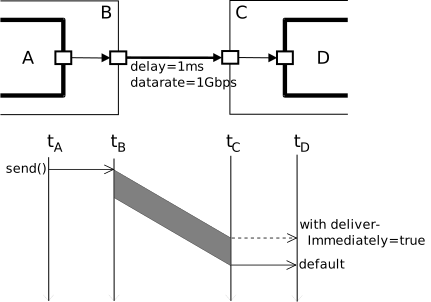
Packet transmission
When a packet is delivered to the module, you can call the packet’s
isReceptionStart() and isReceptionEnd() methods to
determine whether it represents the start or end of the reception process.
(Note that for a transmission update, both methods may return false.)
Handling Transmission Updates
The receiver should recognize transmission updates using isUpdate() and
react accordingly.
Receivers that receive the packet at the end of the reception, which is the default behavior, will only receive the final update. The original packet and intermediate updates are managed by the simulation kernel.
Receivers that receive the packet at the start of the reception (as selected by
setDeliverImmediately(true) in the previous section) should be prepared
to receive the original packet and updates, and handle them appropriately. If an
update arrives, the receiver should replace the original packet with the update
and reschedule any potential end-reception event to simTime() + pk->getRemainingDuration().
As a safeguard against unprepared modules accidentally processing transmission
updates as independent packets, the receiver is only given transmission updates
if it has explicitly declared support for them. The module declares support
by calling setTxUpdateSupport(true), usually in the initialize() method.
Non-transmission channels handle updates in the same way as they handle any other messages and packets.
Receiving Messages with activity()
Receiving Messages
Modules based on activity() receive messages using the receive() method of cSimpleModule. The receive() method cannot be used with modules based on handleMessage().
cMessage *msg = receive();
The receive() function accepts an optional timeout
parameter (in the form of a delta, not an
absolute simulation time). If no message arrives within the timeout period,
the function returns nullptr.
[10]
simtime_t timeout = 3.0;
cMessage *msg = receive(timeout);

if (msg == nullptr) {
    ...   // handle timeout
}
else {
    ...  // process message
}
The wait() Function
The wait() function suspends the execution of the module for a given amount of simulation time (a delta). wait() cannot be used with modules based on handleMessage().
wait(delay);
Internally, the wait() function is implemented by a combination of scheduleAt() and receive(). The wait() function is very convenient in modules that do not need to be prepared for incoming messages, such as message generators. Here is an example usage:
for (;;) {
    // Wait for some, potentially random, amount of time specified
    // in the interarrivalTime volatile module parameter
    wait(par("interarrivalTime").doubleValue());

    // Generate and send message
    ...
}
It is a runtime error if a message arrives during the wait interval. If you expect messages to arrive during the wait period, you can use the waitAndEnqueue() function. It takes a pointer to a queue object of class cQueue, described in Chapter The Simulation Library, in addition to the wait interval. Messages that arrive during the wait interval are accumulated in the queue and can be processed after the waitAndEnqueue() call returns.
Here is an example:
cQueue queue("queue");
...
waitAndEnqueue(waitTime, &queue);
if (!queue.empty())
{
    // Process messages that arrived during the wait interval
    ...
}
Channels
Overview
Channels encapsulate parameters and behavior associated with connections. Channel types are similar to simple modules in that they are declared in NED, and there are C++ implementation classes underlying them. Section Channels describes NED language support for channels and explains how to associate C++ classes with declared channel types in NED.
C++ channel classes must subclass the abstract base class cChannel. However, when creating a new channel class, it may be more practical to extend one of the existing C++ channel classes behind the three predefined NED channel types:
cIdealChannel implements the functionality of
ned.IdealChannel.cDelayChannel implements the functionality of
ned.DelayChannel.cDatarateChannel implements the functionality of
ned.DatarateChannel.
Channel classes need to be registered with the Define_Channel() macro, just like simple module classes need Define_Module().
The channel base class cChannel inherits from cComponent, so channels participate in the initialization and finalization protocol (initialize() and finish()) described in Initialization and Finalization.
The parent module of a channel (as returned by getParentModule()) is the module that contains the connection. If a connection connects two modules that are children of the same compound module, the channel’s parent is the compound module. If the connection connects a compound module to one of its submodules, the channel’s parent is also the compound module.
The Channel API
When subclassing cChannel, the following pure virtual member functions need to be overridden:
bool isTransmissionChannel() const
simtime_t getTransmissionFinishTime() const
Result processMessage(cMessage *msg, const SendOptions& options, simtime_t t)
The first two functions are usually one-liners; the channel behavior is encapsulated in the third function, processMessage().
cChannel also provides an isDisabled() virtual method
(returning false by default) that subclasses can override.
Both cDelayChannel and cDatarateChannel override it
to return the value of their disabled NED parameter. A disabled
channel discards all messages sent on it.
Transmission Channels
The first function, isTransmissionChannel(), determines whether the channel is a transmission channel, i.e. one that models transmission duration. A transmission channel sets the duration field of packets sent through it (see the setDuration() field of cPacket).
The getTransmissionFinishTime() function is only used with
transmission channels, and it should return the simulation time the sender
will finish (or has finished) transmitting. This method is called by
modules that send on a transmission channel to find out when the channel
becomes available. The channel’s isBusy() method is implemented
simply as return getTransmissionFinishTime() < simTime(). For
non-transmission channels, the getTransmissionFinishTime() return
value may be any simulation time which is less than or equal to the current
simulation time.
The processMessage() Function
The third function, processMessage(), encapsulates the channel’s functionality. However, before going into the details of this function, we need to understand how OMNeT++ handles message sending on connections.
Inside the send() call, OMNeT++ follows the connection path denoted by the getNextGate() functions of gates until it reaches the target module. At each “hop”, the corresponding connection’s channel (if the connection has one) gets a chance to add to the message’s arrival time (propagation time modeling), calculate a transmission duration, and modify the message object in various ways, such as setting the bit error flag in it (bit error modeling). After processing all hops that way, OMNeT++ inserts the message object into the Future Events Set (FES, see section The Event Loop), and the send() call returns. Then OMNeT++ continues to process events in increasing timestamp order. The message will be delivered to the target module’s handleMessage() (or receive()) function when it gets to the front of the FES.
A few more details: a channel may instruct OMNeT++ to delete the message instead of inserting it into the FES; this can be useful to model disabled channels or to model that the message has been lost altogether. The getDeliverOnReceptionStart() flag of the final gate in the path will determine whether the transmission duration will be added to the arrival time or not. Packet transmissions have been described in section Packet Transmissions.
Now, back to the processMessage() method.
The method gets called as part of the above process when the message is processed at the given hop. The method’s arguments are the message object, the simulation time the beginning of the message will reach the channel (i.e., the sum of all previous propagation delays), and a struct in which the method can return the results:
Result processMessage(cMessage *msg, const SendOptions& options, simtime_t t);
The Result struct is an inner type of cChannel
and looks like this:
struct Result
{
    bool discard = false;        // whether the channel has lost the msg
    simtime_t delay;             // propagation delay
    simtime_t duration;          // transmission duration
    simtime_t remainingDuration; // remaining tx duration (for tx update)
};
It also has a constructor that initializes all fields to zero; it is left out for brevity.
The method should model the transmission of the given message starting at the given t time and store the results (propagation delay, transmission duration, deletion flag) in the result object. Only the relevant fields in the result object need to be changed; others can be left untouched.
Transmission duration and bit error modeling only apply to packets (i.e., to instances of cPacket, where cMessage’s isPacket() returns true); they should be skipped for non-packet messages. processMessage() does not need to call the setDuration() method on the packet; this is done by the simulation kernel. However, it should call setBitError(true) on the packet if error modeling results in bit errors.
If the method sets the discard flag in the result object, that
means that the message object will be deleted by OMNeT++; this facility
can be used to model that the message gets lost in the channel.
The processMessage() method does not need to throw an error on overlapping transmissions or if the packet’s duration field is already set; these checks are done by the simulation kernel before processMessage() is called.
Channel Examples
To illustrate coding channel behavior, we look at how the built-in channel types are implemented.
cIdealChannel lets messages and packets pass through without
any delay or change. Its isTransmissionChannel() method returns
false, getTransmissionFinishTime() returns \(0s\), and the
body of its processMessage() method is empty:
cChannel::Result cIdealChannel::processMessage(cMessage *msg,
                    const SendOptions& options, simtime_t t)
{
    return Result();
}
cDelayChannel implements propagation delay, and it can be
disabled; in its disabled state, messages sent through it will be discarded.
This class still models zero transmission duration, so its
isTransmissionChannel() and getTransmissionFinishTime()
methods still return false and \(0s\). The processMessage() method
sets the appropriate fields in the Result struct:
cChannel::Result cDelayChannel::processMessage(cMessage *msg,
                    const SendOptions& options, simtime_t t)
{
    Result result;

    // if channel is disabled, signal that the message should be deleted
    if (isDisabled) {
        result.discard = true;
        return result;
    }

    // propagation delay modeling
    result.delay = delay;
    return result;
}
The handleParameterChange() method is also redefined, so that
the channel can update its internal delay and isDisabled
data members if the corresponding channel parameters change during simulation.
[11]
cDatarateChannel is different. It performs packet duration modeling
(duration is calculated from the data rate and the length of the packet),
so isTransmissionChannel() returns true.
getTransmissionFinishTime() returns the value of the
channelFinishTime data member, which gets updated after every packet.
simtime_t cDatarateChannel::getTransmissionFinishTime() const
{
    return channelFinishTime;
}
cDatarateChannel’s processMessage() method makes use of
the isDisabled, datarate, ber, and per data
members, which are also kept up to date with the help of
handleParameterChange().
An important detail is that non-packet messages (such as cMessage instances) pass through the channel without interfering with packet transmissions. They are only subject to the propagation delay, and are discarded if the channel is disabled.
cChannel::Result cDatarateChannel::processMessage(cMessage *msg,
                    const SendOptions& options, simtime_t t)
{
    Result result;

    if (msg->isPacket()) {
        // packet transmission: disabled check, duration, error modeling
        processPacket(static_cast<cPacket *>(msg), options, t, result);
    }
    else {
        // non-packet messages: only subject to disabled check
        if (isDisabled)
            result.discard = true;
    }

    // propagation delay modeling
    result.delay = delay;

    return result;
}
The processPacket() helper function (not shown in full) handles computing the transmission duration, either from the packet’s bit length and the channel’s data rate, or from the explicit duration specified in SendOptions; bookkeeping of the transmission state including support for transmission updates; and bit error modeling. [12]
cDatarateChannel Operating Modes
cDatarateChannel supports three operating modes, selectable via the setMode() method. The mode determines how the channel handles overlapping transmissions, and affects the behavior of the isBusy() and getTransmissionFinishTime() methods.
SINGLE(the default): At most one transmission can be active at any given time. If a module attempts to send a packet while the channel is still busy with a previous transmission, a runtime error is raised. This is the traditional behavior, and it is appropriate for simple point-to-point links. The isBusy() and getTransmissionFinishTime() methods report the state of the single ongoing transmission.MULTI: Multiple concurrent transmissions are allowed, and the channel tracks all of them individually. This is useful for modeling a channel with multiple subchannels or carriers. Transmission updates must refer to an existing and still active transmission via the transmission ID. The isBusy() method returnstrueif any of the tracked transmissions is still in progress, and getTransmissionFinishTime() returns the latest finish time among all active transmissions.UNCHECKED: Multiple concurrent transmissions are allowed, but the channel does not keep track of ongoing transmissions. This is the low-overhead version ofMULTI. As a consequence, no consistency checks are performed, the isBusy() and getTransmissionFinishTime() methods are not supported (they throw an error if called), and the channel does not emitchannelBusysignals. In this mode, bothdurationandremainingDurationmust be explicitly specified in SendOptions for transmission updates, because the channel has no state to compute the missing value from.
The mode can be set programmatically using setMode():
cDatarateChannel *ch = check_and_cast<cDatarateChannel *>(
    gate("out")->getTransmissionChannel());
ch->setMode(cDatarateChannel::MULTI);
Note
The mode should be set before the channel starts being used for transmissions. Switching the operating mode while transmissions are in progress is not allowed and will result in a runtime error.
Optional Data Rate in cDatarateChannel
The data rate of a cDatarateChannel is optional: it can be set to
0 or nan (in NED) to leave it unspecified. When the data rate is
unspecified, the channel cannot compute the transmission duration from the
packet length, so the sender must explicitly provide it in the send call
via SendOptions:
simtime_t duration = pkt->getBitLength() / selectedBitrate;
send(pkt, SendOptions().duration(duration), "out");
This feature is useful for modeling links where the data rate can vary on a per-packet basis, such as wireless links with adaptive modulation and coding schemes, or multi-rate Ethernet.
If neither the channel data rate nor an explicit duration is specified, a runtime error will be raised.
Stopping the Simulation
Normal Termination
You can terminate the simulation using the endSimulation() function:
endSimulation();
endSimulation() is rarely needed in practice because you can specify simulation time and CPU time limits in the ini file (see later).
Raising Errors
When the simulation encounters an error condition, it can throw a
cRuntimeError exception to terminate the simulation with an error
message. (Under Cmdenv, the exception also causes a nonzero program exit
code). The cRuntimeError class has a constructor with a
printf()-like argument list. An example:
if (windowSize <= 0)
    throw cRuntimeError("Invalid window size %d; must be >=1", windowSize);
Do not include a newline (\n), period, or exclamation mark in the error text; it will be added by OMNeT++.
The same effect can be achieved by calling the error() method of cModule:
if (windowSize <= 0)
    error("Invalid window size %d; must be >=1", windowSize);
Of course, the error() method can only be used when a module pointer is available.
Finite State Machines
Overview
Finite State Machines (FSMs) can make life easier when dealing with handleMessage(). OMNeT++ provides a class and a set of macros to build FSMs.
The key points are:
There are two kinds of states: transient and steady. On each event (that is, at each call to handleMessage()), the FSM transitions out of the current (steady) state, undergoes a series of state changes (runs through a number of transient states), and finally arrives at another steady state. Thus between two events, the system is always in one of the steady states. Transient states are therefore not really necessary – they exist only to group actions to be taken during a transition in a convenient way.
You can assign program code to handle entering and leaving a state, known as entry/exit code. Staying in the same state is handled as leaving and re-entering the state.
Entry code should not modify the state (this is verified by OMNeT++). State changes (transitions) must be put into the exit code.
OMNeT++’s FSMs can be nested. This means that any state (or rather, its entry or exit code) may contain a further full-fledged FSM_Switch() (see below). This allows you to introduce sub-states and thereby bring some structure into the state space if it becomes too large.
The FSM API
FSM state is stored in an object of type cFSM. The possible states are defined by an enum; the enum is also a place to define which state is transient and which is steady. In the following example, SLEEP and ACTIVE are steady states and SEND is transient (the numbers in parentheses must be unique within the state type and they are used for constructing the numeric IDs for the states):
enum {
  INIT = 0,
  SLEEP = FSM_Steady(1),
  ACTIVE = FSM_Steady(2),
  SEND = FSM_Transient(1),
};
The actual FSM is embedded in a switch-like statement, FSM_Switch(), with cases for entering and leaving each state:
FSM_Switch(fsm)
{
  case FSM_Exit(state1):
    //...
    break;
  case FSM_Enter(state1):
    //...
    break;
  case FSM_Exit(state2):
    //...
    break;
  case FSM_Enter(state2):
    //...
    break;
  //...
};
State transitions are done via calls to FSM_Goto(), which simply stores the new state in the cFSM object:
FSM_Goto(fsm, newState);
The FSM starts from the state with the numeric code 0; this state is conventionally named INIT.
Debugging FSMs
FSMs can log their state transitions, with the output looking like this:
...
FSM GenState: leaving state SLEEP
FSM GenState: entering state ACTIVE
...
FSM GenState: leaving state ACTIVE
FSM GenState: entering state SEND
FSM GenState: leaving state SEND
FSM GenState: entering state ACTIVE
...
FSM GenState: leaving state ACTIVE
FSM GenState: entering state SLEEP
...
To enable the above output, define FSM_DEBUG before including omnetpp.h.
#define FSM_DEBUG    // enables debug output from FSMs
#include <omnetpp.h>
FSMs perform their logging via the FSM_Print() macro, defined as something like this:
#define FSM_Print(fsm,exiting)
  (EV << "FSM " << (fsm).getName()
      << ((exiting) ? ": leaving state " : ": entering state ")
      << (fsm).getStateName() << endl)
The log output format can be changed by undefining FSM_Print() after the
inclusion of omnetpp.h, and providing a new definition.
Implementation
FSM_Switch() is a macro. It expands to a switch
statement embedded in a for() loop which repeats until the
FSM reaches a steady state.
Infinite loops are avoided by counting state transitions: if an FSM goes through 64 transitions without reaching a steady state, the simulation will terminate with an error message.
An Example
Let us write another bursty packet generator. It will have two states, SLEEP and ACTIVE. In the SLEEP state, the module does nothing. In the ACTIVE state, it sends messages with a given inter-arrival time. The code was taken from the Fifo2 sample simulation.
#define FSM_DEBUG
#include <omnetpp.h>
using namespace omnetpp;

class BurstyGenerator : public cSimpleModule
{
  protected:
    // parameters
    double sleepTimeMean;
    double burstTimeMean;
    double sendIATime;
    cPar *msgLength;

    // FSM and its states
    cFSM fsm;
    enum {
      INIT = 0,
      SLEEP = FSM_Steady(1),
      ACTIVE = FSM_Steady(2),
      SEND = FSM_Transient(1),
    };

    // variables used
    int i;
    cMessage *startStopBurst;
    cMessage *sendMessage;

    // the virtual functions
    virtual void initialize();
    virtual void handleMessage(cMessage *msg);
};

Define_Module(BurstyGenerator);

void BurstyGenerator::initialize()
{
    fsm.setName("fsm");
    sleepTimeMean = par("sleepTimeMean");
    burstTimeMean = par("burstTimeMean");
    sendIATime = par("sendIATime");
    msgLength = &par("msgLength");
    i = 0;
    WATCH(i); // always put watches in initialize()
    startStopBurst = new cMessage("startStopBurst");
    sendMessage = new cMessage("sendMessage");
    scheduleAt(0.0,startStopBurst);
}

void BurstyGenerator::handleMessage(cMessage *msg)
{
   FSM_Switch(fsm) {
     case FSM_Exit(INIT):
       // transition to SLEEP state
       FSM_Goto(fsm,SLEEP);
       break;
     case FSM_Enter(SLEEP):
       // schedule end of sleep period (start of next burst)
       scheduleAt(simTime()+exponential(sleepTimeMean), startStopBurst);
     break;
     case FSM_Exit(SLEEP):
       // schedule end of this burst
       scheduleAt(simTime()+exponential(burstTimeMean), startStopBurst);
       // transition to ACTIVE state:
       if (msg!=startStopBurst) {
         error("invalid event in state ACTIVE");
       }
       FSM_Goto(fsm,ACTIVE);
       break;
     case FSM_Enter(ACTIVE):
       // schedule next sending
       scheduleAt(simTime()+exponential(sendIATime), sendMessage);
     break;
     case FSM_Exit(ACTIVE):
       // transition to either SEND or SLEEP
       if (msg==sendMessage) {
         FSM_Goto(fsm,SEND);
       } else if (msg==startStopBurst) {
         cancelEvent(sendMessage);
         FSM_Goto(fsm,SLEEP);
       } else {
         error("invalid event in state ACTIVE");
       }
       break;
     case FSM_Exit(SEND): {
       // generate and send out job
       char msgname[32];
       sprintf(msgname, "job-%d", ++i);
       EV << "Generating " << msgname << endl;
       cMessage *job = new cMessage(msgname);
       job->setBitLength((long) *msgLength);
       job->setTimestamp();
       send(job, "out");
       // return to ACTIVE
       FSM_Goto(fsm,ACTIVE);
       break;
     }
   }
}
Navigating the Module Hierarchy
Module Vectors
If a module is part of a module vector, the getIndex() and getVectorSize() member functions can be used to query its index and the vector size:
EV << "This is module [" << module->getIndex() <<
      "] in a vector of size [" << module->getVectorSize() << "].\n";
Component IDs
Every component (module and channel) in the network has an ID that can be obtained from cComponent’s getId() member function:
int componentId = getId();
An ID uniquely identifies a module or channel for the whole duration of the simulation. This holds even when modules are created and destroyed dynamically because IDs of deleted modules or channels are never reused for newly created ones.
To look up a component by ID, one needs to use methods of the simulation
manager object, cSimulation. getComponent() expects an ID and
returns the component’s pointer if the component still exists. Otherwise, it
returns nullptr. The method has two variations, getModule(id)
and getChannel(id). They return cModule and cChannel
pointers if the identified component is, in fact, a module or channel, respectively.
Otherwise, they return nullptr.
int id = 100;
cModule *mod = getSimulation()->getModule(id); // exists, and is a module
Walking Up and Down the Module Hierarchy
The parent module can be accessed by the getParentModule() member function:
cModule *parent = getParentModule();
For example, the parameters of the parent module are accessed like this:
double timeout = getParentModule()->par("timeout");
cModule’s findSubmodule() and getSubmodule()
member functions make it possible to look up the module’s submodules
by name (or name and index if the submodule
is in a module vector). The first one returns the module ID of
the submodule, and the latter returns the module pointer. If the
submodule is not found, they return -1 or nullptr, respectively.
int submodID = module->findSubmodule("foo", 3); // look up "foo[3]"
cModule *submod = module->getSubmodule("foo", 3);
Finding Modules by Path
cModule’s getModuleByPath() member function can be used to
find modules by relative or absolute path. It accepts a path string and
returns the pointer of the matching module or throws an exception if it
was not found. If it is not known in advance whether the module exists,
its companion function findModuleByPath() can be used.
findModuleByPath() returns nullptr if the module
identified by the path does not exist but otherwise behaves identically
to getModuleByPath(). [13]
The path is a dot-separated list of module names. The special module name,
^ (caret), stands for the parent module. If the path
starts with a dot or caret, it is understood as relative to this module.
Otherwise, it is taken to mean an absolute path. For absolute paths,
inclusion of the toplevel module’s name in the path is optional.
The toplevel module itself may be referred to as <root>.
The following lines demonstrate relative paths. They find the app[3]
submodule and the gen submodule of the app[3] submodule of the
module in question:
cModule *app = module->getModuleByPath(".app[3]");  // note leading dot
cModule *gen = module->getModuleByPath(".app[3].gen");
Without the leading dot, the path is interpreted as absolute. The following
lines both find the tcp submodule of host[2] in the network,
regardless of the module on which the getModuleByPath() has been
invoked.
cModule *tcp = module->getModuleByPath("Network.host[2].tcp");
cModule *tcp = module->getModuleByPath("host[2].tcp");
The parent module may be expressed with a caret:
cModule *parent = module->getModuleByPath("^"); // parent module
cModule *tcp = module->getModuleByPath("^.tcp"); // sibling module
cModule *other = module->getModuleByPath("^.^.host[1].tcp"); // two levels up, then...
Iterating over Submodules
To access all modules within a compound module, one can use cModule::SubmoduleIterator.
for (cModule::SubmoduleIterator it(module); !it.end(); it++) {
    cModule *submodule = *it;
    EV << submodule->getFullName() << endl;
}
Navigating Connections
To determine the module at the other end of a connection, use cGate’s getPreviousGate(), getNextGate(), and getOwnerModule() methods. An example:
cModule *neighbour = gate("out")->getNextGate()->getOwnerModule();
For input gates, use getPreviousGate() instead of getNextGate().
The endpoints of the connection path are returned by the
getPathStartGate() and getPathEndGate() cGate
methods. These methods follow the connection path by repeatedly calling
getPreviousGate() and getNextGate(), respectively,
until they arrive at a nullptr. An example:
cModule *peer = gate("out")->getPathEndGate()->getOwnerModule();
Direct Method Calls Between Modules
In some simulation models, there might be modules that are too tightly coupled for message-based communication to be efficient. In such cases, the solution might be to call one simple module’s public C++ methods from another module.
Simple modules are C++ classes, so normal C++ method calls will work. However, two issues need to be mentioned:
how to obtain a pointer to the object representing the module;
how to inform the simulation kernel that a method call across modules is taking place.
Typically, the called module is in the same compound module as the caller,
so the getParentModule() and getSubmodule() methods of
cModule can be used to obtain a cModule* pointer to the
called module. (Further ways to obtain the pointer are described
in section Navigating the Module Hierarchy).
The cModule* pointer then has to be cast to the actual C++ class
of the module, so that its methods become visible.
This can be achieved using the following code:
cModule *targetModule = getParentModule()->getSubmodule("foo");
Foo *target = check_and_cast<Foo *>(targetModule);
target->doSomething();
The check_and_cast<>() template function on the second line
is part of OMNeT++. It performs a standard C++ dynamic_cast and checks
the result: if it is nullptr, check_and_cast raises an OMNeT++ error.
Using check_and_cast saves you from writing error checking code:
if targetModule from the first line is nullptr because
the submodule named "foo" was not found, or if that
module is actually not of type Foo, an exception is thrown
from check_and_cast with an appropriate error message. [14]
The second issue is how to inform the simulation kernel that a method call across modules is taking place. Why is this necessary in the first place? First, the simulation kernel always needs to know which module’s code is currently executing in order for ownership handling and other internal mechanisms to work correctly. Second, the Qtenv simulation GUI can animate method calls, but to be able to do that, it needs to know about them. Third, method calls are also recorded in the event log.
The solution is to add the Enter_Method() or Enter_Method_Silent()
macro at the beginning of the methods that may be invoked from other
modules. These calls perform context switching and, in the case of
Enter_Method(), notify the simulation GUI so that animation
of the method call can take place. Enter_Method_Silent()
does not animate the method call, but otherwise, it is equivalent
to Enter_Method(). Both macros accept a printf()-like
argument list (it is optional for Enter_Method_Silent()),
which should produce a string with the method name and the
actual arguments as much as possible. The string is displayed in
the animation (Enter_Method() only) and recorded into the event log.
void Foo::doSomething()
{
    Enter_Method("doSomething()");
    ...
}
Dynamic Module Creation
When To Use
Certain simulation scenarios require the ability to dynamically create and destroy modules. For example, simulating the arrival and departure of new users in a mobile network may be implemented in terms of adding and removing modules during the course of the simulation. Loading and instantiating network topology (i.e. nodes and links) from a data file is another common technique enabled by dynamic module (and link) creation.
OMNeT++ allows both simple and compound modules to be created at runtime. When instantiating a compound module, its full internal structure (submodules and internal connections) is reproduced.
Once created and started, dynamic modules are no different from “static” modules.
Overview
To understand how dynamic module creation works, you have to know a
bit about how OMNeT++ normally instantiates modules. Each module type
(class) has a corresponding factory object of the class
cModuleType. This object is created under the hood by the
Define_Module() macro, and it has a factory
method which can instantiate the module class (this function basically
only consists of a return new <moduleclass>(...) statement).
The cModuleType object can be looked up by its name string (which is the same as the module class name). Once you have its pointer, it is possible to call its factory method and create an instance of the corresponding module class – without having to include the C++ header file containing the module’s class declaration into your source file.
The cModuleType object also knows what gates and parameters the given module type has to have. (This information comes from NED files.)
Simple modules can be created in one step. For a compound module, the situation is more complicated because its internal structure (submodules, connections) may depend on parameter values and gate vector sizes. Thus, for compound modules, it is generally required to first create the module itself, second, set parameter values and gate vector sizes, and then call the method that creates its submodules and internal connections.
As you already know, simple modules with activity() need a starter message. For statically created modules, this message is created automatically by OMNeT++, but for dynamically created modules, you have to do this explicitly by calling the appropriate functions.
Calling initialize() has to take place after insertion of the starter messages because the initializing code may insert new messages into the FES, and these messages should be processed after the starter message.
Creating Modules
The first step is to find the factory object. The cModuleType::get()
function expects a fully qualified NED type name and returns the factory
object:
cModuleType *moduleType = cModuleType::get("foo.nodes.WirelessNode");
The return value does not need to be checked for nullptr because
the function raises an error if the requested NED type is not found.
(If this behavior is not what you need, you can use the similar
cModuleType::find() function, which returns nullptr if the type
was not found.)
The All-in-One Method
cModuleType has a createScheduleInit(const char *name, cModule *parentmod) convenience function to get a module up and running in one step.
cModule *mod = moduleType->createScheduleInit("node", this);
createScheduleInit() performs the following steps: create(), finalizeParameters(), buildInside(), scheduleStart(now), and callInitialize().
This method can be used for both simple and compound modules. Its applicability is somewhat limited, however: because it does everything in one step, you do not have the chance to set parameters or gate sizes, and to connect gates before initialize() is called. (initialize() expects all parameters and gates to be in place and the network fully built when it is called.) Because of the above limitation, this function is mainly useful for creating basic simple modules.
The Detailed Procedure
If the createScheduleInit() all-in-one method is not applicable, one needs to use the full procedure. It consists of five steps:
Find the factory object;
Create the module;
Set up its parameters and gate sizes as needed;
Tell the (possibly compound) module to recursively create its internal submodules and connections;
Schedule activation message(s) for the new simple module(s).
Each step (except for Step 3.) can be done with one line of code.
See the following example, where Step 3 is omitted:
// find factory object
cModuleType *moduleType = cModuleType::get("foo.nodes.WirelessNode");

// create (possibly compound) module and build its submodules (if any)
cModule *module = moduleType->create("node", this);
module->finalizeParameters();
module->buildInside();

// create activation message
module->scheduleStart(simTime());
If you want to set up parameter values or gate vector sizes (Step 3.), the code goes between the create() and buildInside() calls:
// create
cModuleType *moduleType = cModuleType::get("foo.nodes.WirelessNode");
cModule *module = moduleType->create("node", this);

// set up parameters and gate sizes before we set up its submodules
module->par("address") = ++lastAddress;
module->finalizeParameters();

module->setGateSize("in", 3);
module->setGateSize("out", 3);

// create internals, and schedule it
module->buildInside();
module->scheduleStart(simTime());
Deleting Modules
To delete a module dynamically, use cModule’s deleteModule() member function:
module->deleteModule();
If the module was a compound module, this involves recursively deleting all its submodules. An activity()-based simple module can also delete itself; in that case, the deleteModule() call does not return to the caller.
The preDelete() method
When deleteModule() is called on a compound module, individual modules under the compound module are notified by calling their preDelete() member functions before any change is actually made.
This notification can be quite useful when the compound module contains modules that hold pointers to each other, necessitated by their complex interactions via C++ method calls. With such modules, destruction can be tricky: given a sufficiently complex control flow involving cascading cross-module method calls and signal listeners, it is actually quite easy to accidentally invoke a method on a module that has already been deleted at that point, resulting in a crash. (Note that destructors of collaborating modules cannot rely on being invoked in any particular order because that order is determined factors, e.g. submodule order in NED, which are out of the control of the C++ code.)
preDelete() is a cComponent virtual method that, similar to
handleMessage() and initialize(), is intended for being overridden
by the user. When a compound module is deleted, deleteModule() first
invokes preDelete() recursively on the submodule tree and only starts
deleting modules after that. This gives a chance to modules that override
preDelete() to set pointers to collaborating modules to nullptr,
or otherwise ensure that nothing bad will happen once modules start being
deleted.
preDelete() receives an argument: the pointer of the module on which deleteModule() was invoked. This allows the module to tell apart cases when, for example, it is deleted itself or as part of a larger unit.
An example:
void Foo::preDelete(cComponent *root)
{
    barModule = nullptr;
}
Component Weak Pointers
opp_component_ptr offers an answer to a related problem: how to detect when a module we have a pointer to is deleted, so that we no longer try to access it.
opp_component_ptr is a smart pointer that points to a
cComponent object (i.e. a module or a channel) and automatically
becomes nullptr when the referenced object is deleted. It is a non-owning
(“weak”) pointer, i.e. the pointer going out of scope has no effect on the
referenced object.
In practice, one would replace bare pointers in the code (for example,
Foo*) with opp_component_ptr smart pointers and test
before accessing the other module that the pointer is still valid.
An example:
opp_component_ptr<Foo> fooModule;  // as class member

if (fooModule)
    fooModule->doSomething();

// or: obtain a bare pointer for multiple use
if (Foo *fooPtr = fooModule.get()) {
    fooPtr->doSomething();
    fooPtr->doSomethingElse();
}
Module Deletion and finish()
finish() is called for all modules at the end of the simulation, no matter how the modules were created. If a module is dynamically deleted before that, finish() will not be invoked (deleteModule() does not do it). However, you can still manually invoke it before deleteModule().
You can use the callFinish() function to invoke finish() (It is not a good idea to invoke finish() directly). If you are deleting a compound module, callFinish() will recursively invoke finish() for all submodules, and if you are deleting a simple module from another module, callFinish() will do the context switch for the duration of the call. [15]
Example:
mod->callFinish();
mod->deleteModule();
Creating Connections
Connections can be created using cGate’s connectTo() method. connectTo() should be invoked on the source gate of the connection and expects the destination gate pointer as an argument. The use of the words source and destination correspond to the direction of the arrow in NED files.
srcGate->connectTo(destGate);
connectTo() also accepts a channel object (cChannel*) as an
additional, optional argument. Similarly to modules, channels can be
created using their factory objects that have the type cChannelType:
cGate *outGate, *inGate;
...

// find factory object and create a channel
cChannelType *channelType = cChannelType::get("foo.util.Channel");
cChannel *channel = channelType->create("channel");

// create connecting
outGate->connectTo(inGate, channel);
The channel object will be owned by the source gate of the connection, and one cannot reuse the same channel object with several connections.
Instantiating one of the built-in channel types (cIdealChannel, cDelayChannel, or cDatarateChannel) is somewhat simpler because those classes have static create() factory functions and the step of finding the factory object can be spared. Alternatively, one can use cChannelType’s createIdealChannel(), createDelayChannel(), and createDatarateChannel() static methods.
The channel object may need to be parameterized before using it for a connection. For example, cDelayChannel has a setDelay() method, and cDatarateChannel has setDelay(), setDatarate(), setBitErrorRate(), and setPacketErrorRate().
An example that sets up a channel with a datarate and a delay between two modules:
cDatarateChannel *datarateChannel = cDatarateChannel::create("channel");
datarateChannel->setDelay(0.001);
datarateChannel->setDatarate(1e9);
outGate->connectTo(inGate, datarateChannel);
Finally, here is a more complete example that creates two modules and connects them in both directions:
cModuleType *moduleType = cModuleType::get("TicToc");
cModule *a = modtype->createScheduleInit("a", this);
cModule *b = modtype->createScheduleInit("b", this);

a->gate("out")->connectTo(b->gate("in"));
b->gate("out")->connectTo(a->gate("in"));
Removing Connections
The disconnect() method of cGate can be used to remove connections. This method has to be invoked on the source side of the connection. It also destroys the channel object associated with the connection if one has been set.
srcGate->disconnect();
Signals
This section describes simulation signals, or signals for short. Signals are a versatile concept that first appeared in OMNeT++ 4.1.
Simulation signals can be used for:
exposing statistical properties of the model, without specifying whether and how to record them
receiving notifications about simulation model changes at runtime, and acting upon them
implementing a publish-subscribe style communication among modules; this is advantageous when the producer and consumer of the information do not know about each other, and possibly there is a many-to-one or many-to-many relationship among them
emitting information for other purposes, for example as input for custom animation effects
Signals are emitted by components (modules and channels). Signals propagate on the module hierarchy up to the root. At any level, one can register listeners, that is, objects with callback methods. These listeners will be notified (their appropriate methods called) whenever a signal value is emitted. The result of upwards propagation is that listeners registered at a compound module can receive signals from all components in that submodule tree. A listener registered at the system module can receive signals from the whole simulation.
Note
A channel’s parent is the (compound) module that contains the connection, not the owner of either gate the channel is connected to.
Signals are identified by signal names (i.e. strings), but for efficiency,
at runtime we use dynamically assigned numeric identifiers (signal IDs,
typedef’d as simsignal_t). The mapping of signal names to signal IDs is
global, so all modules and channels asking to resolve a particular signal name
will get back the same numeric signal ID.
Listeners can subscribe to signal names or IDs, regardless of their
source. For example, if two different and unrelated module types, say
Queue and Buffer, both emit a signal named "length", then
a listener that subscribes to "length" at some higher compound module
will get notifications from both Queue and Buffer module
instances. The listener can still look at the source of the signal if it
wants to distinguish the two (it is available as a parameter to the
callback function), but the signals framework itself does not have such a
feature.
Note
Because the component type that emits the signal is not part of the signal’s identity, it is advised to choose signal names carefully. A good naming scheme facilitates the “merging” of signals that arrive from different sources but mean the same thing, and reduces the chance of collisions between signals that accidentally have the same name but represent different things.
When a signal is emitted, it can carry a value with it. There are multiple overloaded versions of the emit() method for different data types, and also overloaded receiveSignal() methods in listeners. The signal value can be of selected primitive types, or an object pointer; anything that is not feasible to emit as a primitive type may be wrapped into an object and emitted as such.
Even when the signal value is of a primitive type, it is possible to convey extra information to listeners via an additional details object, which is an optional argument of emit().
Design Considerations and Rationale
The implementation of signals is based on the following assumptions:
subscribe/unsubscribe operations are rare compared to emit() calls, so it is emit() that needs to be efficient
the signals mechanism is present in every module, so per-module memory overhead must be kept as low as possible
it is expected that modules and channels will be heavily instrumented with signals, and only a subset of signals will actually be used (will have listeners) in any particular simulation; therefore, the CPU and memory overhead of momentarily unused signals must be as low as possible
These goals have been achieved in the 4.1 version with the following
implementation. First, the data structure that used to store listeners in
components is dynamically allocated, so if there are no listeners, the
per-component overhead is only the size of the pointer (which will be
nullptr then).
Second, additionally there are two bitfields in every component that store
which one of the first 64 signals (IDs 0..63) have local listeners and
listeners in ancestor modules. [16] Using these bitfields, it is possible to determine in constant
time for the first 64 signals whether the signal has listeners, so
emit() can return immediately if there are none. For other signals,
emit() needs to examine the listener lists up to the root every
time. Even if a simulation uses more than 64 signals, in
performance-critical situations it is possible to arrange that frequently
emitted signals (e.g. "txBegin") get the “fast” signal IDs, while
infrequent signals (like e.g. "routerDown") get the rest.
The Signals Mechanism
Signal-related methods are declared on cComponent, so they are available for both cModule and cChannel.
Signal IDs
Signals are identified by names, but internally, numeric signal IDs are used
for efficiency. The registerSignal() method takes a signal name as
a parameter and returns the corresponding simsignal_t value.
The method is static, illustrating the fact that signal names are global.
An example:
simsignal_t lengthSignalId = registerSignal("length");
The getSignalName() method (also static) does the reverse:
it accepts a simsignal_t and returns the name of the signal as
a const char * (or nullptr for an invalid signal handle):
const char *signalName = getSignalName(lengthSignalId); // --> "length"
Note
Since OMNeT++ 4.3, the lifetime of signal IDs is the entire program, and it is possible to call registerSignal() from initializers of global variables, e.g., static class members. In earlier versions, signal IDs were usually allocated in initialize() and were only valid for that simulation run.
Emitting Signals
The emit() family of functions emit a signal from the module or
channel. emit() takes a signal ID (simsignal_t) and
a value as parameters:
emit(lengthSignalId, queue.length());
The value can be of type bool, long, double, simtime_t,
const char *, or (const) cObject *. Other types can be cast into
one of these types or wrapped into an object subclassed from cObject.
emit() also has an extra, optional object pointer argument named
details, with the type cObject*. This argument may be used
to convey extra information to listeners. [17]
When there are no listeners, the runtime cost of emit() is usually minimal.
However, if producing a value has a significant runtime cost, then the
mayHaveListeners() or hasListeners() method can be used
to check beforehand whether the given signal has any listeners at all.
If not, producing the value and emitting the signal can be skipped.
Example usage:
if (mayHaveListeners(distanceToTargetSignal)) {
    double d = sqrt((x-targetX)*(x-targetX) + (y-targetY)*(y-targetY));
    emit(distanceToTargetSignal, d);
}
The mayHaveListeners() method is very efficient (a constant-time operation) but may return false positive. In contrast, hasListeners() will search up to the top of the module tree if the answer is not cached, so it is generally slower. We recommend that you take into account the cost of producing notification information when deciding between mayHaveListeners() and hasListeners().
Signal Declarations
Since OMNeT++ 4.4, signals can be declared in NED files for documentation purposes, and OMNeT++ can check that only declared signals are emitted, and that they actually conform to the declarations (with regard to the data type, etc.)
The following example declares a queue module that emits a signal named
queueLength:
simple Queue
{
    parameters:
        @signal[queueLength](type=long);
        ...
}
Signals are declared with the @signal property on
the module or channel that emits it. (NED properties are described in
Metadata Annotations (Properties)). The property index corresponds
to the signal name, and the property’s body may declare various attributes
of the signal; currently only the data type is supported.
The type property key is optional; when present, its value should be
bool, long, unsigned long, double, simtime_t,
string, or a registered class name optionally followed by a question
mark. Classes can be registered using the Register_Class() or
Register_Abstract_Class() macros; these macros create a
cObjectFactory instance, and the simulation kernel will call
cObjectFactory’s isInstance() method to check that the
emitted object is really a subclass of the declared class.
isInstance() just wraps a C++ dynamic_cast.)
A question mark after the class name means that the signal is allowed to
emit nullptr pointers. For example, a module named PPP may emit
the frame (packet) object every time it starts transmitting and emit
nullptr when the transmission is completed:
simple PPP
{
    parameters:
        @signal[txFrame](type=PPPFrame?);  // a PPPFrame or nullptr
        ...
}
The property index may contain wildcards, which is important for declaring
signals whose names are only known at runtime. For example, if a module emits
signals called session-1-seqno, session-2-seqno, session-3-seqno,
etc., those signals can be declared as:
@signal[session-*-seqno]();
Enabling/Disabling Signal Checking
Starting with OMNeT++ 5.0, signal checking is turned on by default when
the simulation kernel is compiled in debug mode, requiring all signals to be
declared with @signal. (It is turned off in release-mode
simulation kernels due to performance reasons.)
If needed, signal checking can be disabled with the check-signals
configuration option:
check-signals = false
Signal Data Objects
When emitting a signal with a cObject* pointer, you can pass as data
an object that you already have in the model, provided you have a suitable
object at hand. However, it is often necessary to declare a custom class
to hold all the details, and fill in an instance just for the purpose of
emitting the signal.
The custom notification class must be derived from cObject. We recommend that you also add noncopyable as a base class, because then you don’t need to write a copy constructor, assignment operator, and dup() function, sparing some work. When emitting the signal, you can create a temporary object and pass its pointer to the emit() function.
An example of custom notification classes are the ones associated with model change notifications (see Listening to Model Changes). For example, the data class that accompanies a signal that announces that a gate or gate vector is about to be created looks like this:
class cPreGateAddNotification : public cObject, noncopyable
{
  public:
    cModule *module;
    const char *gateName;
    cGate::Type gateType;
    bool isVector;
};
And the code that emits the signal:
if (hasListeners(PRE_MODEL_CHANGE))
{
    cPreGateAddNotification tmp;
    tmp.module = this;
    tmp.gateName = gatename;
    tmp.gateType = type;
    tmp.isVector = isVector;
    emit(PRE_MODEL_CHANGE, &tmp);
}
Subscribing to Signals
The subscribe() method registers a listener for a signal. Listeners are objects that extend the cIListener class. The same listener object can be subscribed to multiple signals. subscribe() has two arguments: the signal and a pointer to the listener object:
cIListener *listener = ...;
simsignal_t lengthSignalId = registerSignal("length");
subscribe(lengthSignalId, listener);
For convenience, the subscribe() method has a variant that takes the signal name directly, so the registerSignal() call can be omitted:
cIListener *listener = ...;
subscribe("length", listener);
One can also subscribe at other modules, not only the local one. For example, to get signals from all parts of the model, one can subscribe at the system module level:
cIListener *listener = ...;
getSimulation()->getSystemModule()->subscribe("length", listener);
The unsubscribe() method has the same parameter list as subscribe() and unregisters the given listener from the signal:
unsubscribe(lengthSignalId, listener);
or
unsubscribe("length", listener);
It is an error to subscribe the same listener to the same signal twice.
It is possible to test whether a listener is subscribed to a signal using the isSubscribed() method, which also takes the same parameter list.
if (isSubscribed(lengthSignalId, listener)) {
    ...
}
For completeness, there are methods for getting the list of signals
that the component has subscribed to (getLocalListenedSignals())
and the list of listeners for a given signal (getLocalSignalListeners()).
The former returns a std::vector<simsignal_t>; the latter takes
a signal ID (simsignal_t) and returns a std::vector<cIListener*>.
The following example prints the number of listeners for each signal:
EV << "Signal listeners:\n";
std::vector<simsignal_t> signals = getLocalListenedSignals();
for (unsigned int i = 0; i < signals.size(); i++) {
    simsignal_t signalID = signals[i];
    std::vector<cIListener*> listeners = getLocalSignalListeners(signalID);
    EV << getSignalName(signalID) << ": " << listeners.size() << " signals\n";
}
Listeners
Listeners are objects that subclass from the cIListener class, which declares the following methods:
class cIListener
{
  public:
    virtual ~cIListener() {}
    virtual void receiveSignal(cComponent *src, simsignal_t id,
                               bool value, cObject *details) = 0;
    virtual void receiveSignal(cComponent *src, simsignal_t id,
                               intval_t value, cObject *details) = 0;
    virtual void receiveSignal(cComponent *src, simsignal_t id,
                               uintval_t value, cObject *details) = 0;
    virtual void receiveSignal(cComponent *src, simsignal_t id,
                               double value, cObject *details) = 0;
    virtual void receiveSignal(cComponent *src, simsignal_t id,
                               simtime_t value, cObject *details) = 0;
    virtual void receiveSignal(cComponent *src, simsignal_t id,
                               const char *value, cObject *details) = 0;
    virtual void receiveSignal(cComponent *src, simsignal_t id,
                               cObject *value, cObject *details) = 0;
    virtual void finish(cComponent *component, simsignal_t id) {}
    virtual void subscribedTo(cComponent *component, simsignal_t id) {}
    virtual void unsubscribedFrom(cComponent *component, simsignal_t id) {}
};
This class has a number of virtual methods:
Several overloaded receiveSignal() methods, one for each data type. Whenever a signal is emitted (via emit()), the matching receiveSignal() method is invoked on the subscribed listeners.
finish() is called by a component on its local listeners after the component’s finish() method was called. If the listener is subscribed to multiple signals or at multiple components, the method will be called multiple times. Note that finish() methods in general are not invoked if the simulation terminates with an error, so that method is not a place for doing cleanup.
subscribedTo(), unsubscribedFrom() are called when this listener object is subscribed/unsubscribed to (from) a signal. These methods give the opportunity for listeners to track whether and where they are subscribed. It is also OK for a listener to delete itself in the last statement of the unsubscribedFrom() method, but you must be sure that there are no other places the same listener is still subscribed.
Since cIListener has a large number of pure virtual methods, it is more
convenient to subclass from cListener, a do-nothing implementation
instead. It defines finish(), subscribedTo(), and
unsubscribedFrom() with an empty body, and the receiveSignal()
methods with bodies that throw a "Data type not supported" error.
You can redefine the receiveSignal() method(s) whose data type
you want to support, and signals emitted with other (unexpected) data
types will result in an error instead of going unnoticed.
The order in which listeners will be notified is undefined (it is not necessarily the same order in which listeners were subscribed.)
Listener Life Cycle
When a component (module or channel) is deleted, it automatically unsubscribes (but does not delete) the listeners it has. When a module is deleted, it first unsubscribes all listeners from all modules and channels in its submodule tree before starting to recursively delete the modules and channels themselves.
When a listener is deleted, it automatically unsubscribes from all components it is subscribed to. [18]
Note
If your module has added listeners to other modules (e.g., the top-level module), these listeners must be unsubscribed in the module destructor at the latest. Remember to make sure the modules still exist before you call unsubscribe() on them, unless they are an ancestor of your module in the module tree.
Listening to Model Changes
In simulation models, it is often useful to hold references to other modules, a connecting channel, or other objects, or to cache information derived from the model topology. However, such pointers or data may become invalid when the model changes at runtime and need to be updated or recalculated. The problem is how to get notification that something has changed in the model.
Note
Whenever you see a cModule*, cChannel*, cGate*, or
similar pointer kept as state in a simple module, you should think about
how it will be kept up-to-date if the model changes at runtime.
The solution is, of course, signals. OMNeT++ has two built-in signals,
PRE_MODEL_CHANGE and POST_MODEL_CHANGE (these macros
are simsignal_t values, not names) that are emitted before and
after each model change.
Pre/post model change notifications are emitted with data objects that carry the details of the change. The data classes are:
cPreModuleDeleteNotification / cPostModuleDeleteNotification
cPreModuleReparentNotification / cPostModuleReparentNotification
cPreGateVectorResizeNotification / cPostGateVectorResizeNotification
cPreGateDisconnectNotification / cPostGateDisconnectNotification
cPreParameterChangeNotification / cPostParameterChangeNotification
cPreDisplayStringChangeNotification / cPostDisplayStringChangeNotification
They all subclass from cModelChangeNotification, which is, of course, a
cObject. Inside the listener, you can use dynamic_cast<> to figure
out what notification arrived.
Note
Please look up these classes in the API documentation to see their data fields, when exactly they get fired, and what one needs to be careful about when using them.
An example listener that prints a message when a module is deleted:
class MyListener : public cListener
{
   ...
};

void MyListener::receiveSignal(cComponent *src, simsignal_t id, cObject *value,
                               cObject *details)
{
    if (dynamic_cast<cPreModuleDeleteNotification *>(value)) {
        cPreModuleDeleteNotification *data = (cPreModuleDeleteNotification *)value;
        EV << "Module " << data->module->getFullPath() << " is about to be deleted\n";
    }
}
If you’d like to get notification about the deletion of any module, you need to install the listener on the system module:
getSimulation()->getSystemModule()->subscribe(PRE_MODEL_CHANGE, listener);
Note
PRE_MODEL_CHANGE and POST_MODEL_CHANGE are fired on the module (or channel) affected by the change, and not on the module which executes the code that causes the change. For example, pre-module-deleted is fired on the module to be removed, and post-module-deleted is fired on its parent (because the original module no longer exists), and not on the module that contains the deleteModule() call.
Note
A listener will not receive pre/post-module-deleted notifications if the whole submodule tree that contains the subscription point is deleted. This is because compound module destructors begin by unsubscribing all modules/channels in the subtree before starting recursive deletion.
Signal-Based Statistics Recording
Motivation
One use of signals is to expose variables for result collection without specifying where, how, and whether to record them. With this approach, modules only publish the variables, and the actual result recording takes place in listeners. Listeners may be added by the simulation framework (based on the configuration) or by other modules (for example, by dedicated result collection modules).
The signals approach allows for several possibilities:
Provides a controllable level of detail: in some simulation runs, you may want to record all values as a time series; in other runs, you may only want to record the mean, time average, minimum/maximum value, standard deviation, etc.; and in yet other runs, you may want to record the distribution as a histogram.
Depending on the purpose of the simulation experiment, you may want to process the results before recording them. For example, you may want to record a smoothed or filtered value, the percentage of time the value is nonzero or over a threshold, the sum of the values, etc.
You may want aggregate statistics, such as recording the total number of packet drops or the average end-to-end delay for the entire network.
You may want to record combined statistics, for example, a drop percentage (drop count/total number of packets).
You may want to ignore results generated during the warm-up period or during other transients.
The signals approach can fulfill the above goals.
Declaring Statistics
Introduction
In order to record simulation results based on signals, you need to add
@statistic properties to the NED definition of the simple module
or channel. A @statistic property defines the name of the
statistic, which signal(s) are used as input, what processing steps are to
be applied to them (e.g., smoothing, filtering, summing, differential
quotient), and what properties are to be recorded (minimum, maximum,
average, etc.) and in which form (vector, scalar, histogram). Record items
can be marked optional, which allows you to denote a “default”
and a more comprehensive “all” result set to be recorded.
The list of record items can be further tweaked from the configuration.
You can also specify a descriptive name (“title”) for the statistic, as
well as a measurement unit.
The following example declares a queue module with a queue length statistic:
simple Queue
{
    parameters:
        @statistic[queueLength](record=max,timeavg,vector?);
    gates:
        input in;
        output out;
}
As you can see, statistics are represented with indexed NED properties (see
Metadata Annotations (Properties)). The property name is always statistic,
and the index (here, queueLength) is the name of the statistic. The
property value, that is, everything inside the parentheses, provides hints
and extra information for recording.
The above @statistic declaration assumes that the module’s C++ code
emits the queue’s updated length as signal queueLength whenever
elements are inserted into the queue or removed from it.
By default, the maximum and the time average of the queue length will
be recorded as scalars. You can also instruct the simulation to record
“all” results, which will turn on optional record items marked
with a question mark. In this case, the queue lengths will also be
recorded into an output vector.
Note
The configuration lets you fine-tune the list of result items even
beyond the default and all settings. See section
Selecting Recording Modes for Signal-Based Statistics for more information.
In the above example, the signal to be recorded was taken from the
statistic name. However, if this is not suitable, you can use the
source property key to specify a different signal as input for the
statistic. The following example assumes that the C++ code emits a qlen
signal and declares a queueLength statistic based on that:
simple Queue
{
    parameters:
        @signal[qlen](type=int); // optional
        @statistic[queueLength](source=qlen; record=max,timeavg,vector?);
        ...
}
Note that the source=qlen property key has been added to specify
the qlen signal as the input for the statistic. Additionally, a
signal declaration (@signal property) has been added for the
qlen signal. Although signal declarations are currently optional
and ignored by the system, it is good practice to include them.
You can also apply processing to a signal before recording it. Consider the following example:
@statistic[dropCount](source=count(drop); record=last,vector?);
This records the total number of packet drops as a scalar and, optionally,
the number of packets dropped over time as a vector. This assumes that the
C++ code emits a drop signal every time a packet is dropped.
Here, count() is a result filter.
Note
Starting from OMNeT++ 4.4, items containing parentheses (e.g.,
count(drop)) no longer need to be enclosed in quotation marks.
Another example:
@statistic[droppedBytes](source=sum(packetBytes(pkdrop)); record=last,vector?);
This assumes that the C++ code emits a pkdrop signal with a
cPacket pointer as the value. Based on that signal, it records
the total number of bytes dropped as a scalar and optionally as a vector.
The packetBytes() filter extracts the number of bytes from each packet
using the getByteLength() method in cPacket, and the
sum() filter sums up the values.
Arithmetic expressions can also be used. For example, the following line
computes the number of dropped bytes using the packetBits() filter:
@statistic[droppedBytes](source=sum(8*packetBits(pkdrop)); record=last,
vector?);
The source can also combine multiple signals in an arithmetic expression:
@statistic[dropRate](source=count(drop)/count(pk); record=last,vector?);
When using multiple signals, a value arriving on either signal will result in one output value. The computation will use the last values of the other signals (sample-hold interpolation). However, the same signal cannot occur twice, as it would cause glitches in the output.
Record items can also be expressions and contain filters. For example, the following statistic is equivalent to one of the previous examples. It computes and records the total number of bytes dropped, using a cPacket*-valued signal as input. However, some of the computations have been moved to the recorder part.
@statistic[droppedBytes](source=packetBits(pkdrop); record=last(8*sum),
vector(8*sum)?);
Property Keys
The following keys are understood in @statistic properties:
- source:
Defines the input for the recorders (see the
record=key). If omitted, the statistic name is taken as the signal name.- record:
Contains a list of recording modes, separated by commas. Recording modes define how to record the source (see the
source=key).- title:
A longer, descriptive name for the statistic signal. Result visualization tools may use it as the chart label (e.g., in the legend).
- unit:
The unit of measurement for the values. This may also appear in charts. It is not recorded for the
countandtotalCountrecording modes, because a count has no unit.- interpolationmode:
Defines how to interpolate signal values where needed (e.g., for drawing). Possible values are
none,sample-hold,backward-sample-hold,linear.- enum:
Defines symbolic names for various integer signal values. The property value must be a string containing name=value pairs separated by commas. For example:
"IDLE=1,BUSY=2,DOWN=3".- checkSignals
: Controls whether signal declarations (
@signal) are checked for the signals used by this statistic. Accepted values aretrueandfalse. When not specified, the global setting (thecheck-signalsconfiguration option) is used.- autoWarmupFilter
: Controls whether a warmup period filter is automatically inserted at the front of the result filter chain. Accepted values are
trueandfalse. When not specified (or set totrue), the warmup filter is added if the configured warmup period is nonzero. Setting it tofalsedisables the automatic warmup filter for this statistic.
Available Filters and Recorders
The following table contains a list of predefined result filters. All filters in the table output a value for each input value.
Filter |
Description |
|---|---|
|
Computes and outputs the count of values received so far. |
|
Computes and outputs the sum of values received so far. |
|
Computes and outputs the minimum of values received so far. |
|
Computes and outputs the maximum of values received so far. |
|
Computes and outputs the average (sum / count) of values received so far. |
|
Regards the input values and their timestamps as a step function (sample-hold style), and computes and outputs their time average (integral divided by duration). |
|
Outputs a constant 0 for each received value (independent of the value). |
|
Outputs a constant 1 for each received value (independent of the value). |
|
Expects |
|
Expects |
|
For each value, computes the sum of values received so far, divides it by the duration, and outputs the result. |
|
Removes repeated values, i.e., discards values that are the same as the previous one. |
The list of predefined result recorders:
Recorder |
Description |
|---|---|
|
Records the last value into an output scalar. |
|
Records the count of the input values into an output scalar;
functionally equivalent to |
|
Records the sum of the input values into an output scalar
(or zero if there were none);
functionally equivalent to |
|
Records the minimum of the input values into an output scalar
(or positive infinity if there were none);
functionally equivalent to |
|
Records the maximum of the input values into an output scalar
(or negative infinity if there were none);
functionally equivalent to |
|
Records the mean of the input values into an output scalar
(or NaN if there were none);
functionally equivalent to |
|
Regards the input values with their timestamps as a step
function (sample-hold style), and records the time average of the
input values into an output scalar;
functionally equivalent to |
|
Computes basic statistics (count, mean, std.dev, min, max) from the input values, and records them into the output scalar file as a statistic object. |
|
Computes a histogram and basic statistics (count, mean, std.dev, min, max) from the input values, and records the result into the output scalar file as a histogram object. |
|
Records the input values with their timestamps into an output vector. |
Note
You can print the list of available result filters and result recorders
by executing the opp_run -h resultfilters and commands.
Naming and Attributes of Recorded Results
The names of recorded result items are formed by concatenating the
statistic name and the recording mode with a colon between them:
"<statisticName>:<recordingMode>".
Thus, the following statistics
@statistic[dropRate](source=count(drop)/count(pk); record=last,vector?);
@statistic[droppedBytes](source=packetBytes(pkdrop); record=sum,vector(sum)?);
will produce the following scalars: dropRate:last, droppedBytes:sum,
and the following vectors: dropRate:vector, droppedBytes:vector(sum).
All property keys (except for record) are recorded as result
attributes into the vector file or scalar file. The title property
will be modified slightly before recording, by adding the recording mode
after a comma. Otherwise, all result items saved from the same statistic
would have exactly the same name. Examples: "Dropped Bytes, sum",
"Dropped Bytes, vector(sum)".
It is allowed to use other property keys as well, but they won’t be interpreted by the OMNeT++ runtime or the result analysis tool.
Source and Record Expressions in Detail
To fully understand source and record, it is useful
to see how result recording is set up.
When a module or channel is created in the simulation, the OMNeT++ runtime
checks the @statistic properties on its NED declaration and adds
listeners to the signals mentioned as input. There are two types of
listeners associated with result recording: result filters and
result recorders. Result filters can be chained, and at the end of
the chain, there is always a recorder. So, there may be a recorder directly
subscribed to a signal, or there may be a chain of one or more filters plus
a recorder. You can think of it as a pipeline or a “pipe tree”, where the
tree roots are signals, the leaves are result recorders, and the intermediate
nodes are result filters.
Result filters typically perform some processing on the values they receive on their inputs (from the previous filter in the chain or directly from the signal) and propagate them to their outputs (to chained filters and recorders). A filter may also discard values (i.e., not propagate them). Recorders may write the received values into an output vector or record output scalar(s) at the end of the simulation.
Many operations exist in both filter and recorder form. For example, the
sum filter passes on the sum of the values received on its input to
its output, while the sum recorder computes the sum of the received values
to record it as an output scalar on simulation completion.
The next figure illustrates which filters and recorders are created and how they are connected for the following statistics:
@statistic[droppedBits](source=8*packetBytes(pkdrop); record=sum,vector(sum));
Result filters and recorders chained
Hint
To see how result filters and recorders are set up for a particular
simulation, run the simulation with the debug-statistics-recording
configuration option. For example, specify --debug-statistics-recording=true
on the command line.
Demultiplexing Results with the Demux Filter
The demux result filter in OMNeT++ provides a mechanism for
recording a breakdown of simulation results based on runtime attributes. It
facilitates the separation of results into multiple streams or categories,
leveraging the properties of emitted signals. This is particularly
advantageous in scenarios with multiple interacting entities or modules.
The demux filter works by demultiplexing its input into several
outputs, dynamically creating new outputs as required. The filter uses the name
string of the details object associated with the emitted signal as the
selector for this demultiplexing process. This capability enables dynamic
categorization of statistics based on runtime conditions, such as signal
sources.
Let’s consider a practical example. Suppose we have a network simulation where a sink module receives packets from multiple senders. We’d like to separately record the total number of bytes received from each sender.
First, we define a sink module in NED, which is equipped with a signal and
a statistic that uses the demux filter:
simple Sink {
    @signal[packetReceived];
    @statistic[bytesReceivedPerSender](source=packetReceived;record=sum(demux));
}
Next, we implement the sink module to emit a signal each time it receives a packet, tagging the emission with the sender’s name:
class Sink : public cSimpleModule {
  protected:
    virtual void handleMessage(cMessage *msg) override {
        if (msg->isPacket()) {
            cPacket *pkt = check_and_cast<cPacket *>(msg);
            static simsignal_t packetReceivedSignal = registerSignal("packetReceived");
            const char *senderName = pkt->getSendingModule()->getFullName();

            cNamedObject senderDetails(senderName);
            emit(packetReceivedSignal, pkt->getByteLength(), &senderDetails);

            delete msg;
        }
    }
};
With the demux filter, the generated statistic names will include
the demux label (i.e., the sender’s name), resulting in statistic names such as:
bytesReceivedPerSender:Sender1:sumbytesReceivedPerSender:Sender2:sum…
Each statistic records the sum of the bytes received from its corresponding sender, providing a detailed breakdown of the data volume by source.
Statistics Recording for Dynamically Registered Signals
It is often convenient to have a module record statistics per session, per
connection, per client, etc. One way to handle this is by registering
signals dynamically (e.g., session1-jitter, session2-jitter, …),
and setting up @statistic-style result recording for each.
The NED file would look like this:
@signal[session*-jitter](type=simtime_t); // note the wildcard
@statisticTemplate[sessionJitter](record=mean,vector?);
In the C++ code of the module, you need to register each new signal with
registerSignal() and, in addition, inform OMNeT++ to set up statistics
recording for it as described by the @statisticTemplate property.
This can be done by calling getEnvir()->addResultRecorders().
char signalName[32];
sprintf(signalName, "session%d-jitter", sessionNum);
simsignal_t signal = registerSignal(signalName);

char statisticName[32];
sprintf(statisticName, "session%d-jitter", sessionNum);
cProperty *statisticTemplate =
    getProperties()->get("statisticTemplate", "sessionJitter");
getEnvir()->addResultRecorders(this, signal, statisticName, statisticTemplate);
In the @statisticTemplate property, the source key will be
ignored (as the parameter signal will be used as the source). The actual
name and index of the property will also be ignored. (In the case of @statistic,
the index holds the result name, but here the name is explicitly specified
in the statisticName parameter.) Warm-up period support works
the same way as with @statistic, including the autoWarmupFilter
key.
When recording multiple signals using a common @statisticTemplate,
you may want the titles of the recorded statistics to differ for each signal.
This can be achieved by using dollar variables in the title key of the
@statisticTemplate. The following variables are available:
$name: name of the statistic$component: component’s full path$mode: recording mode$namePart[0-9]+: the given part of the statistic name when split along colons (:); numbering starts with 1
For example, if the statistic name is "conn:host1-to-host4(3):bytesSent",
and the title is "bytes sent in connection $namePart2", it will become
"bytes sent in connection host1-to-host4(3)".
Adding Result Filters and Recorders Programmatically
As an alternative to using @statisticTemplate and addResultRecorders(),
it is possible to set up result recording programmatically by creating and
attaching result filters and recorders to the desired signals.
Note
It is important to know that @statistic implements warm-up period
support by including a special warm-up period filter at the
front of the filter/recorder chain. When adding result filters and recorders
manually, you need to add this filter manually as well.
The following code example sets up recording to an output vector after
removing duplicate values. It is essentially equivalent to the following
@statistic line:
@statistic[queueLength](source=qlen; record=vector(removeRepeats);
                        title="Queue Length"; unit=packets);
The C++ code:
simsignal_t signal = registerSignal("qlen");

cResultFilter *warmupFilter =
        cResultFilterType::get("warmup")->create();
cResultFilter *removeRepeatsFilter =
        cResultFilterType::get("removeRepeats")->create();
cResultRecorder *vectorRecorder =
        cResultRecorderType::get("vector")->create();
opp_string_map *attrs = new opp_string_map;
(*attrs)["title"] = "Queue Length";
(*attrs)["unit"] = "packets";
cResultRecorder::Context ctx { this, "queueLength", "vector",
                               nullptr, attrs};
vectorRecorder->init(&ctx);

subscribe(signal, warmupFilter);
warmupFilter->addDelegate(removeRepeatsFilter);
removeRepeatsFilter->addDelegate(vectorRecorder);
Emitting Signals
Emitting signals for statistical purposes is not much different from
emitting signals for any other purpose. Statistic signals are primarily
expected to contain numeric values, so the overloaded emit() functions
that take long, double, and simtime_t are typically used.
Emitting with a timestamp. By default, the emitted values are associated with the current simulation time. However, there might be cases where you want to associate the values with a different timestamp. For example, you may want to associate values with past timestamps, as is done with the recordWithTimestamp() method of cOutVector (see Output Vectors: cOutVector). This situation can arise when, for example, you want to emit a value with a timestamp that reflects the start of an event, even though the event’s outcome (the value) can only be known after the event has completed.
To emit a value with a different timestamp, you need to construct an object
that contains a \((timestamp, value)\) pair, and use the emit(simsignal_t, cObject*)
method to emit it. The cTimestampedValue class provides this functionality,
with two public data members: time (of type simtime_t) and
value (of type double). It also has a convenience constructor that
takes these two values.
Note
cTimestampedValue is not part of the signal mechanism per se. However, the result recording listeners provided by OMNeT++ are designed to understand cTimestampedValue and know how to handle it.
Here is an example usage:
simtime_t frameReceptionStartTime = ...;
double receivePower = ...;
cTimestampedValue tmp(frameReceptionStartTime, receivePower);
emit(recvPowerSignal, &tmp);
If performance is critical, you can make the cTimestampedValue object a class member or a static variable to eliminate the construction/destruction time. [19]
Timestamps must be monotonically increasing.
Emitting non-numeric values. Sometimes, it is practical to have
multi-purpose signals or retrofit an existing non-statistical signal so that it
can be recorded as a result. For this reason, signals with non-numeric types
(i.e., const char * and cObject *) may also be recorded as results.
The built-in result recording listeners follow these rules when interpreting
non-numeric values:
Strings are recorded as 1.0.
Objects that can be cast to cITimestampedValue are recorded using the getSignalTime() and getSignalValue() methods of the class.
Other objects are recorded as 1.0, except for
nullptr, which is recorded as 0.0.
cITimestampedValue is a C++ interface that can be used as an additional base class for any class. It is declared as follows:
class cITimestampedValue {
    public:
        virtual ~cITimestampedValue() {}
        virtual double getSignalValue(simsignal_t signalID) = 0;
        virtual simtime_t getSignalTime(simsignal_t signalID);
};
The getSignalValue() function is pure virtual (i.e., it must return some value),
but the getSignalTime() function has a default implementation that
returns the current simulation time. Note that the signalID argument
allows the same class to serve multiple signals (i.e., to return different values for each).
Writing Result Filters and Recorders
You can define your own result filters and recorders in addition to the
built-in ones. To do this, you need to write the implementation in C++ and
register it with a macro to let OMNeT++ know about it. The new result filter
or recorder can then be used in the source= and record= attributes
of @statistic properties, just like the built-in ones.
Result filters must be subclassed from cResultFilter or one of its more specific subclasses (cNumericResultFilter and cObjectResultFilter). The new result filter class needs to be registered using the Register_ResultFilter(NAME, CLASSNAME) macro.
Similarly, a result recorder must be subclassed from cResultRecorder or the more specific cNumericResultRecorder class, and be registered using the Register_ResultRecorder(NAME, CLASSNAME) macro.
Inheritance of result filter and recorder classes
Here is an example implementation of a result filter taken from the simulation runtime:
/**
 * Filter that outputs the sum of signal values divided by the measurement
 * interval (simtime minus warmup period).
 */
class SumPerDurationFilter : public cNumericResultFilter
{
    protected:
        double sum;
    protected:
        virtual bool process(simtime_t& t, double& value, cObject *details);
    public:
        SumPerDurationFilter() {sum = 0;}
};

Register_ResultFilter("sumPerDuration", SumPerDurationFilter);

bool SumPerDurationFilter::process(simtime_t& t, double& value, cObject *)
{
    sum += value;
    value = sum / (simTime() - getSimulation()->getWarmupPeriod());
    return true;
}
Goldberg, David. 1991. “What Every Computer Scientist Should Know About Floating-Point Arithmetic.” ACM Computing Surveys 23 (1): 5–48. citeseer.nj.nec.com/goldberg91what.html.